
PhilHealth Online Registration & Portal Guide 2026
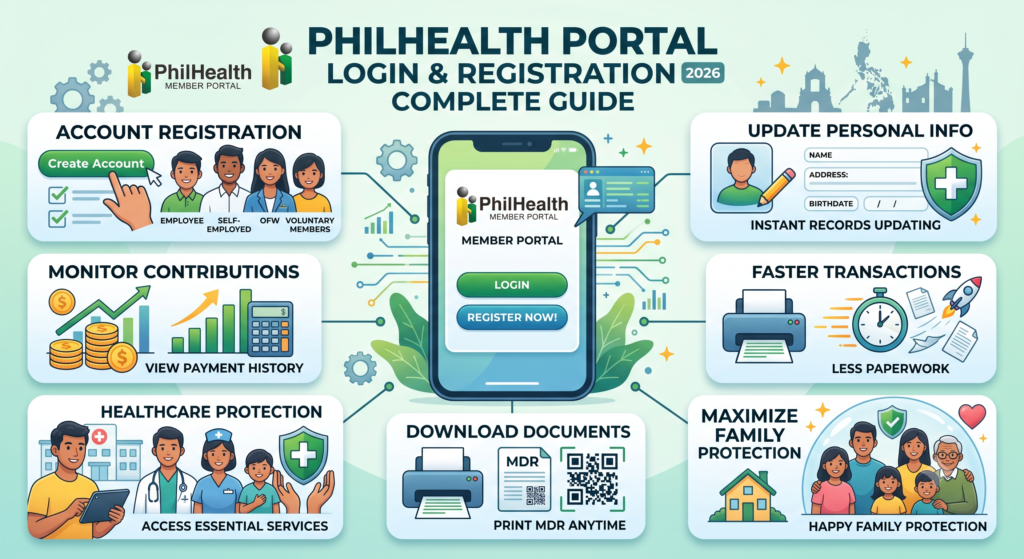
PhilHealth Portal Login & Registration makes it easier for every Filipino to access essential healthcare services without unnecessary paperwork. By creating your PhilHealth Member Portal account, you can complete your PhilHealth Registration, monitor your PhilHealth Contribution, update personal information, and download important documents anytime.
Whether you are an employee, self-employed worker, OFW, or voluntary member, the online portal simplifies every step of managing your membership. It also lets you view your payment history, print your Member Data Record, and stay updated on the latest benefits and services. Understanding how the system works helps you enjoy faster transactions, avoid common mistakes, and maximize your healthcare protection for yourself and your family.

2. What Is PhilHealth?
PhilHealth is the Philippines’ national health insurance program that helps make healthcare more affordable for Filipinos. Managed by the Philippine Health Insurance Corporation (PhilHealth), it provides financial support by covering part of your hospital bills and eligible medical treatments. Members contribute regularly, while qualified groups such as indigent families and many senior citizens receive government-funded coverage.
How Does PhilHealth Work?
PhilHealth operates through a shared contribution system where members and employers help fund healthcare benefits. The collected funds are used to reduce medical expenses when members receive treatment at accredited healthcare facilities.
- Regular Contributions: Employees, self-employed individuals, and voluntary members pay contributions based on PhilHealth rules.
- Government Support: Qualified indigent families, sponsored members, and eligible senior citizens receive subsidized or fully funded coverage.
- Hospital Bill Assistance: PhilHealth pays a portion of eligible hospital and medical expenses directly to accredited hospitals and healthcare providers.
Main PhilHealth Benefits
Members can access a variety of healthcare services that help lower out-of-pocket medical expenses.
| Benefit | What It Covers |
|---|---|
| Inpatient Care | Covers part of hospital room charges, medicines, laboratory tests, surgeries, and professional fees during confinement. |
| Outpatient Care | Provides assistance for consultations, diagnostic tests, selected procedures, and day surgeries without hospital admission. |
| Maternity Benefits | Helps cover prenatal care, childbirth, and postnatal services for qualified members. |
| Z Benefits Package | Offers higher financial assistance for serious illnesses such as selected cancers, kidney disease, and other life-threatening conditions. |
3. History and Background of PhilHealth
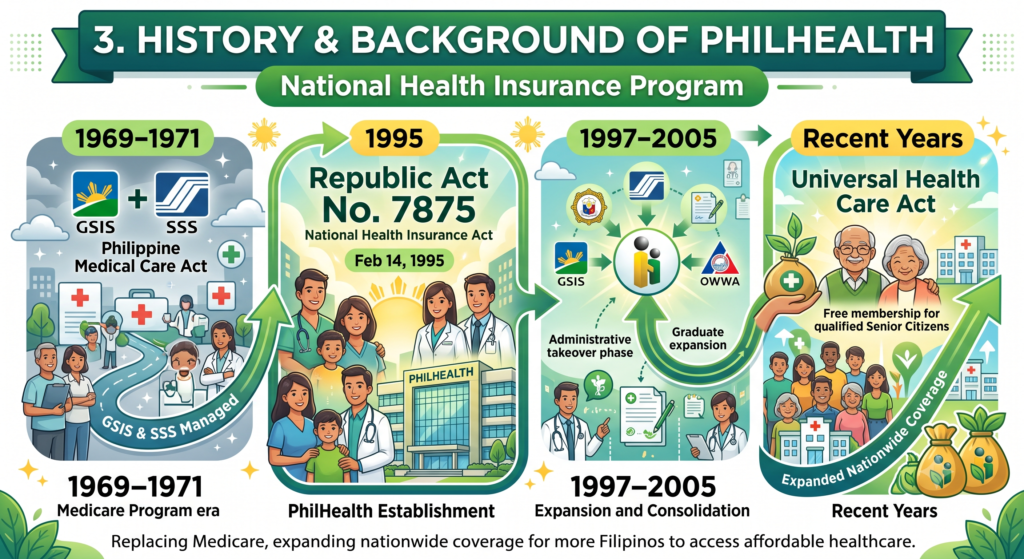
PhilHealth, or the Philippine Health Insurance Corporation, is the government agency responsible for managing the country’s national health insurance program. It was established on February 14, 1995, through Republic Act No. 7875, also known as the National Health Insurance Act. The program replaced the older Medicare system with the goal of giving more Filipinos access to affordable healthcare and expanding health insurance coverage nationwide.
Major Milestones in PhilHealth’s History
PhilHealth has continued to grow over the years through new laws and expanded healthcare programs.
- 1969–1971: The Philippine Medical Care Act created the original Medicare program, managed by the GSIS and SSS.
- 1995: Republic Act No. 7875 officially established PhilHealth as the country’s national health insurance provider.
- 1997–2005: PhilHealth gradually took over the administration of healthcare programs previously handled by GSIS, SSS, and OWWA.
- Recent Years: Additional laws expanded coverage, including free membership for qualified senior citizens and the implementation of the Universal Health Care Act.
PhilHealth’s Main Responsibilities
PhilHealth aims to make healthcare more accessible by providing financial assistance for medical expenses through accredited healthcare providers.
| Function | Description |
|---|---|
| National Health Insurance | Manages the country’s public health insurance program for qualified members. |
| Healthcare Support | Helps reduce hospital and medical expenses through benefit packages. |
| Membership Coverage | Serves employees, self-employed workers, voluntary members, OFWs, indigent families, senior citizens, and lifetime members. |
| Medical Benefits | Provides assistance for inpatient care, outpatient services, maternity care, and selected treatments for serious illnesses. |
4. Who Can Become a PhilHealth Member?
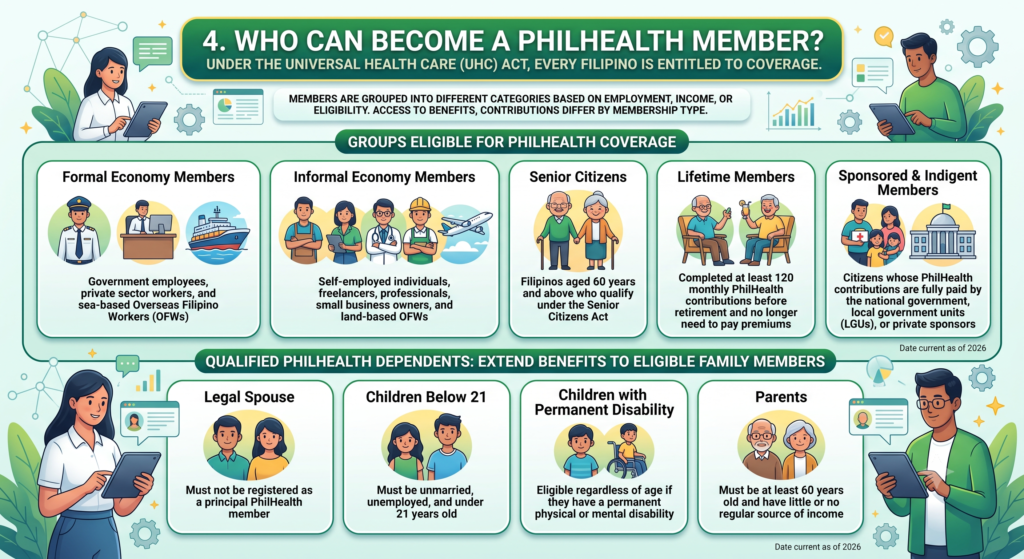
Under the Universal Health Care (UHC) Act, every Filipino is entitled to health insurance coverage through PhilHealth. Members are grouped into different categories based on their employment status, income source, or eligibility. Each category receives access to healthcare benefits, while contribution requirements may differ depending on membership type.
PhilHealth Membership Categories
The following groups can register or be covered under PhilHealth:
- Formal Economy Members: Government employees, private sector workers, and sea-based Overseas Filipino Workers (OFWs).
- Informal Economy Members: Self-employed individuals, freelancers, professionals, small business owners, and land-based OFWs.
- Senior Citizens: Filipinos aged 60 years and above who qualify under the Senior Citizens Act.
- Lifetime Members: Individuals who have completed at least 120 monthly PhilHealth contributions before retirement and no longer need to pay premiums.
- Sponsored and Indigent Members: Citizens whose PhilHealth contributions are fully paid by the national government, local government units (LGUs), or private sponsors.
Qualified PhilHealth Dependents
Registered PhilHealth members can also extend healthcare benefits to eligible family members without additional premium payments.
| Qualified Dependent | Eligibility |
|---|---|
| Legal Spouse | Must not be registered as a principal PhilHealth member. |
| Children Below 21 | Must be unmarried, unemployed, and under 21 years old. |
| Children with Permanent Disability | Eligible regardless of age if they have a permanent physical or mental disability. |
| Parents | Must be at least 60 years old and have little or no regular source of income. |
Why Membership Matters
Having an active PhilHealth membership gives you access to financial assistance for hospital stays, outpatient care, maternity services, and other covered treatments. Registering yourself and your qualified dependents helps ensure your family can receive healthcare support whenever it is needed.
5. PhilHealth Membership Requirements
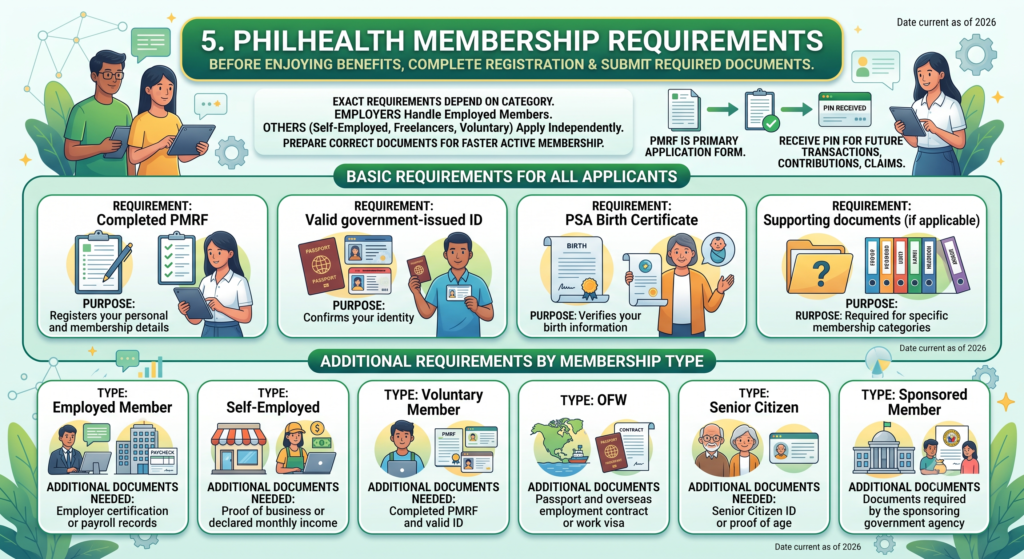
Before you can enjoy PhilHealth benefits, you must complete your PhilHealth Registration and submit the required documents. The exact requirements depend on your membership category. Employees are usually registered by their employers, while self-employed individuals, freelancers, and voluntary members need to apply on their own. Preparing the correct documents in advance helps avoid delays and ensures your PhilHealth Membership becomes active as quickly as possible.
The PMRF is the primary application form for all new members. You also need a valid identification document and proof of identity. Some membership types may require additional records, such as proof of employment or income. Once your application is approved, you will receive your PhilHealth Identification Number (PIN), which you will use for future transactions, contribution payments, and benefit claims.
Basic Requirements for All Applicants
| Requirement | Purpose |
|---|---|
| Completed PMRF | Registers your personal and membership details |
| Valid government-issued ID | Confirms your identity |
| PSA Birth Certificate | Verifies your birth information |
| Supporting documents (if applicable) | Required for specific membership categories |
Additional Requirements by Membership Type
| Membership Type | Additional Documents Needed |
|---|---|
| Employed Member | Employer certification or payroll records |
| Self-Employed | Proof of business or declared monthly income |
| Voluntary Member | Completed PMRF and valid ID |
| OFW | Passport and overseas employment contract or work visa |
| Senior Citizen | Senior Citizen ID or proof of age |
| Sponsored Member | Documents required by the sponsoring government agency |
Submitting complete and accurate documents makes the registration process much smoother. If any information changes later, such as your address, civil status, or employment category, update your records promptly to keep your PhilHealth Membership active and accurate.
6. Documents Required for PhilHealth Registration
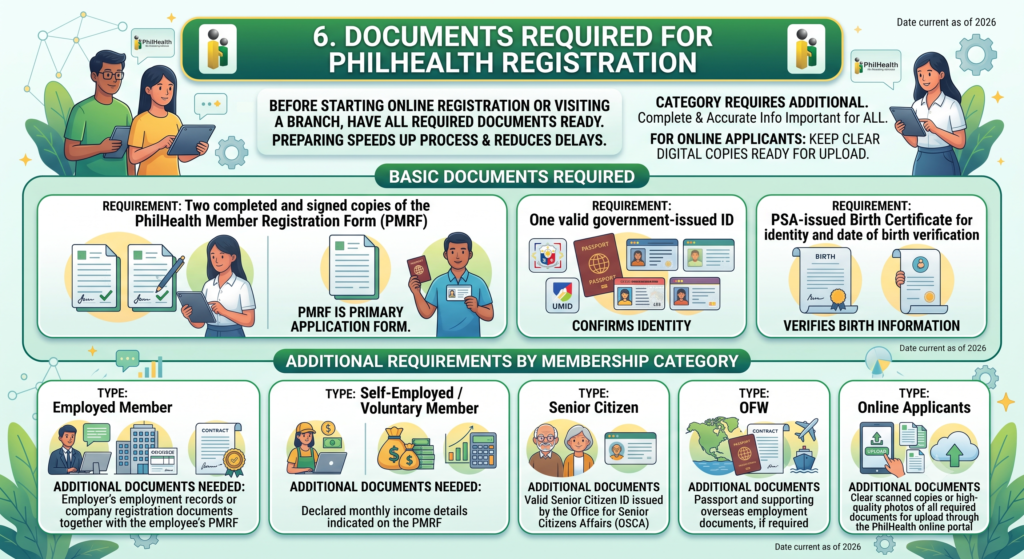
Before starting your PhilHealth Online Registration or visiting a local branch, make sure you have all the required documents ready. Preparing everything in advance helps speed up the application process and reduces the chances of delays. While every applicant must submit a few basic documents, some membership categories require additional paperwork based on employment or personal status.
Whether you are an employee, self-employed professional, voluntary member, senior citizen, or applying through the PhilHealth online application, providing complete and accurate information is important. If you plan to register online, keep clear digital copies of your documents ready for uploading during the application process.
Basic Documents Required
The following documents are generally required for all new applicants:
- Two completed and signed copies of the PhilHealth Member Registration Form (PMRF)
- One valid government-issued ID, such as:
- National ID (PhilID)
- Passport
- Driver’s License
- UMID
- PSA-issued Birth Certificate for identity and date of birth verification
Additional Requirements by Membership Category
| Membership Category | Additional Documents |
|---|---|
| Employed Member | Employer’s employment records or company registration documents together with the employee’s PMRF |
| Self-Employed / Voluntary Member | Declared monthly income details indicated on the PMRF |
| Senior Citizen | Valid Senior Citizen ID issued by the Office for Senior Citizens Affairs (OSCA) |
| OFW | Passport and supporting overseas employment documents, if required |
| Online Applicants | Clear scanned copies or high-quality photos of all required documents for upload through the PhilHealth online portal |
Before submitting your application, double-check that every document is complete and that the information matches your identification records. Accurate documents help ensure faster processing, quicker approval, and a smooth start to your PhilHealth Membership.
7. How to Register for PhilHealth Online
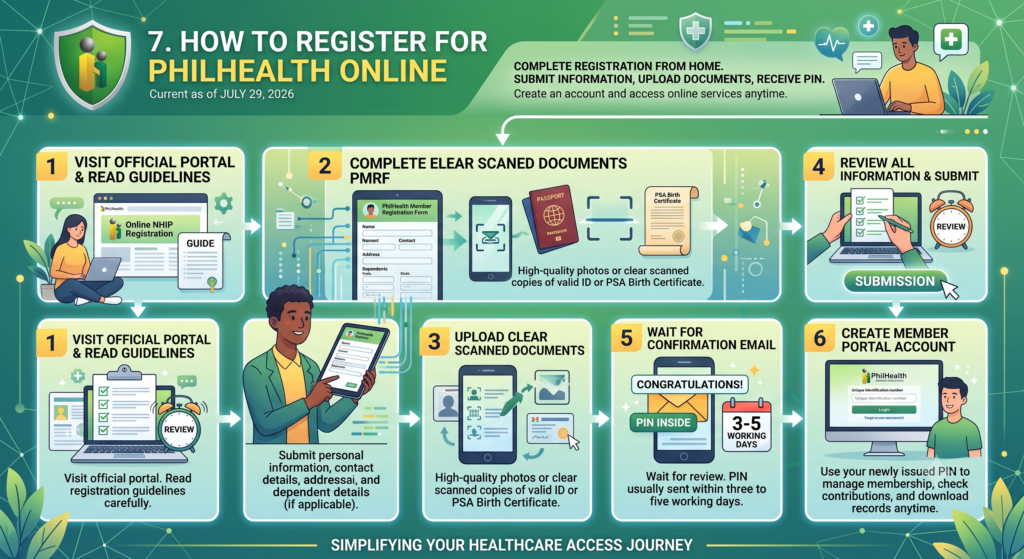
If you want to become a PhilHealth Member without visiting a branch, you can complete the PhilHealth Online Registration process from home. The online system allows eligible applicants to submit their information, upload supporting documents, and receive their PhilHealth Identification Number (PIN) after approval. Once your registration is successful, you can create your PhilHealth Account and access various PhilHealth Online Services anytime.
The registration process is straightforward as long as you provide accurate information and upload clear copies of your documents. After your application is reviewed, you will receive a confirmation through your registered email. You can then use your PhilHealth Portal account to monitor your membership, check contributions, and download your records whenever needed.
Steps to Register for PhilHealth Online
| Step | What You Need to Do |
|---|---|
| Step 1 | Visit the official PhilHealth Online NHIP Registration portal and read the registration guidelines before starting your application. |
| Step 2 | Complete the electronic PhilHealth Member Registration Form (PMRF) with your personal information, contact details, address, and dependent information, if applicable. |
| Step 3 | Upload clear scanned copies or high-quality photos of your valid government-issued ID or PSA-issued Birth Certificate. |
| Step 4 | Review all the information carefully before submitting your online application to avoid processing delays. |
| Step 5 | Wait for the confirmation email. Once approved, your PhilHealth Identification Number (PIN) is usually sent within three to five working days. |
| Step 6 | Use your newly issued PIN to create your PhilHealth Member Portal account, where you can manage your membership online. |
What You Can Do After Registration
After creating your online account, you can access several useful services, including:
- View your PhilHealth Contribution records
- Download and print your Member Data Record (MDR)
- Update selected personal information
- Monitor your membership status
- Access available PhilHealth Online Services
- Prepare for future contribution payments and benefit claims
Before submitting your application, make sure every detail is correct and all uploaded documents are clear and readable. Accurate information helps speed up the approval process and allows you to start using your PhilHealth membership without unnecessary delays.
For detailed analysis, please read this: https://philhealthregistration.online/philhealth-online-registration/
8. How to Register for PhilHealth at a Branch
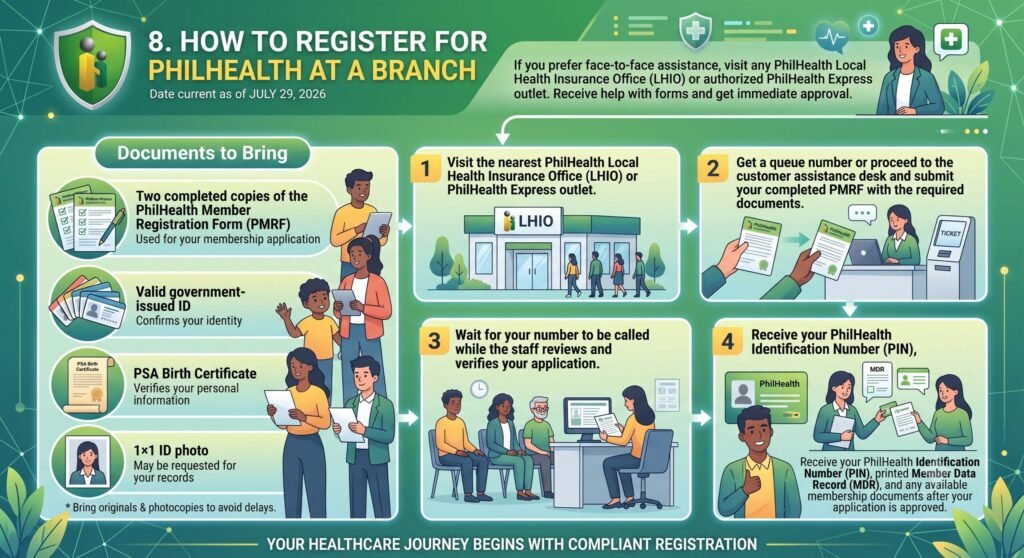
If you prefer face-to-face assistance, you can complete your PhilHealth Registration at any PhilHealth Local Health Insurance Office (LHIO) or authorised PhilHealth Express outlet. A branch visit is a good option if you need help completing your forms or have questions about your PhilHealth Membership. Once your application is approved, you will receive your PhilHealth Identification Number (PIN) and a printed Member Data Record (MDR).
Before visiting the branch, prepare all the required documents to make the process faster. Bringing both the original copies and photocopies of your documents can help avoid delays. After your information is verified, the staff will process your application and provide your membership details so you can begin using PhilHealth services.
Documents to Bring
| Required Document | Purpose |
|---|---|
| Two completed copies of the PhilHealth Member Registration Form (PMRF) | Used for your membership application |
| Valid government-issued ID | Confirms your identity |
| PSA Birth Certificate | Verifies your personal information |
| 1×1 ID photo | May be requested for your records |
Step-by-Step Branch Registration Process
| Step | What to Do |
|---|---|
| Step 1 | Visit the nearest PhilHealth Local Health Insurance Office (LHIO) or PhilHealth Express outlet. |
| Step 2 | Get a queue number or proceed to the customer assistance desk and submit your completed PMRF with the required documents. |
| Step 3 | Wait for your number to be called while the staff reviews and verifies your application. |
| Step 4 | Receive your PhilHealth Identification Number (PIN), printed Member Data Record (MDR), and any available membership documents after your application is approved. |
A branch registration is ideal if you need immediate assistance or want to clarify your membership details in person. Before leaving the office, review all the information on your Member Data Record (MDR) to ensure your name, birth date, address, and other personal details are accurate. This helps prevent future issues when paying contributions or claiming PhilHealth benefits.
9. How to Log In to Your PhilHealth Member Portal
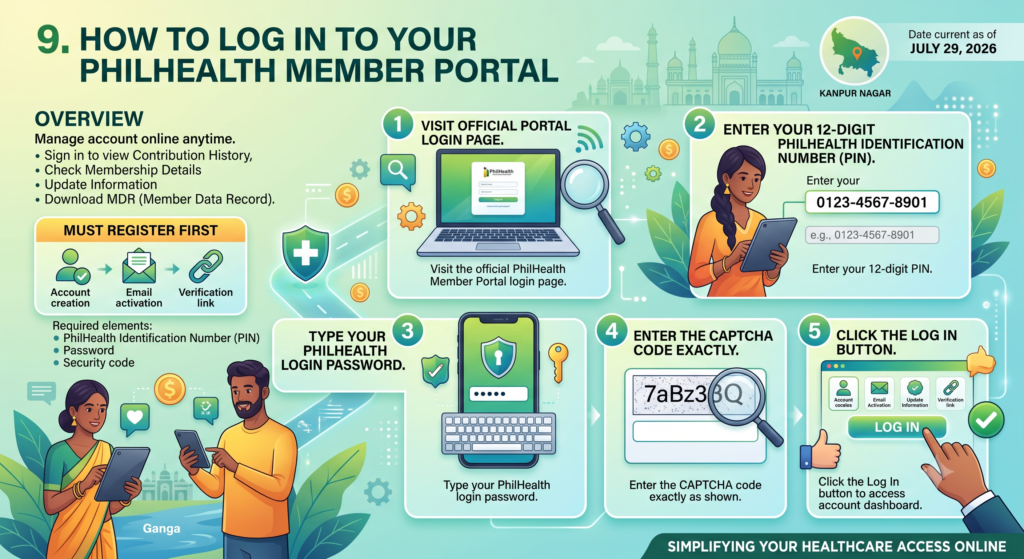
The PhilHealth Member Portal allows members to manage their account online anytime. After signing in, you can view your PhilHealth Contribution History, check your membership details, update eligible information, and download your Member Data Record (MDR). You only need your PhilHealth Identification Number (PIN), password, and the security code displayed on the login page.
If you have not created a PhilHealth Account yet, you must register first before accessing the portal. During account creation, you will provide your personal details and email address, then activate your account using the verification link sent to your inbox. Once activated, you can use your login credentials whenever you access the portal.
Steps to Log In
| Step | What You Need to Do |
|---|---|
| Step 1 | Visit the official PhilHealth Member Portal login page. |
| Step 2 | Enter your 12-digit PhilHealth Identification Number (PIN). |
| Step 3 | Type your PhilHealth login password in the password field. |
| Step 4 | Enter the CAPTCHA code exactly as shown on the screen. |
| Step 5 | Click the Log In button to access your account dashboard. |
If You Don’t Have a PhilHealth Account
If you are logging in for the first time, follow these steps to create your account:
- Click Create Account on the login page.
- Enter your PhilHealth Identification Number (PIN), full name, email address, and other requested details.
- Verify your email by clicking the activation link sent to your inbox.
- Create a secure password for future logins.
- Return to the PhilHealth Member Portal and sign in using your new credentials.
Once you have successfully logged in, you can access various PhilHealth Online Services, including checking your contribution records, printing your Member Data Record (MDR), reviewing your membership details, and managing your account more conveniently online.
10. How to Recover Your PhilHealth Account or Reset Your Password
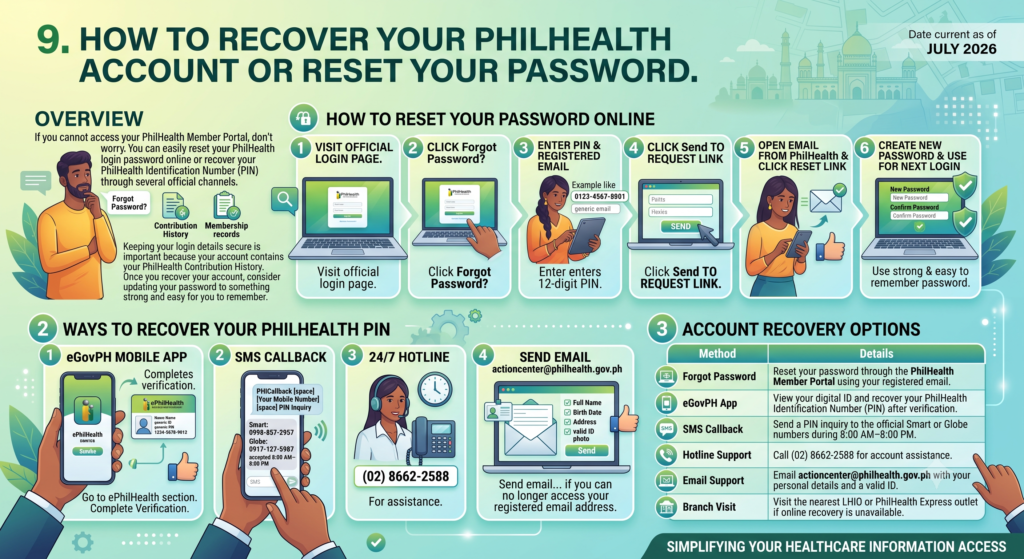
If you cannot access your PhilHealth Member Portal, don’t worry. You can easily reset your PhilHealth login password online or recover your PhilHealth Identification Number (PIN) through several official channels. Make sure you use the same email address that is linked to your account. If you no longer have access to that email, you can contact PhilHealth or visit the nearest branch for assistance.
Keeping your login details secure is important because your account contains your PhilHealth Contribution History, membership records, and other personal information. Once you recover your account, consider updating your password to something strong and easy for you to remember.
How to Reset Your Password Online
| Step | What to Do |
|---|---|
| Step 1 | Visit the official PhilHealth Member Portal login page. |
| Step 2 | Click Forgot Password? below the login form. |
| Step 3 | Enter your PhilHealth Identification Number (PIN) and your registered email address. |
| Step 4 | Click Send to request a password reset link. |
| Step 5 | Open the email from PhilHealth and click the reset link. |
| Step 6 | Create a new password and use it for your next login. |
Ways to Recover Your PhilHealth PIN
If you cannot remember your PhilHealth Identification Number (PIN), you can use any of the following official methods:
- Open the eGovPH mobile app and go to the ePhilHealth section. Complete the verification process to view your digital ID and PIN.
- Request an SMS callback by sending:
- PHICallback [space] Your Mobile Number [space] PIN Inquiry
- Smart: 0998-857-2957 or 0968-865-4670
- Globe: 0917-127-5987 or 0917-110-9812
- SMS requests are accepted between 8:00 AM and 8:00 PM.
- Call the PhilHealth 24/7 hotline at (02) 8662-2588 for assistance.
- Send an email with your full name, birth date, address, and a photo of a valid government-issued ID to actioncenter@philhealth.gov.ph.
- Visit any PhilHealth Local Health Insurance Office (LHIO) or PhilHealth Express outlet with a valid ID if you can no longer access your registered email address.
Account Recovery Options
| Recovery Method | Details |
|---|---|
| Forgot Password | Reset your password through the PhilHealth Member Portal using your registered email. |
| eGovPH App | View your digital ID and recover your PhilHealth Identification Number (PIN) after verification. |
| SMS Callback | Send a PIN inquiry to the official Smart or Globe numbers during 8:00 AM–8:00 PM. |
| Hotline Support | Call (02) 8662-2588 for account assistance. |
| Email Support | Email actioncenter@philhealth.gov.ph with your personal details and a valid ID. |
| Branch Visit | Visit the nearest LHIO or PhilHealth Express outlet if online recovery is unavailable. |
If your account is still inaccessible after trying these recovery methods, visit a PhilHealth branch with valid identification. The staff can verify your identity and help restore access to your PhilHealth Account safely.
11. PhilHealth ID Explained
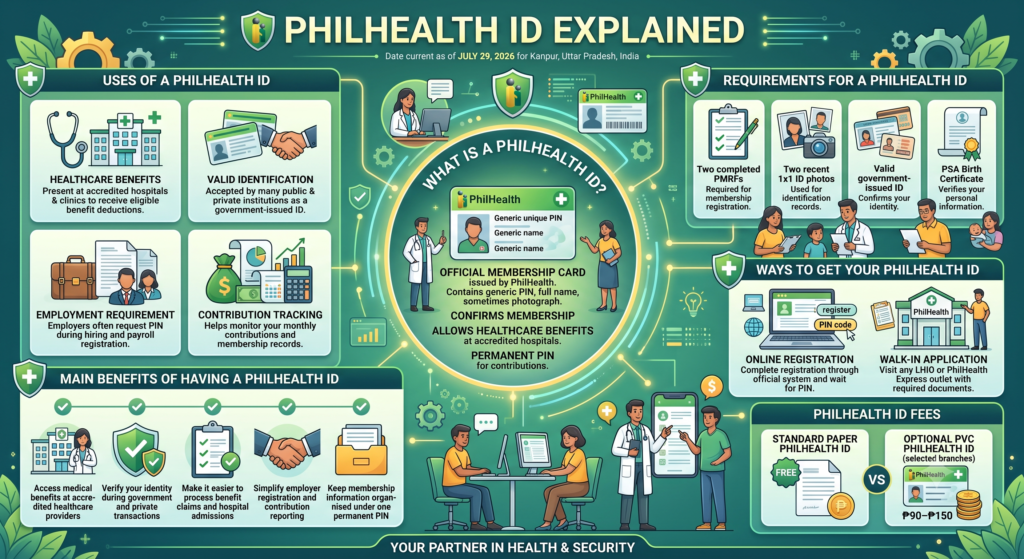
A PhilHealth ID is an official membership card issued by the Philippine Health Insurance Corporation (PhilHealth). It contains your unique PhilHealth Identification Number (PIN), full name, and, in some cases, your photograph. This card confirms your PhilHealth Membership and allows you to access healthcare benefits at accredited hospitals and medical facilities. It also serves as proof that you are enrolled in the national health insurance programme.
Aside from healthcare services, a PhilHealth ID is commonly requested during employment, government transactions, and benefit applications. Your PhilHealth Identification Number (PIN) remains the same throughout your lifetime, making it an important record for tracking contributions and membership information.
Uses of a PhilHealth ID
| Purpose | Description |
|---|---|
| Healthcare Benefits | Present your PhilHealth ID at accredited hospitals and clinics to receive eligible benefit deductions. |
| Valid Identification | Accepted by many public and private institutions as a government-issued ID. |
| Employment Requirement | Employers often request your PhilHealth Identification Number (PIN) during hiring and payroll registration. |
| Contribution Tracking | Helps monitor your monthly contributions and membership records. |
Main Benefits of Having a PhilHealth ID
- Access medical benefits at PhilHealth Accredited Hospitals and healthcare providers.
- Verify your identity during government and private transactions.
- Make it easier to process benefit claims and hospital admissions.
- Simplify employer registration and contribution reporting.
- Keep your membership information organised under one permanent PhilHealth Identification Number (PIN).
Requirements for a PhilHealth ID
| Required Document | Purpose |
|---|---|
| Two completed copies of the PMRF | Required for membership registration |
| Two recent 1×1 ID photos | Used for identification records |
| Valid government-issued ID | Confirms your identity |
| PSA Birth Certificate | Verifies your personal information |
Ways to Get Your PhilHealth ID
| Method | Process |
|---|---|
| Online Registration | Complete the registration through the official PhilHealth Online Registration system and wait for your PhilHealth Identification Number (PIN). |
| Walk-in Application | Visit any PhilHealth Local Health Insurance Office (LHIO) or PhilHealth Express outlet with your required documents. |
PhilHealth ID Fees
| ID Type | Cost |
|---|---|
| Standard Paper PhilHealth ID | Free |
| Optional PVC PhilHealth ID (available at selected branches) | ₱90–₱150 |
Once you receive your PhilHealth ID, keep it in a safe place and present it whenever you visit accredited healthcare facilities or complete official transactions related to your PhilHealth Membership. If your card is lost or damaged, you can request a replacement by visiting a PhilHealth branch and submitting the necessary identification documents.
For detailed Analysis plaese read this article: PhilHealth ID: Your Complete July 2026 Guide
12. How to Get a PhilHealth ID
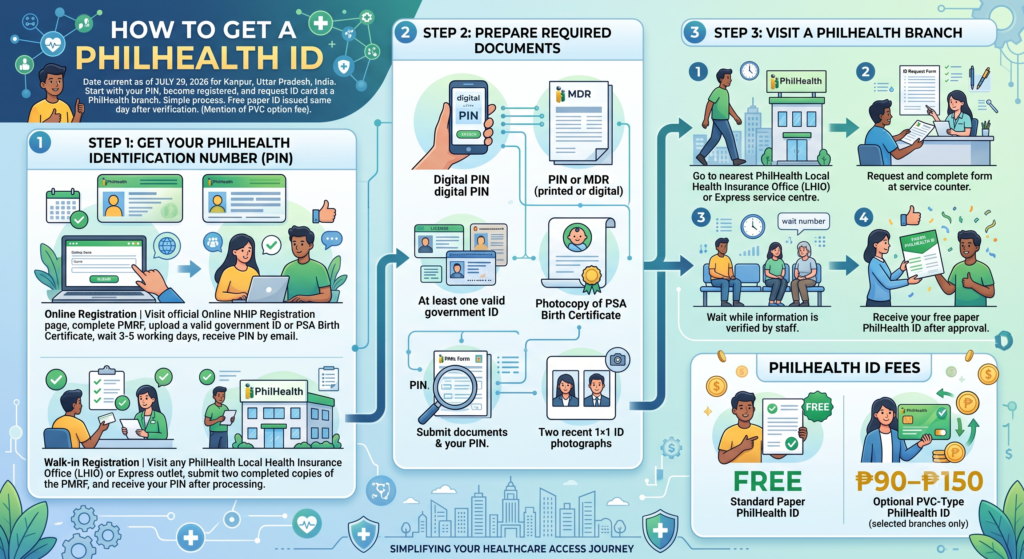
Getting a PhilHealth ID starts with obtaining your PhilHealth Identification Number (PIN). Once you become a registered PhilHealth Member, you can request your ID card by visiting a PhilHealth branch. The process is simple and requires only a few documents. After verification, the standard paper ID is usually issued on the same day.
If you already have your PhilHealth MDR or PIN, the application becomes even faster. Before visiting a branch, prepare all the required documents to avoid delays. Some PhilHealth offices also offer an optional PVC card for an additional fee, depending on availability.
Step 1: Get Your PhilHealth Identification Number (PIN)
You must first secure your PhilHealth Identification Number (PIN) before requesting an ID card.
| Registration Method | Process |
|---|---|
| Online Registration | Visit the PhilHealth Online NHIP Registration page, complete the PMRF, upload a valid government ID or PSA Birth Certificate, and wait 3 to 5 working days to receive your PIN by email. |
| Walk-in Registration | Visit any PhilHealth Local Health Insurance Office (LHIO) or PhilHealth Express outlet, submit two completed copies of the PMRF, and receive your PIN after your application is processed. |
Step 2: Prepare the Required Documents
Bring the following documents when applying for your PhilHealth ID:
- Your printed or digital PhilHealth Identification Number (PIN) or Member Data Record (MDR)
- At least one valid government-issued ID
- Photocopy of your PSA-issued Birth Certificate
- Two recent 1×1 ID photographs
Step 3: Visit a PhilHealth Branch
Once your documents are ready, visit the nearest PhilHealth office to request your membership card.
| Step | What to Do |
|---|---|
| Step 1 | Go to the nearest PhilHealth Local Health Insurance Office (LHIO) or PhilHealth Express service centre. |
| Step 2 | Request and complete the PhilHealth ID request form at the service counter. |
| Step 3 | Submit your documents together with your PhilHealth Identification Number (PIN). |
| Step 4 | Wait while your information is verified by the PhilHealth staff. |
| Step 5 | Receive your free paper PhilHealth ID after your application is approved. |
PhilHealth ID Fees
| ID Type | Fee |
|---|---|
| Standard Paper PhilHealth ID | Free |
| Optional PVC-Type PhilHealth ID (selected branches only) | ₱90–₱150 |
Before leaving the branch, check that your name, PhilHealth Identification Number (PIN), and other personal details are printed correctly on your PhilHealth ID. If you prefer a more durable card, you may ask the staff whether the optional PVC version is available at your branch.
13. How to Download and Print Your Member Data Record (MDR)
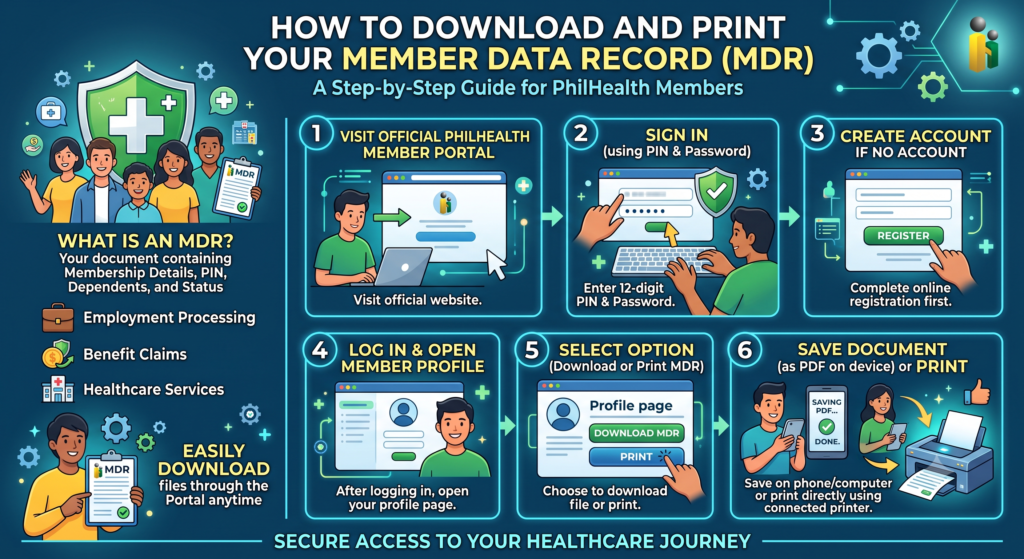
Your Member Data Record (MDR) is an important document that contains your PhilHealth Membership details, PhilHealth Identification Number (PIN), dependents, and membership status. Many employers, hospitals, and government offices may ask for a copy when processing employment, benefit claims, or healthcare services. You can easily download Member Data Record files through the PhilHealth Member Portal anytime after creating your online account.
Once you log in, you can view your personal information and save your PhilHealth MDR as a PDF for future use. Keeping a digital copy on your phone or computer makes it easier to access whenever you need it, while printing a hard copy is useful for transactions that require physical documents.
Steps to Download and Print Your MDR
| Step | What to Do |
|---|---|
| Step 1 | Visit the official PhilHealth Member Portal website. |
| Step 2 | Sign in using your PhilHealth Identification Number (PIN) and password. |
| Step 3 | If you do not have an account, create one first by completing the online registration process. |
| Step 4 | After logging in, open your member profile or account information page. |
| Step 5 | Select the option to download Member Data Record or print your PhilHealth MDR. |
| Step 6 | Save the document as a PDF on your device or print it directly using a connected printer. |
Benefits of Keeping a Copy of Your MDR
- Verify your PhilHealth Membership information.
- Confirm your PhilHealth Identification Number (PIN).
- Check your registered dependents.
- Present the document during employment or hospital transactions.
- Keep a digital backup for future benefit claims.
Before printing, review your Member Data Record (MDR) carefully to make sure your personal details are accurate. If you notice incorrect information, update your records through the PhilHealth Member Portal or visit a PhilHealth branch to request a correction before using the document for official transactions.
here’s a vedio
14. PhilHealth Contribution Guide for 2026
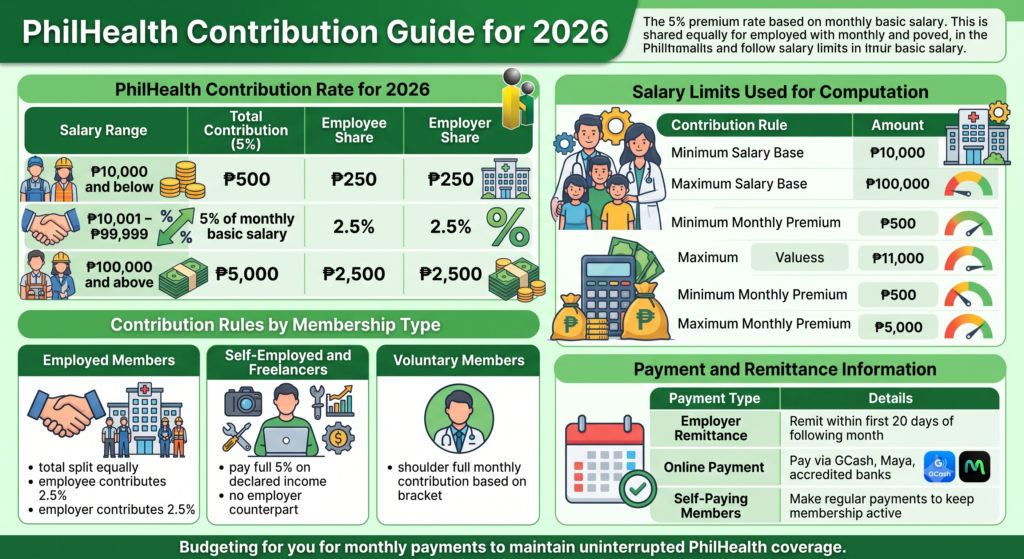
The PhilHealth Contribution for 2026 is calculated using a 5% PhilHealth premium rate based on your monthly basic salary. For employed workers, the total premium is shared equally between the employee and the employer, while self-employed individuals and freelancers pay the entire amount themselves. The computation also follows a salary floor and ceiling, ensuring that contributions remain within the prescribed limits.
Whether you are an employed worker, a self-employed professional, or a voluntary member, understanding the latest contribution rules helps you budget your monthly payments and maintain uninterrupted PhilHealth Coverage. Paying your premiums on time also ensures continued access to healthcare benefits whenever you need medical treatment.
PhilHealth Contribution Rate for 2026
| Salary Range | Total Contribution (5%) | Employee Share | Employer Share |
|---|---|---|---|
| ₱10,000 and below | ₱500 | ₱250 | ₱250 |
| ₱10,001 – ₱99,999 | 5% of monthly basic salary | 2.5% | 2.5% |
| ₱100,000 and above | ₱5,000 | ₱2,500 | ₱2,500 |
Contribution Rules by Membership Type
- Employed Members
- Total contribution is shared equally between the employee and employer.
- The employee contributes 2.5% of the monthly basic salary.
- The employer contributes the remaining 2.5%.
- Self-Employed and Freelancers
- Pay the full 5% premium based on their declared monthly income.
- No employer counterpart is provided.
- Voluntary Members
- Shoulder the full monthly contribution based on the applicable income bracket.
Salary Limits Used for Computation
| Contribution Rule | Amount |
|---|---|
| Minimum Salary Base | ₱10,000 |
| Maximum Salary Base | ₱100,000 |
| Minimum Monthly Premium | ₱500 |
| Maximum Monthly Premium | ₱5,000 |
Payment and Remittance Information
| Payment Type | Details |
|---|---|
| Employer Remittance | Contributions should be remitted within the first 20 days of the month following the applicable payroll period. |
| Online Payment | Members may pay through digital platforms such as GCash, Maya, and accredited online banking partners. |
| Self-Paying Members | Payments should be made regularly to keep membership active and avoid contribution gaps. |
Understanding the PhilHealth Contribution schedule and payment rules helps you avoid missed remittances and ensures continuous eligibility for medical benefits. Before making a payment, verify your contribution amount based on your salary or declared income to ensure accurate and timely remittance.
15. How to Check Your PhilHealth Contributions Online
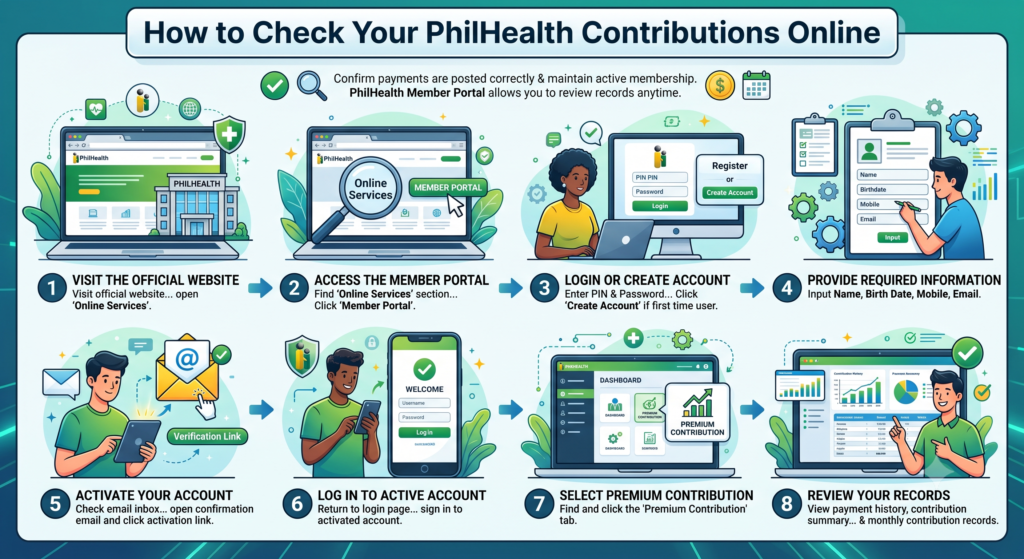
Checking your PhilHealth contributions online helps you confirm that your payments have been posted correctly and that your membership remains active. The PhilHealth Member Portal allows you to review your contribution records, payment history, and monthly premium details anytime with an internet connection.
If you do not yet have an online account, you can register using your personal information and activate your account through the confirmation email. Once your account is active, you can easily monitor your contributions whenever you need them.
Steps to Check Your Contributions
- Visit the PhilHealth Official Website and open the Online Services section.
- Click Member Portal to access the login page.
- Enter your PhilHealth Identification Number (PIN) and password.
- If you don’t have an account yet, click Create Account or Register.
- Provide the required information, including your name, birth date, mobile number, and email address.
- Open the confirmation email and activate your account.
- After logging in, select the Premium Contribution tab.
- View your payment history, contribution summary, and monthly contribution records.
PhilHealth Contribution Checking Process
| Step | Action |
|---|---|
| 1 | Visit the PhilHealth Official Website. |
| 2 | Open Online Services and select Member Portal. |
| 3 | Log in using your PhilHealth Identification Number (PIN) and password. |
| 4 | Create and activate an account if you are a first-time user. |
| 5 | Open the Premium Contribution section. |
| 6 | Review your contribution history and monthly payment records. |
Information You Can View
| Information | Description |
|---|---|
| Contribution History | Displays all recorded premium payments. |
| Monthly Contributions | Shows the contribution posted for each month. |
| Payment Summary | Provides an overview of your total recorded contributions. |
| Membership Status | Helps confirm whether your account is active and updated. |
Regularly checking your contribution records helps you identify missing or delayed postings early. If you notice any discrepancies, keep your payment receipts or transaction references and contact PhilHealth for record verification and correction.ating.
For detailed analysis, please read this article: PhilHealth Contribution 2026: Rates, Table, Calculator & Payment Guide
16. PhilHealth Benefits and Coverage
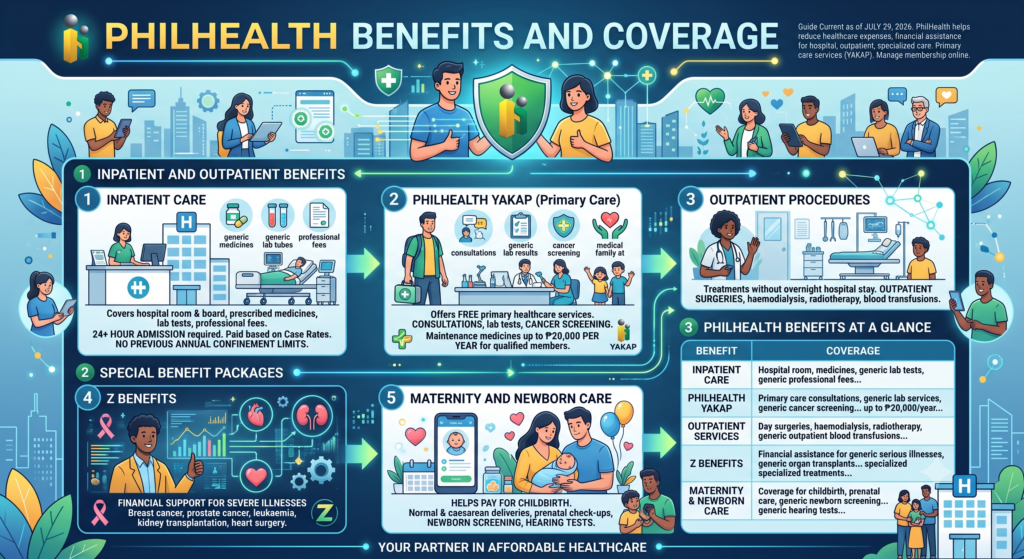
PhilHealth helps reduce healthcare expenses by providing financial assistance for hospital admissions, outpatient treatments, and specialised medical care. Members can also access primary healthcare services through the PhilHealth YAKAP programme and manage their membership using the PhilHealth Member Portal.
The coverage includes hospital care, preventive services, maternity assistance, and high-cost treatment packages for serious illnesses. These benefits are available at accredited healthcare facilities, helping members receive quality medical care while lowering their out-of-pocket costs.
Inpatient and Outpatient Benefits
- Inpatient Care
- Covers hospital room and board, prescribed medicines, laboratory tests, and professional fees.
- Applies to hospital admissions lasting at least 24 hours.
- Benefits are paid based on approved case rates.
- Previous annual confinement and single-period confinement limits are no longer applied.
- PhilHealth YAKAP
- Offers free primary healthcare services through accredited providers.
- Includes medical consultations, selected laboratory tests, and cancer screening.
- Covers maintenance medicines worth up to ₱20,000 per year for qualified members.
- Outpatient Procedures
- Covers treatments that do not require an overnight hospital stay.
- Includes outpatient surgeries, haemodialysis, radiotherapy, and blood transfusions.
Special Benefit Packages
- Z Benefits
- Provides financial support for members with severe or life-threatening illnesses.
- Covers conditions such as breast cancer, prostate cancer, leukaemia, kidney transplantation, and heart surgery.
- Maternity and Newborn Care
- Helps pay for normal and caesarean deliveries.
- Covers prenatal check-ups, newborn screening, and hearing tests performed in accredited healthcare facilities.
PhilHealth Benefits at a Glance
| Benefit | Coverage |
|---|---|
| Inpatient Care | Hospital room, medicines, laboratory tests, and professional fees for qualified admissions. |
| PhilHealth YAKAP | Primary care consultations, laboratory services, cancer screening, and maintenance medicines up to ₱20,000 per year. |
| Outpatient Services | Day surgeries, haemodialysis, radiotherapy, and outpatient blood transfusions. |
| Z Benefits | Financial assistance for serious illnesses, organ transplants, and specialised treatments. |
| Maternity & Newborn Care | Coverage for childbirth, prenatal care, newborn screening, and hearing tests. |
Why These Benefits Matter
| Advantage | How It Helps |
|---|---|
| Lower Medical Costs | Reduces the amount members pay for approved healthcare services. |
| Access to Quality Care | Members can receive treatment at accredited hospitals and clinics across the Philippines. |
| Preventive Healthcare | Encourages regular check-ups and early disease detection through the YAKAP programme. |
| Financial Protection | Provides assistance for expensive medical procedures and critical illnesses. |
| Family Support | Offers healthcare assistance during pregnancy, childbirth, and newborn care. |
17. PhilHealth Dependents Guide
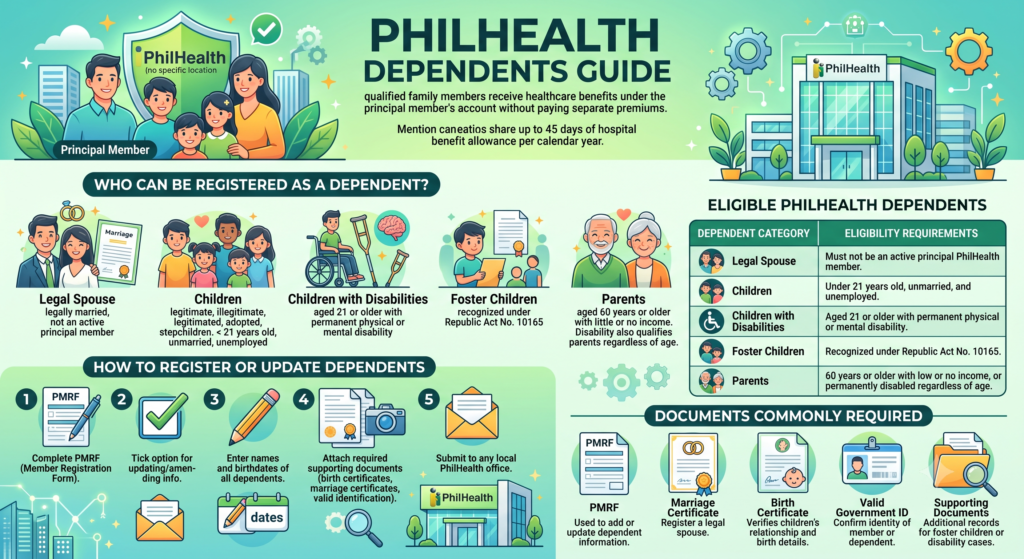
PhilHealth allows qualified family members to receive healthcare benefits under the principal member’s account without paying separate premiums. Eligible PhilHealth dependents include a legal spouse, qualified children, foster children, and elderly parents who meet the required conditions.
Once your dependents are successfully registered, they can enjoy medical coverage and share up to 45 days of hospital benefit allowance per calendar year with the principal member, subject to PhilHealth’s benefit rules.
Who Can Be Registered as a Dependent?
- Legal Spouse
- Must be legally married to the principal member.
- Should not be registered as an active principal PhilHealth member.
- Children
- Includes legitimate, illegitimate, legitimated, adopted, and stepchildren.
- Must be below 21 years old.
- Should be unmarried and unemployed.
- Children with Disabilities
- Children aged 21 years or older with a permanent physical or mental disability remain qualified as dependents.
- Foster Children
- Eligible if recognised under Republic Act No. 10165.
- Parents
- Parents aged 60 years or older with little or no income.
- Parents with a permanent disability may also qualify regardless of age.
How to Register or Update Dependents
- Complete the PhilHealth Member Registration Form (PMRF).
- Tick the option for updating or amending member information.
- Enter the complete names and birth dates of all qualified dependents.
- Attach the required supporting documents, such as birth certificates, marriage certificates, or valid identification.
- Submit the completed form and documents to any local PhilHealth office for processing.
Eligible PhilHealth Dependents
| Dependent Category | Eligibility Requirements |
|---|---|
| Legal Spouse | Must not be an active principal PhilHealth member. |
| Children | Under 21 years old, unmarried, and unemployed. |
| Children with Disabilities | Aged 21 or older with permanent physical or mental disability. |
| Foster Children | Recognised under Republic Act No. 10165. |
| Parents | 60 years or older with low or no income, or permanently disabled regardless of age. |
Documents Commonly Required
| Document | Purpose |
|---|---|
| PhilHealth Member Registration Form (PMRF) | Used to add or update dependent information. |
| Marriage Certificate | Required when registering a legal spouse. |
| Birth Certificate | Verifies the relationship and birth details of children. |
| Valid Government ID | Confirms the identity of the member or dependent when required. |
| Supporting Documents | Additional records may be requested for foster children or dependents with disabilities. |
18. How to Pay PhilHealth Contribution
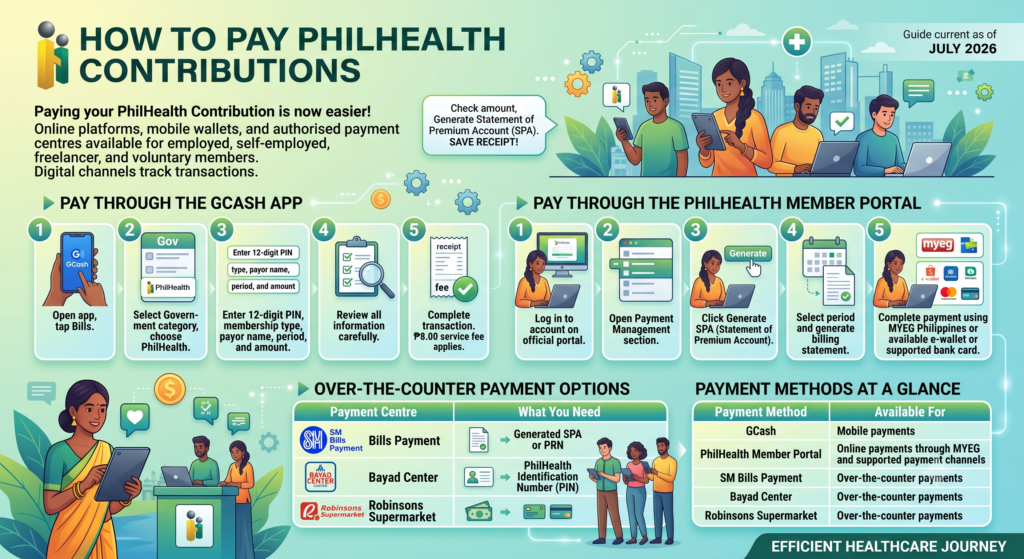
Paying your PhilHealth contribution is simple because you can use online platforms, mobile wallets, or authorised payment centres. Whether you are an employed member, self-employed, or a voluntary contributor, choosing the right payment method helps keep your contribution record updated and your health coverage active.
Before making a payment through the PhilHealth Member Portal, generate your Statement of Premium Account (SPA). This ensures that you pay the correct amount for your selected contribution period.
Pay Using the GCash App
- Open the GCash app and tap Bills.
- Select the Government category.
- Choose PhilHealth from the list of billers.
- Enter your 12-digit PhilHealth Identification Number (PIN).
- Provide your membership type, payor name, applicable period, and payment amount.
- Review all details carefully before confirming the transaction.
- An ₱8.00 service fee applies to each successful payment.
Pay Through the PhilHealth Member Portal
- Log in to your account on the PhilHealth Official Website.
- Open the Payment Management section.
- Click Generate SPA (Statement of Premium Account).
- Select your preferred payment period.
- Generate the billing statement.
- Complete the payment using MYEG Philippines or any available e-wallet or card payment option.
Over-the-Counter Payment
- Visit an accredited payment partner.
- Present your generated SPA or PRN (Payment Return Number).
- Provide your PhilHealth Identification Number (PIN).
- Pay using cash or an accepted payment card.
Available Payment Methods
| Payment Method | How It Works |
|---|---|
| GCash | Pay through the Bills section after entering your membership details. An ₱8.00 service fee applies. |
| PhilHealth Member Portal | Generate an SPA and pay online using MYEG Philippines or supported digital payment options. |
| SM Bills Payment | Present your SPA or PRN and complete the payment at the counter. |
| Bayad Center | Submit your payment details and pay over the counter. |
| Robinsons Supermarket | Pay your contribution by presenting your SPA or PRN at the payment counter. |
Information Required Before Payment
| Requirement | Purpose |
|---|---|
| PhilHealth Identification Number (PIN) | Identifies your membership account. |
| Statement of Premium Account (SPA) | Shows the amount due for online payments. |
| Payment Return Number (PRN) | Used for over-the-counter transactions when applicable. |
| Applicable Contribution Period | Specifies the month or months you are paying for. |
| Membership Type | Ensures the correct contribution category is applied. |
Using the correct payment channel and entering accurate membership details helps avoid delays in posting your contributions and keeps your PhilHealth records up to date.
19. PhilHealth Contribution Payment Guide for 2026
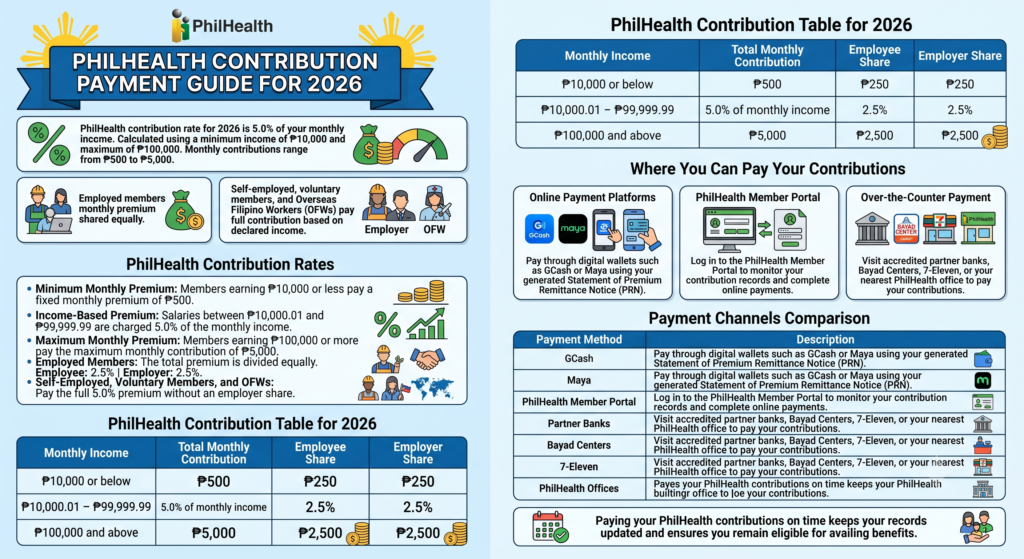
The PhilHealth contribution rate for 2026 is 5.0% of your monthly income. The premium is calculated using a minimum income of ₱10,000 and a maximum income of ₱100,000, resulting in monthly contributions ranging from ₱500 to ₱5,000.
For employed members, the monthly premium is shared equally between the employee and the employer. Meanwhile, self-employed individuals, voluntary members, and Overseas Filipino Workers (OFWs) are responsible for paying the full contribution based on their declared monthly income.
PhilHealth Contribution Rates
- Minimum Monthly Premium
- Members earning ₱10,000 or less pay a fixed monthly premium of ₱500.
- Income-Based Premium
- Salaries between ₱10,000.01 and ₱99,999.99 are charged 5.0% of the monthly income.
- Maximum Monthly Premium
- Members earning ₱100,000 or more pay the maximum monthly contribution of ₱5,000.
- Employed Members
- The total premium is divided equally.
- Employee: 2.5%
- Employer: 2.5%
- Self-Employed, Voluntary Members, and OFWs
- Pay the full 5.0% premium without an employer share.
PhilHealth Contribution Table for 2026
| Monthly Income | Total Monthly Contribution | Employee Share | Employer Share |
|---|---|---|---|
| ₱10,000 or below | ₱500 | ₱250 | ₱250 |
| ₱10,000.01 – ₱99,999.99 | 5.0% of monthly income | 2.5% | 2.5% |
| ₱100,000 and above | ₱5,000 | ₱2,500 | ₱2,500 |
Where You Can Pay Your Contributions
- Online Payment Platforms
- Pay through digital wallets such as GCash or Maya using your generated Statement of Premium Remittance Notice (PRN).
- PhilHealth Member Portal
- Log in to the PhilHealth Member Portal to monitor your contribution records and complete online payments.
- Over-the-Counter Payment
- Visit accredited partner banks, Bayad Centers, 7-Eleven, or your nearest PhilHealth office to pay your contributions.
Payment Channels Comparison
| Payment Method | Description |
|---|---|
| GCash | Convenient mobile wallet payment using your generated PRN. |
| Maya | Digital payment option for fast and secure contribution payments. |
| PhilHealth Member Portal | Allows members to view records and pay contributions online. |
| Partner Banks | Accept contribution payments through authorised banking channels. |
| Bayad Centers | Over-the-counter payment option available nationwide. |
| 7-Eleven | Selected branches accept PhilHealth contribution payments. |
| PhilHealth Offices | Members may pay directly at authorised PhilHealth branches. |
Paying your PhilHealth contributions on time helps keep your records updated and ensures you remain eligible for available healthcare benefits whenever you need medical assistance.
20. How to Check Your PhilHealth Contribution Online
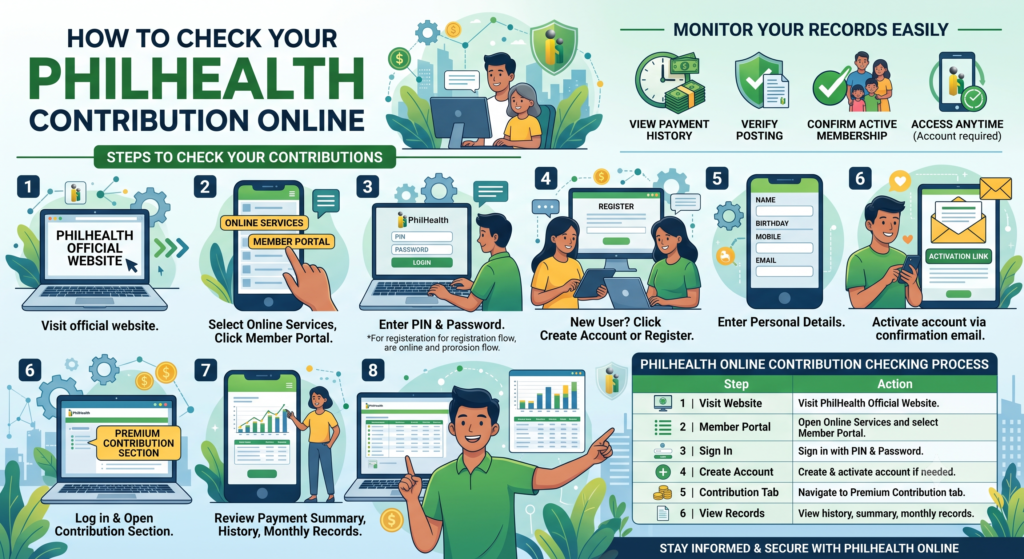
You can easily monitor your PhilHealth contribution records through the PhilHealth Member Portal. By signing in to your account, you can view your payment history, verify whether contributions have been posted correctly, and confirm that your membership remains active.
If you have not created an online account yet, you can register using your personal information and activate it through the confirmation email. Once your account is active, you can access your contribution details anytime.
Steps to Check Your Contributions
- Visit the PhilHealth Official Website.
- Select Online Services and click Member Portal.
- Log in using your PhilHealth Identification Number (PIN) and password.
- If you are a new user, click Create Account or Register.
- Enter your personal details, including your name, birthday, mobile number, and email address.
- Activate your account through the confirmation email sent to your inbox.
- After logging in, open the Premium Contribution section.
- Review your payment summary, contribution history, and monthly contribution records.
PhilHealth Online Contribution Checking Process
| Step | What to Do |
|---|---|
| 1 | Visit the PhilHealth Official Website. |
| 2 | Open Online Services and select Member Portal. |
| 3 | Sign in with your PhilHealth Identification Number (PIN) and password. |
| 4 | Create and activate an account if you do not already have one. |
| 5 | Navigate to the Premium Contribution tab. |
| 6 | View your contribution history, payment summary, and monthly records. |
Information Available in the Member Portal
| Information | Description |
|---|---|
| Contribution History | Displays all recorded premium payments. |
| Monthly Contribution Records | Shows the contributions posted for each payment period. |
| Payment Summary | Provides an overview of your completed contribution payments. |
| Membership Status | Confirms whether your PhilHealth account is active. |
Regularly checking your contribution records helps you confirm that payments have been successfully posted. If you notice missing or incorrect entries, keep your payment receipts or transaction references and contact PhilHealth for verification and record updating.
Key Advantages of PhilHealth Coverage
| Feature | Benefit |
|---|---|
| Lower Healthcare Costs | Reduces the amount members pay for approved medical services. |
| Primary Healthcare Access | Encourages preventive care through the PhilHealth YAKAP programme. |
| Critical Illness Support | Provides financial assistance for costly treatments under the Z Benefits package. |
| Maternity Assistance | Helps families manage pregnancy, delivery, and newborn healthcare expenses. |
| Nationwide Coverage | Benefits are available at accredited hospitals and healthcare facilities across the Philippines. |
21. How to Update Your PhilHealth Information
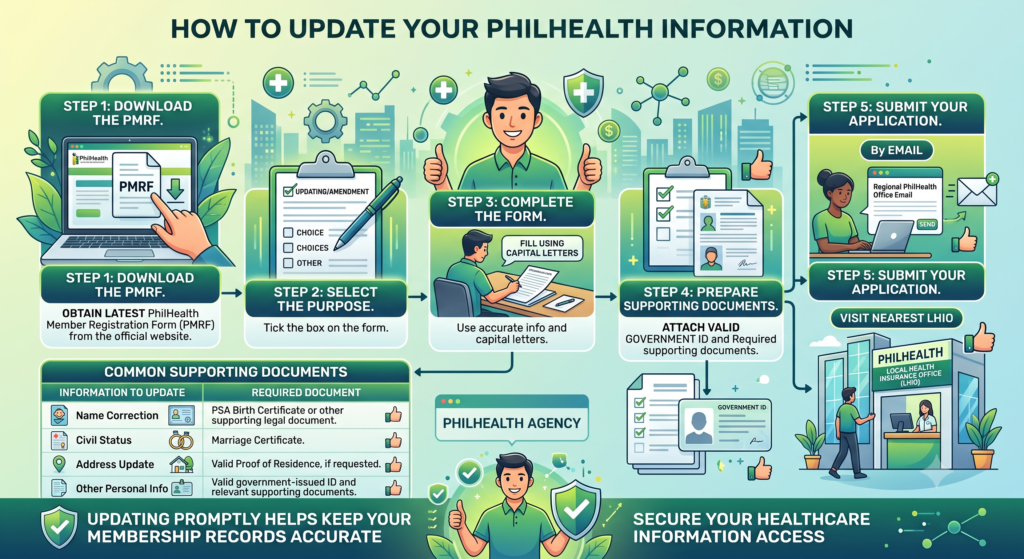
Keeping your PhilHealth records up to date ensures that your personal details, membership information, and dependent records remain accurate. Whenever you change your name, civil status, address, or other personal information, you should update your records to avoid delays when using your healthcare benefits.
You can request an update by completing the PhilHealth Member Registration Form (PMRF), attaching the necessary supporting documents, and submitting your application either by email or at your nearest Local Health Insurance Office (LHIO).
Steps to Update Your PhilHealth Information
- Download the PMRF
- Obtain the latest PhilHealth Member Registration Form (PMRF) from the official PhilHealth website.
- Select the Purpose
- Tick the “Updating/Amendment” box at the top of the form.
- Complete the form using capital letters.
- Prepare Supporting Documents
- Attach a copy of a valid government-issued ID.
- Include documents that support your requested changes, such as a birth certificate for name corrections or a marriage certificate for changes in civil status.
- Submit Your Application
- Email scanned copies of the completed form and supporting documents to your regional PhilHealth office.
- You may also submit the documents personally at the nearest Local Health Insurance Office (LHIO).
PhilHealth Information Update Process
| Step | What to Do |
|---|---|
| 1 | Download the PhilHealth Member Registration Form (PMRF). |
| 2 | Select “Updating/Amendment” as the purpose of your request. |
| 3 | Complete the form using accurate information and capital letters. |
| 4 | Attach a valid government ID and the required supporting documents. |
| 5 | Submit your application by email or visit the nearest Local Health Insurance Office (LHIO). |
Common Supporting Documents
| Information to Update | Required Document |
|---|---|
| Name Correction | PSA Birth Certificate or other supporting legal document |
| Civil Status | Marriage Certificate |
| Address Update | Valid proof of residence, if requested |
| Other Personal Information | Valid government-issued ID and any relevant supporting documents |
Updating your PhilHealth information promptly helps keep your membership records accurate and ensures you can access healthcare benefits without unnecessary processing delays.
23. Common PhilHealth Login, Registration, and Contribution Problems
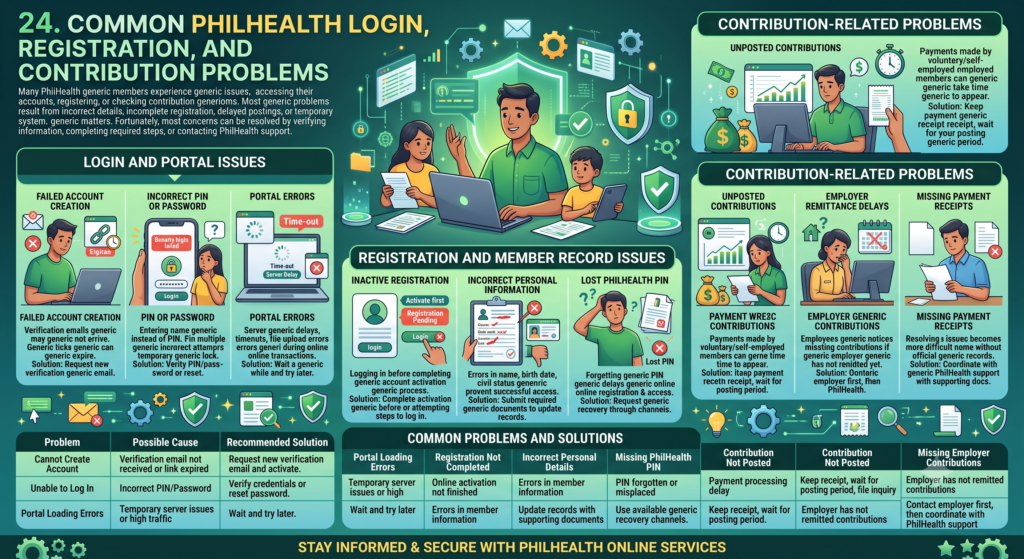
Many PhilHealth members experience issues when accessing their accounts, registering for membership, or checking contribution records. Most of these problems are caused by incorrect login details, incomplete registration, delayed payment posting, or temporary system issues.
Fortunately, most concerns can be resolved by verifying your account information, completing the required registration steps, or contacting PhilHealth with the necessary supporting documents.
Login and Portal Issues
- Failed Account Creation
- Verification emails may not arrive.
- Activation links can expire before they are used.
- Incorrect PIN or Password
- Members sometimes enter their username instead of their PhilHealth Identification Number (PIN).
- Multiple incorrect login attempts may temporarily lock the account.
- Portal Errors
- The PhilHealth Online Services portal may experience server delays.
- Users may encounter loading issues, timeouts, or file upload errors during online transactions.
Registration and Member Record Issues
- Inactive Registration
- New members may try to log in before completing the online account activation process through the PhilHealth Member Portal.
- Incorrect Personal Information
- Errors in names, birth dates, or civil status can prevent successful account access.
- Lost PhilHealth PIN
- Forgetting your PhilHealth Identification Number (PIN) can delay online registration and account access.
Contribution-Related Problems
- Unposted Contributions
- Payments made by voluntary or self-employed members may take time to appear in the contribution history.
- Employer Remittance Delays
- Employees may notice missing contributions if their employer has not yet submitted the required remittance.
- Missing Payment Receipts
- Without official payment receipts or transaction records, resolving missing contribution issues can become more difficult.
Common Problems and Solutions
| Problem | Possible Cause | Recommended Solution |
|---|---|---|
| Cannot Create an Account | Verification email not received or activation link expired | Request a new verification email and complete the activation process. |
| Unable to Log In | Incorrect PhilHealth Identification Number (PIN) or password | Verify your login credentials or reset your password if necessary. |
| Portal Loading Errors | Temporary server issues or heavy website traffic | Wait a while and try accessing the portal again later. |
| Registration Not Completed | Online activation was not finished | Complete the account activation before attempting to log in. |
| Incorrect Personal Details | Errors in member information | Update your records by submitting the required supporting documents. |
| Missing PhilHealth PIN | PIN forgotten or misplaced | Request PIN recovery through PhilHealth’s available support channels. |
| Contribution Not Posted | Payment processing delay | Keep your payment receipt and wait for the posting period before filing an inquiry. |
| Missing Employer Contributions | Employer has not yet remitted contributions | Contact your employer first, then coordinate with PhilHealth if the issue remains unresolved. |
Keeping your login details secure, maintaining copies of payment receipts, and regularly reviewing your membership records can help prevent many common PhilHealth account and contribution issues.
25. Tips to Maximize Your PhilHealth Membership and Benefits
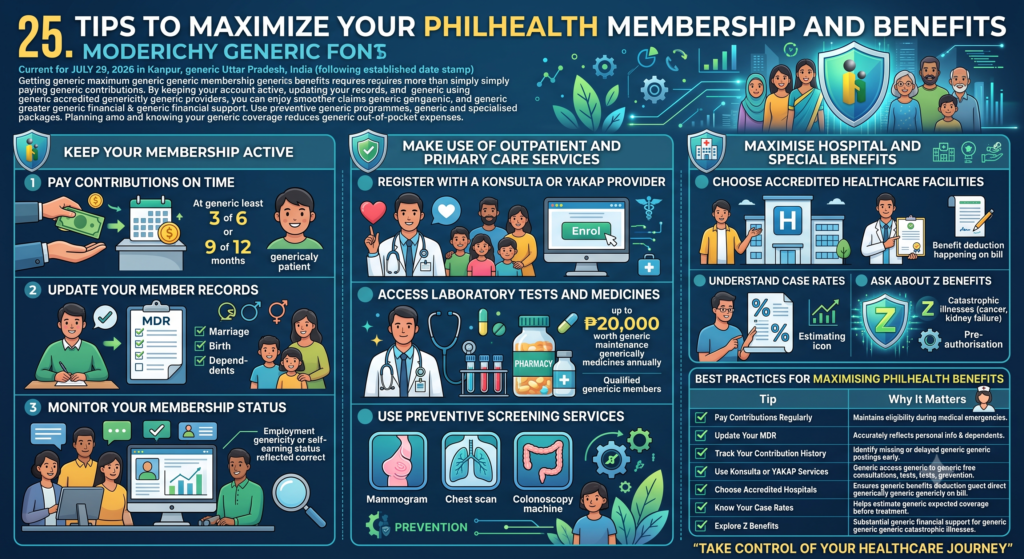
Getting the most from your PhilHealth membership requires more than simply paying your contributions. By keeping your account active, updating your records, and using accredited healthcare providers, you can enjoy smoother claims and greater financial support whenever you need medical care.
You should also take advantage of preventive healthcare programmes and specialised benefit packages. Planning ahead and understanding your available coverage can significantly reduce your out-of-pocket medical expenses.
Keep Your Membership Active
- Pay Contributions on Time
- Maintain your contribution record by paying at least 3 monthly contributions within the last 6 months or 9 monthly contributions within the last 12 months before hospital confinement.
- Update Your Member Records
- Keep your Member Data Record (MDR) current.
- Add qualified dependents promptly after marriage, childbirth, or other major life events.
- Monitor Your Membership Status
- Regularly check your contribution history.
- Ensure your employment or self-earning status is correctly reflected in your PhilHealth account.
Make Use of Outpatient and Primary Care Services
- Register with a Konsulta or YAKAP Provider
- Enrol with an accredited provider to receive free primary healthcare consultations.
- Access Laboratory Tests and Medicines
- Qualified members can receive selected diagnostic laboratory services.
- Eligible members may also receive up to ₱20,000 worth of annual maintenance medicines.
- Use Preventive Screening Services
- Take advantage of available health screenings, including mammograms, chest scans, and colonoscopies where offered.
Maximise Hospital and Special Benefits
- Choose Accredited Healthcare Facilities
- Visit PhilHealth-accredited hospitals and consult accredited doctors so benefit deductions are applied directly to your hospital bill.
- Understand Case Rates
- Review the standard case rates before treatment to estimate how much financial assistance you can receive.
- Ask About Z Benefits
- If diagnosed with a serious illness such as cancer or kidney failure, inquire about Z Benefits and complete any required pre-authorisation process.
Best Practices for Maximising PhilHealth Benefits
| Tip | Why It Matters |
|---|---|
| Pay Contributions Regularly | Helps maintain eligibility for PhilHealth benefits during medical emergencies. |
| Update Your MDR | Ensures your personal information and dependents remain accurate. |
| Track Your Contribution History | Allows you to identify missing or delayed contribution postings early. |
| Use Konsulta or YAKAP Services | Gives access to free consultations, laboratory tests, and preventive healthcare. |
| Choose Accredited Hospitals | Ensures PhilHealth benefits are deducted directly from your hospital bill. |
| Know Your Case Rates | Helps estimate your expected healthcare coverage before treatment. |
| Explore Z Benefits | Provides substantial financial support for catastrophic illnesses and specialised treatments. |
Quick Checklist
| Action | Benefit |
|---|---|
| Keep contributions current | Maintains active healthcare coverage. |
| Update dependent information | Allows eligible family members to receive benefits. |
| Visit accredited providers | Reduces out-of-pocket medical expenses. |
| Use preventive healthcare services | Helps detect health conditions early. |
| Review available benefit packages | Ensures you receive the maximum financial assistance available. |
Following these simple practices can help you maximise your PhilHealth benefits, reduce healthcare costs, and enjoy smoother access to medical services whenever you or your qualified dependents need treatment.
Also Read:
- PhilHealth ID: Your Complete July 2026 Guide
- PhilHealth Login 2026: Ultimate Guide to Member Portal, Password Reset & MDR Download
- PhilHealth Employer Guide 2026: Registration & Compliance
- PhilHealth Online Registration: Why 90% of Filipinos Get This One Step Wrong
- PhilHealth Online Appointment 2026: Step-by-Step Booking Secrets Revealed
- PhilHealth Requirements 2026: The One Document Everyone Forgets
Conclusion
Your PhilHealth Portal Login & Registration 2026 account is more than just an online profile. It is your gateway to better healthcare and faster access to essential medical services in the Philippines. By completing your PhilHealth Registration, creating your PhilHealth Account, and keeping your information updated, you can easily manage your PhilHealth Contribution, view your Member Data Record (MDR), monitor your payment history, and enjoy uninterrupted PhilHealth Benefits whenever you need them.
Whether you are an employee, self-employed worker, voluntary member, OFW, senior citizen, or employer, using the PhilHealth Portal makes membership management much simpler. Regularly check your records, pay contributions on time, update your personal details, and keep copies of important documents. Staying informed about the latest PhilHealth services and policies helps you maximize your healthcare coverage and ensures you and your family receive the financial protection you deserve during medical emergencies.
Frequently Asked Questions (FAQs)
How do I register for PhilHealth online?
You can register through the official PhilHealth online registration system by completing the required form and uploading the necessary documents if applicable. After your application is processed, you’ll receive your PhilHealth Identification Number (PIN). Keep a copy of your registration details for future use.
How do I log in to the PhilHealth Member Portal?
Visit the PhilHealth Member Portal and enter your registered email address or PhilHealth credentials along with your password. Once logged in, you can check your contributions, download your Member Data Record (MDR), and update your profile information.
What should I do if I forgot my PhilHealth password?
Use the “Forgot Password” option on the PhilHealth login page. Follow the instructions sent to your registered email address to reset your password. If you no longer have access to your email, contact the nearest PhilHealth office for assistance.
How can I recover my PhilHealth account?
If you cannot access your account, use the account recovery feature on the Member Portal. You may need to verify your identity using your PhilHealth Identification Number (PIN) and registered email. PhilHealth branches can also assist if online recovery is unsuccessful.
How do I download and print my PhilHealth MDR?
Log in to your PhilHealth Member Portal account and select the Member Data Record (MDR) option. You can download the document as a PDF and print it whenever needed for employment, hospital admission, or other official transactions.
Can I check my PhilHealth contributions online?
Yes. Sign in to the PhilHealth Member Portal and open your Contribution History. You can view your posted payments, contribution records, and payment history to make sure your account is updated.
How can I update my PhilHealth information?
You can update personal details such as your address, civil status, employment information, or dependents by submitting the required forms through a PhilHealth branch. Some updates may also be available through PhilHealth’s online services.
How do I verify my PhilHealth Identification Number (PIN)?
You can verify your PhilHealth Identification Number by logging into your Member Portal account or requesting assistance from a PhilHealth branch. Bring a valid government-issued ID if identity verification is required.
Can I replace my lost PhilHealth ID?
es. If your PhilHealth ID is lost or damaged, visit the nearest PhilHealth office and request a replacement. You may be asked to present a valid ID and complete the necessary request form before a new ID is issued.
Who can become a PhilHealth member?
Almost all Filipinos can become PhilHealth members, including employed workers, self-employed individuals, freelancers, voluntary members, Overseas Filipino Workers (OFWs), senior citizens, and qualified dependents under the Universal Health Care Act.