
PhilHealth ID: Your Complete July 2026 Guide
Someone at a hospital counter asks for your PhilHealth ID, and suddenly you’re digging through your bag, hoping it’s actually in there. Sound familiar? You’re not alone. Millions of Filipinos carry this small card without fully understanding what it does or why it matters.
Is it just a piece of identification, or does it hold the key to your entire health insurance program? This guide breaks it all down in plain, simple terms. We’ll cover the different card types, requirements, application steps, and what happens if you lose it. By the end, you’ll know exactly how your ID connects to real healthcare benefits and genuine peace of mind.

2. What Is a PhilHealth ID?
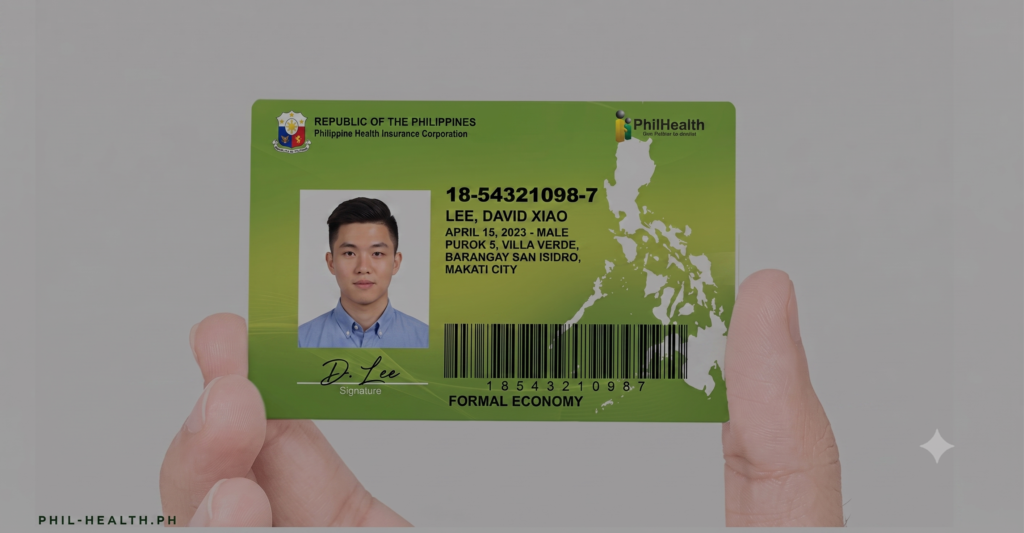
A PhilHealth ID is an official membership card issued by the Philippine Health Insurance Corporation (PhilHealth). It contains your unique 12-digit PhilHealth Identification Number (PIN), your full name, and your photo. The card serves as proof that you are enrolled in the national health insurance programme and can be used when accessing eligible healthcare services. The standard paper PhilHealth ID is issued free of charge and does not have an expiration date.
Besides confirming your membership, the PhilHealth ID is useful for hospital transactions, employment requirements, and identity verification. Once you have your PIN, you can visit a PhilHealth office to receive your physical ID card after presenting the required documents.
Main Uses of a PhilHealth ID
- Hospital Benefits
- Present your PhilHealth ID at accredited hospitals and clinics to receive eligible benefit deductions and healthcare packages.
- Employment Requirements
- Many employers request a PhilHealth ID during the hiring process for employee registration and payroll records.
- Identity Verification
- The card can be used as a recognised secondary government-issued ID for various public and private transactions.
How to Get a PhilHealth ID
- Register Online
- Apply through the PhilHealth Member Portal to obtain your PhilHealth Identification Number (PIN).
- Visit a PhilHealth Branch
- Go to your nearest PhilHealth office or PhilHealth Express outlet.
- Bring your PIN, a valid government-issued ID, 1×1 ID photos, and your birth certificate to request your printed PhilHealth ID.
PhilHealth ID at a Glance
| Feature | Details |
|---|---|
| Issued By | Philippine Health Insurance Corporation (PhilHealth) |
| Validity | Non-expiring membership card |
| Cost | Standard paper PhilHealth ID is issued free of charge |
| Contains | 12-digit PhilHealth Identification Number (PIN), member’s name, and photo |
| Main Purpose | Proof of PhilHealth membership and access to healthcare benefits |
Benefits of Having a PhilHealth ID
| Benefit | Description |
|---|---|
| Healthcare Access | Helps members claim eligible PhilHealth benefits at accredited healthcare facilities. |
| Employment Use | Commonly required during pre-employment processing and company registration. |
| Identity Support | Can be presented as a supporting government-issued identification for eligible transactions. |
3. Why a PhilHealth ID Is Important for Every Member
A PhilHealth ID is more than just a membership card. It helps you access healthcare services, enjoy medical cost reductions, and verify your membership in the National Health Insurance Program. It is also commonly requested during employment and can serve as a supporting government-issued ID for various transactions.
Having an active PhilHealth ID ensures that you can receive eligible healthcare benefits without unnecessary delays. It also makes it easier to prove your membership status whenever required by hospitals, employers, or government offices.
Healthcare Benefits and Financial Savings
- Hospital Bill Assistance
- Helps reduce eligible inpatient and outpatient medical expenses through benefit deductions at accredited hospitals and clinics.
- Preventive Healthcare
- Provides access to consultations, laboratory tests, and essential medicines through approved primary healthcare programmes.
- Dependent Coverage
- Allows qualified family members, including spouses, children, and elderly parents, to receive healthcare benefits when they are registered as dependents.
Employment and Identification Benefits
- Employment Requirement
- Frequently requested by employers during recruitment and employee onboarding.
- Supporting Government ID
- Can be used as a recognised secondary identification document for selected public and private transactions.
- Proof of Membership
- Confirms your active enrolment in the National Health Insurance Program, making benefit verification faster.
Importance of a PhilHealth ID
| Benefit | Description |
|---|---|
| Healthcare Access | Enables members to receive eligible medical benefits at accredited healthcare facilities. |
| Hospital Savings | Helps lower qualified hospital and treatment costs through benefit deductions. |
| Primary Healthcare | Supports access to consultations, laboratory services, and essential medicines. |
| Dependent Protection | Extends healthcare coverage to qualified family members. |
| Employment Support | Commonly required by employers during hiring and payroll processing. |
| Identity Verification | Can serve as a supporting government-issued ID for eligible transactions. |
| Membership Confirmation | Provides proof of active membership in the National Health Insurance Program. |
A PhilHealth ID offers practical value beyond identification. It helps members access healthcare benefits more easily, supports employment requirements, and provides financial assistance for eligible medical services throughout the Philippines.
Your PhilHealth ID matters, but it’s just one piece of a bigger picture. Keep your PhilHealth Member Registration Form details accurate, stay active on the My PhilHealth Portal, and don’t forget your MDR carries just as much weight during real emergencies. A little preparation now means one less thing to worry about later.
4. What are the two types of PhilHealth IDs?
PhilHealth offers two main physical ID card options for its members: the Regular Paper PhilHealth ID and the Digitized PVC Health Insurance Card (HIC). Both cards display your membership details and 12-digit PhilHealth Identification Number (PIN), but they differ in material, features, and accepted uses.
The regular paper card is provided free to members after registration, while the PVC card is a more durable version available to eligible members who wish to obtain it for an additional fee.
A. Regular Paper PhilHealth ID
- Material
- Printed on standard paper or card stock.
- Cost
- Issued free of charge during initial membership registration.
- Main Features
- Displays your 12-digit PhilHealth Identification Number (PIN), full name, and basic membership details.
- Used when claiming PhilHealth benefits and completing membership-related transactions.
- Commonly presented together with your Member Data Record (MDR) when visiting healthcare facilities.
B. Digitized PVC Health Insurance Card (HIC)
- Material
- Manufactured using durable PVC plastic for long-term use.
- Cost
- Available to eligible formal and informal sector members for ₱90.00.
- Main Features
- Functions as a durable membership card with your PhilHealth details.
- Recognised as a valid government-issued ID for banking and identity verification under Bangko Sentral ng Pilipinas guidelines.
- Can be presented directly at accredited healthcare facilities during eligible transactions.
Comparison of PhilHealth ID Cards
| Feature | Regular Paper PhilHealth ID | Digitized PVC Health Insurance Card (HIC) |
|---|---|---|
| Material | Standard paper/card stock | Durable PVC plastic |
| Cost | Free | ₱90.00 |
| Contains | 12-digit PhilHealth Identification Number (PIN) and member details | 12-digit PhilHealth Identification Number (PIN) and member details |
| Primary Purpose | Membership verification and benefit claims | Membership verification, healthcare transactions, and identity verification |
| Durability | Basic paper card | Long-lasting plastic card |
| Government ID Recognition | Generally used as proof of membership | Recognised for banking and identity verification under Bangko Sentral ng Pilipinas guidelines |
Which PhilHealth ID Should You Choose?
| Card Type | Best For |
|---|---|
| Regular Paper PhilHealth ID | New members who need a free membership card for healthcare transactions. |
| Digitized PVC Health Insurance Card (HIC) | Members who prefer a more durable card that can also be used for eligible identity verification purposes. |
Both PhilHealth ID card types allow members to access healthcare benefits. The regular paper card is suitable for everyday membership verification, while the Digitized PVC Health Insurance Card (HIC) offers added durability and broader acceptance for identity verification.
5. Who Can Apply for a PhilHealth ID?
Any person enrolled under the National Health Insurance Program (NHIP) is eligible to apply for a PhilHealth ID. Whether you are employed, self-employed, retired, or a senior citizen, you can obtain a PhilHealth ID once your membership has been registered and your PhilHealth Identification Number (PIN) has been issued.
Before applying, make sure you have completed your membership registration and prepared the required documents. Having accurate records helps speed up the application process and prevents unnecessary delays.
Eligible Applicants
- Employed Members
- Employees in the formal sector registered through their employer or Human Resources (HR) department.
- Self-Employed Individuals and Freelancers
- Business owners, freelancers, professionals, and voluntary members who pay their own PhilHealth contributions.
- Senior Citizens
- Older adults registered through the Office for Senior Citizens Affairs (OSCA) or local health offices.
- Lifetime Members
- Retirees and members who have reached the required age and completed the necessary premium contributions.
Basic Requirements for Application
- Two (2) copies of the completed PhilHealth Member Registration Form (PMRF).
- Two (2) recent 1×1-inch ID photos with a white background.
- A valid government-issued ID, such as a passport, driver’s licence, or UMID.
- A PSA Birth Certificate for identity verification, if requested.
Eligible Members for a PhilHealth ID
| Applicant Category | Eligibility |
|---|---|
| Employed Members | Workers enrolled through their employer or HR department. |
| Self-Employed Members | Individuals paying their own PhilHealth contributions. |
| Freelancers | Independent professionals registered as voluntary members. |
| Senior Citizens | Members enrolled through the Office for Senior Citizens Affairs (OSCA) or local health offices. |
| Lifetime Members | Qualified retirees who have met the required age and contribution requirements. |
Documents Required
| Document | Purpose |
|---|---|
| PhilHealth Member Registration Form (PMRF) | Required for membership and ID application. |
| 1×1 ID Photos | Used for identification and ID card processing. |
| Government-Issued ID | Confirms the applicant’s identity. |
| PSA Birth Certificate | Used for identity verification when required. |
Once your membership is verified and your documents are complete, you can visit the nearest PhilHealth office or authorised service centre to apply for and receive your PhilHealth ID.
6. PhilHealth ID Eligibility Requirements
Under the Universal Health Care (UHC) Act, every Filipino citizen is entitled to become a member of PhilHealth. Once your membership is registered, you can obtain a PhilHealth Identification Number (PIN) and apply for a PhilHealth ID. Whether you are employed, self-employed, an Overseas Filipino Worker (OFW), or a voluntary member, the application process is open to all qualified individuals.
Before visiting a PhilHealth office, prepare the required documents to ensure your application is processed without unnecessary delays. Providing complete and accurate information will help speed up the issuance of your membership records and ID.
Who Is Eligible?
- All Filipino Citizens
- Eligible to receive a PhilHealth Identification Number (PIN) and apply for a PhilHealth ID under the Universal Health Care law.
- Employed Members
- Employees in both the public and private sectors.
- Self-Employed and Voluntary Members
- Business owners, freelancers, professionals, and individuals paying their own PhilHealth contributions.
- Overseas Filipino Workers (OFWs)
- Land-based and sea-based OFWs can also register and apply for a PhilHealth ID.
Documents Required
- PhilHealth Member Registration Form (PMRF)
- Submit two (2) completed and signed copies of the PMRF.
- Valid Government-Issued ID
- Provide at least one (1) or two (2) valid IDs, such as:
- Passport
- Driver’s License
- UMID
- National ID
- Provide at least one (1) or two (2) valid IDs, such as:
- PSA Birth Certificate
- Submit a photocopy of your PSA-issued Birth Certificate for identity verification.
- Recent ID Photos
- Prepare two (2) recent 1×1-inch ID photographs.
- Additional Documents (If Applicable)
- Married women updating their surname should provide a Marriage Certificate.
PhilHealth ID Eligibility
| Applicant Category | Eligible to Apply |
|---|---|
| Filipino Citizens | Yes, under the Universal Health Care Act |
| Employed Members | Yes |
| Self-Employed Individuals | Yes |
| Voluntary Members | Yes |
| Overseas Filipino Workers (OFWs) | Yes |
PhilHealth ID Application Checklist
| Requirement | Purpose |
|---|---|
| Two (2) PMRF Copies | Required for membership registration and ID application |
| Valid Government-Issued ID | Confirms your identity |
| PSA Birth Certificate | Verifies your personal information |
| Two (2) 1×1 ID Photos | Used for ID card processing |
| Marriage Certificate (if applicable) | Supports surname updates for married applicants |
Preparing these documents before applying will make the PhilHealth ID application process faster and help ensure your membership records are completed accurately.
7. Documents Required for a PhilHealth ID Application
Before applying for a PhilHealth ID, make sure you have all the required documents ready. Submitting complete and accurate paperwork helps prevent delays and allows the PhilHealth office to process your application more efficiently. Most applicants only need a few basic documents, while others may need to provide additional records depending on their situation.
If you are applying for the first time, updating your personal information, or requesting a replacement ID, bring both the original documents and photocopies whenever possible. This makes the verification process much smoother.
Basic Documents Required
- PhilHealth Member Registration Form (PMRF)
- Submit two (2) completed and signed copies of the PMRF.
- Valid Government-Issued ID
- Bring the original and photocopies of at least one valid ID.
- Accepted primary IDs include:
- Passport
- National ID (PhilID)
- Driver’s License
- UMID
- If a primary ID is unavailable, secondary IDs such as a Postal ID or NBI Clearance may be accepted.
- PSA Birth Certificate
- Used to verify your legal name, date of birth, and age.
- It may also be requested when correcting personal information.
- Recent ID Photos
- Prepare two (2) recent 1×1-inch photographs taken within the last six months.
Additional Documents (If Applicable)
- Marriage Certificate
- Required for married women who wish to update their surname.
- Affidavit of Loss
- Needed only when applying for a replacement of a lost PhilHealth ID.
- Senior Citizen or Retirement Documents
- Senior citizens may be asked to present their OSCA ID.
- Lifetime members may need pension or retirement documents for verification.
PhilHealth ID Application Checklist
| Document | Purpose |
|---|---|
| Two (2) PMRF Copies | Required for membership registration and ID processing. |
| Valid Government-Issued ID | Confirms the applicant’s identity. |
| PSA Birth Certificate | Verifies personal information and supports record corrections. |
| Two (2) Recent 1×1 ID Photos | Used for ID card preparation and member identification. |
Additional Documents by Applicant Type
| Applicant | Additional Requirement |
|---|---|
| Married Female Applicant | Marriage Certificate for surname update |
| Lost ID Replacement | Affidavit of Loss |
| Senior Citizen | OSCA ID |
| Lifetime Member | Pension or retirement documents (if requested) |
Preparing these documents before visiting a PhilHealth office can make your PhilHealth ID application faster and reduce the chances of processing delays or requests for additional paperwork.
8. How to Get a PhilHealth ID for the first time
Getting a PhilHealth ID for the first time is a straightforward process. You must first register as a PhilHealth member, obtain your PhilHealth Identification Number (PIN), and then visit a PhilHealth office to receive your ID. You can begin your registration online through the PhilHealth Member Portal or apply in person at a nearby PhilHealth branch.
Before starting your application, make sure all your documents are complete and your personal information is accurate. This helps avoid delays and allows your membership to be processed more quickly.
Documents You Need
- PhilHealth Member Registration Form (PMRF)
- Prepare two (2) completed and signed copies of the PMRF.
- Valid Government-Issued ID
- Bring at least one or two valid IDs, such as:
- Passport
- Driver’s License
- National ID
- Postal ID
- Bring at least one or two valid IDs, such as:
- PSA Birth Certificate
- Present the original copy together with a photocopy for identity verification.
- Recent ID Photos
- Bring two recent 1×1 or 2×2 photographs, as some branches may request them during processing.
- First-Time Jobseeker Documents (If Applicable)
- Applicants covered under Republic Act No. 11261 should present a Barangay Certification confirming they are first-time jobseekers to qualify for waived transaction fees.
Step-by-Step Application Process
Step 1: Complete Your Registration
- Register through the PhilHealth Member Portal or obtain a PMRF from the nearest PhilHealth office.
- Fill out the form carefully using correct personal information.
Step 2: Receive Your PhilHealth Identification Number (PIN)
- Online applicants will receive their PIN through their registered email after processing.
- Walk-in applicants will receive their PIN at the PhilHealth service counter once their application is approved.
Step 3: Visit a PhilHealth Office
- Go to your nearest PhilHealth Local Health Insurance Office (LHIO) with all your required documents.
- Submit your application for identity verification.
Step 4: Claim Your PhilHealth ID
- After verification, you can receive your regular paper PhilHealth ID free of charge.
- If available at your branch, you may also ask about obtaining an optional PVC PhilHealth ID for a small fee.
PhilHealth ID Application Requirements
| Requirement | Purpose |
|---|---|
| Two (2) PMRF Copies | Required for member registration and ID application |
| Valid Government-Issued ID | Confirms your identity |
| PSA Birth Certificate | Verifies your personal information |
| Two Recent ID Photos | Used for identification during processing |
| Barangay Certification (First-Time Jobseekers) | Required to receive waived transaction fees under Republic Act No. 11261 |
PhilHealth ID Application Steps
| Step | What to Do |
|---|---|
| 1. Register | Complete the PMRF online or at a PhilHealth office. |
| 2. Get Your PIN | Receive your PhilHealth Identification Number after your registration is processed. |
| 3. Submit Your Documents | Visit the nearest PhilHealth office with your requirements. |
| 4. Receive Your ID | Collect your free paper PhilHealth ID and ask about the optional PVC card if available. |
By preparing your documents in advance and following these steps, you can obtain your PhilHealth ID quickly and begin using your membership benefits for healthcare services and other eligible transactions.
9. How to Apply for a PhilHealth ID Online
Although you can complete your PhilHealth membership registration online, you cannot receive a physical PhilHealth ID entirely through the internet. The online system allows you to register, submit your documents, and obtain your 12-digit PhilHealth Identification Number (PIN). After your registration is approved, you must visit a PhilHealth office to collect your printed ID card.
This online process saves time because your membership details are already recorded before you arrive at the branch. Once your PIN has been issued, the final step is simply verifying your identity and requesting the printing of your PhilHealth ID.
Steps to Register Online
- Access the Online Portal
- Visit the PhilHealth Online NHIP Registration page to begin your application.
- Complete the Registration Form
- Fill in the PhilHealth Member Registration Form (PMRF) with your correct personal and contact information.
- Upload Required Documents
- Attach clear scanned copies or photos of your valid government-issued ID or your birth certificate.
- Wait for Your PIN
- After submitting your application, wait 3 to 5 working days to receive your 12-digit PhilHealth Identification Number (PIN) through your registered email.
How to Claim Your Physical PhilHealth ID
- Visit a PhilHealth Office
- Go to any nearby PhilHealth Branch or PhilHealth Express outlet, including those located in selected shopping malls.
- Bring the Required Documents
- Present a printed copy of the email containing your PIN together with a valid government-issued ID.
- Request Your ID Card
- Complete the request form provided at the service counter.
- Receive Your PhilHealth ID
- Your regular paper PhilHealth ID and Member Data Record (MDR) are usually printed during your visit.
- Some branches also offer an optional PVC PhilHealth ID for a fee ranging from ₱90 to ₱150, depending on availability.
Online Application Process
| Step | What You Need to Do |
|---|---|
| 1. Open the Registration Portal | Visit the PhilHealth Online NHIP Registration page. |
| 2. Complete the PMRF | Enter your personal information accurately. |
| 3. Upload Documents | Submit your valid ID or birth certificate. |
| 4. Receive Your PIN | Wait 3 to 5 working days for your PIN to arrive by email. |
Claiming Your PhilHealth ID
| Requirement | Purpose |
|---|---|
| Printed PIN Email | Confirms your successful online registration. |
| Valid Government-Issued ID | Used to verify your identity. |
| Request Form | Required before your PhilHealth ID and MDR can be printed. |
| PhilHealth Branch Visit | Necessary to receive your physical ID card. |
Completing your registration online is the fastest way to begin your PhilHealth membership. However, you must still visit a PhilHealth office to receive your printed PhilHealth ID, verify your identity, and collect your Member Data Record (MDR).
10. PhilHealth ID Fees and Processing Time
Getting a PhilHealth ID is affordable because the standard paper ID is issued free of charge to registered members. There are no fees for membership registration or obtaining your PhilHealth Identification Number (PIN). If you prefer a more durable card, some PhilHealth branches offer an optional PVC PhilHealth ID for an additional fee.
The time required to receive your ID depends on how you apply. Online registration requires several working days for PIN issuance, while members who already have a confirmed PIN can usually receive their paper ID on the same day when visiting a PhilHealth branch.
PhilHealth ID Fees
- Standard Paper PhilHealth ID
- Issued free of charge to registered members.
- Online Registration
- No payment is required to register or obtain your PhilHealth Identification Number (PIN).
- Optional PVC PhilHealth ID
- Available at selected branches for ₱90 to ₱150, depending on the location.
Processing Time
- Online Registration
- Your PhilHealth Identification Number (PIN) is generally sent to your registered email within 3 to 5 working days after your application is approved.
- Walk-in ID Printing
- Members who already have a confirmed PIN can usually receive their regular paper PhilHealth ID on the same day by visiting a PhilHealth Branch or PhilHealth Express outlet with the required documents.
PhilHealth ID Fees
| Service | Fee |
|---|---|
| Standard Paper PhilHealth ID | Free |
| Online Membership Registration | Free |
| PhilHealth Identification Number (PIN) | Free |
| Optional PVC PhilHealth ID | ₱90 to ₱150 (varies by branch) |
Estimated Processing Time
| Application Method | Processing Time |
|---|---|
| Online Registration (PIN Issuance) | 3 to 5 working days |
| Walk-in Paper ID Printing | Usually issued on the same day after verification |
| PVC PhilHealth ID (Optional) | Depends on branch availability |
Applying for a PhilHealth ID is simple and budget-friendly. Since the standard paper ID and membership registration are free, most applicants only need to prepare their documents. Those who want a longer-lasting card may choose the optional PVC PhilHealth ID, which is available at selected branches for ₱90 to ₱150.
11. How to Download and Print Your PhilHealth Member Data Record (MDR)
Your Member Data Record (MDR) is an important document that contains your PhilHealth membership details, personal information, and registration status. You can easily download and print your MDR by signing in to your account through the PhilHealth Online Services portal. Keeping a digital and printed copy is helpful when applying for employment, visiting hospitals, or updating your membership records.
If you have not created an online account yet, you will need your PhilHealth Identification Number (PIN) and a valid email address to complete the registration process before accessing your MDR.
Accessing Your PhilHealth Account
- Visit the Online Portal
- Open the PhilHealth Online Services page using your web browser.
- Log In to Your Account
- Click Member Portal and enter your PhilHealth Identification Number (PIN) and password.
- Create an Account (If Needed)
- Select Create Account.
- Enter your PIN, personal information, and registered email address.
- Verify your email to activate your online account.
Downloading and Printing Your MDR
- Open Your Dashboard
- After signing in, go to the Member Information or dashboard section.
- Generate Your MDR
- Click the Print MDR or MDR Printing option.
- Download the File
- Save the generated document as a PDF on your computer or mobile device.
- Print Your MDR
- Open the PDF file and print a hard copy whenever you need it for hospital visits, employment requirements, or personal records.
Steps to Download Your MDR
| Step | Action |
|---|---|
| 1. Visit PhilHealth Online Services | Open the official online portal. |
| 2. Sign In | Log in using your PhilHealth Identification Number (PIN) and password. |
| 3. Access Member Information | Open your membership dashboard after logging in. |
| 4. Select Print MDR | Generate your Member Data Record (MDR). |
| 5. Download PDF | Save the MDR to your device. |
| 6. Print the Document | Print a physical copy for future use. |
What You Need Before Downloading
| Requirement | Purpose |
|---|---|
| PhilHealth Identification Number (PIN) | Required to access your online account. |
| PhilHealth Account Password | Used for secure login. |
| Registered Email Address | Needed for account activation if you are a new user. |
| PDF Reader and Printer | Required to open and print the downloaded MDR. |
Downloading your Member Data Record (MDR) only takes a few minutes and gives you instant access to your latest membership information. Keeping both a digital PDF and a printed copy ensures you are always prepared whenever a hospital, employer, or government office requests your PhilHealth records.
12. How to Replace a Lost or Damaged PhilHealth ID
If your PhilHealth ID is lost, stolen, or damaged, you can request a replacement by visiting any PhilHealth Local Health Insurance Office (LHIO). The replacement process is simple, but you must bring the required documents for identity verification. At present, you cannot request a physical replacement card entirely online because your identity must be confirmed at a PhilHealth service office.
Before visiting a branch, prepare your PhilHealth Identification Number (PIN), a valid government-issued ID, and any additional documents required for your situation. Once your records are verified, you can receive a replacement paper ID on the same day in most cases.
A. Documents Required for Replacement
- PhilHealth Identification Number (PIN)
- Bring your PIN or any previous PhilHealth membership details if available.
- Valid Government-Issued ID
- Present a valid ID such as:
- Passport
- Driver’s License
- UMID
- Present a valid ID such as:
- Affidavit of Loss
- Required only if your PhilHealth ID has been lost or stolen.
- Recent ID Photos
- Bring at least two recent 1×1-inch photographs.
- PhilHealth Member Registration Form (PMRF) or Request Form
- Complete the required form provided at the PhilHealth branch.
B. Steps to Replace Your PhilHealth ID
- Step 1: Prepare Your Documents
- Gather your valid ID, recent photos, and Affidavit of Loss if your ID was lost or stolen.
- Step 2: Visit a PhilHealth Office
- Go to the nearest PhilHealth Local Health Insurance Office (LHIO) or an authorised PhilHealth service desk.
- Step 3: Submit Your Application
- Request the replacement form or PMRF, complete it with your correct information and PhilHealth Identification Number (PIN), then submit it together with your supporting documents.
- Step 4: Receive Your Replacement ID
- After your membership details are verified, a regular paper PhilHealth ID is usually printed and issued free of charge.
- If available, you may also request a PVC PhilHealth ID, which may cost ₱90 to ₱150, depending on the branch.
Replacement Requirements
| Requirement | Purpose |
|---|---|
| PhilHealth Identification Number (PIN) | Helps locate your membership record. |
| Valid Government-Issued ID | Confirms your identity. |
| Affidavit of Loss | Required only for lost or stolen IDs. |
| Two Recent 1×1 Photos | Used for replacement processing. |
| PMRF or Replacement Request Form | Required to process the new ID. |
C. PhilHealth ID Replacement Process
| Step | Action |
|---|---|
| 1. Prepare Documents | Collect all required identification and supporting documents. |
| 2. Visit an LHIO | Go to your nearest PhilHealth office or service desk. |
| 3. Submit the Forms | Complete and submit the replacement application. |
| 4. Receive Your New ID | Collect your replacement paper ID after verification. |
How much is the replacement fee for a lost PhilHealth ID?
The regular paper PhilHealth ID is generally replaced free of charge after your identity and membership records have been verified. However, if you prefer a PVC-style PhilHealth ID, some branches offer this option for a fee ranging from ₱90 to ₱150, depending on local branch availability. Since not every office provides PVC cards, it is best to ask the staff before requesting one.
Do I need an affidavit of loss if I lost my PhilHealth ID?
Yes. If your PhilHealth ID has been lost or stolen, you should prepare a notarised Affidavit of Loss before visiting a PhilHealth office. This document supports your replacement request and helps verify that the previous ID is no longer in your possession. If your ID is only damaged or worn out, an Affidavit of Loss is generally not required, but you should still bring your damaged card, if available, together with your valid government-issued ID.
13. Is the PhilHealth ID a Valid Government ID?
Yes, the PhilHealth ID is an officially issued government identification card. However, it is commonly treated as a secondary ID instead of a primary identification document. While many public and private institutions accept it for identity verification, some transactions may require you to present an additional primary ID or supporting document.
The PhilHealth ID is primarily intended to confirm your membership in the national health insurance program and to help you access healthcare services. To ensure it is accepted, your ID should display your photo, signature, and PhilHealth Identification Number (PIN) clearly.
Where the PhilHealth ID Can Be Used
- Government Transactions
- Accepted by several government agencies as a supporting form of identification.
- Healthcare Services
- Used at PhilHealth-accredited hospitals and clinics when claiming healthcare benefits.
- Employment Requirements
- Many employers accept it as one of the required identification documents during hiring.
- Identity Verification
- Can be presented for various public and private transactions where a secondary ID is accepted.
Important Things to Know
- Secondary Government ID
- Most banks and government offices classify the PhilHealth ID as a secondary identification card.
- Additional Documents May Be Needed
- For transactions with stricter verification requirements, you may need to present another valid ID or supporting documents such as a birth certificate or National ID.
- Must Be Complete
- The ID should contain:
- Your recent photograph
- Your signature
- Your PhilHealth Identification Number (PIN)
- The ID should contain:
PhilHealth ID Acceptance
| Transaction | Accepted? | Notes |
|---|---|---|
| PhilHealth Transactions | ✔ Yes | Fully accepted for membership verification and healthcare benefits. |
| Hospital and Clinic Services | ✔ Yes | Used when receiving benefits at accredited healthcare facilities. |
| Employment Requirements | ✔ Yes | Often accepted as a supporting identification document. |
| Banking and Financial Transactions | ✔ Sometimes | May require an additional primary ID. |
| Major Government Applications | ✔ Sometimes | Usually accepted as a secondary ID together with other documents. |
Primary ID vs Secondary ID
| Feature | Primary ID | PhilHealth ID |
|---|---|---|
| Government-issued | ✔ Yes | ✔ Yes |
| Widely accepted for all transactions | ✔ Yes | Limited acceptance |
| Used for healthcare benefits | Sometimes | ✔ Yes |
| May require supporting documents | Rarely | Often |
Although the PhilHealth ID is an official government-issued identification card, it is best viewed as a secondary ID. It is highly useful for healthcare services, employment requirements, and many everyday transactions. However, for applications that require stricter identity verification, carrying another primary government-issued ID alongside your PhilHealth ID is recommended.
14. PhilHealth ID vs Other Government IDs
The PhilHealth ID is mainly designed for healthcare services and membership verification under the national health insurance programme. Although it is an official government-issued card, it is generally recognised as a secondary ID. Other government-issued IDs, such as the Philippine National ID (PhilID), Passport, and UMID, are considered primary identification documents and are accepted for a wider range of official, financial, and legal transactions.
Each government ID serves a different purpose. While the PhilHealth ID helps members access medical benefits and hospital services, primary IDs provide stronger proof of identity and are commonly required for banking, travel, and government applications.
Purpose of Each Government ID
- PhilHealth ID
- Used to access PhilHealth healthcare benefits and verify membership.
- Commonly accepted as a secondary government ID.
- National ID (PhilID)
- Serves as an official proof of identity for both government and private transactions.
- Passport
- Used for international travel and identity verification.
- Widely accepted as a primary government-issued ID.
- UMID
- Issued to qualified members of participating government agencies.
- Accepted for various government and financial transactions.
- Driver’s License
- Authorises an individual to drive legally while also serving as a primary identification document.
Comparison of Government IDs
| Feature | PhilHealth ID | National ID (PhilID) | Passport | UMID | Driver’s License |
|---|---|---|---|---|---|
| Primary Government ID | ❌ No | ✅ Yes | ✅ Yes | ✅ Yes | ✅ Yes |
| Healthcare Benefits | ✅ Yes | ❌ No | ❌ No | ❌ No | ❌ No |
| Identity Verification | Limited | Excellent | Excellent | Excellent | Excellent |
| Banking Transactions | Sometimes | Yes | Yes | Yes | Yes |
| Government Transactions | Yes (Supporting ID) | Yes | Yes | Yes | Yes |
| International Travel | ❌ No | ❌ No | ✅ Yes | ❌ No | ❌ No |
PhilHealth ID vs Primary IDs
| Category | PhilHealth ID | Other Primary IDs |
|---|---|---|
| Main Purpose | Healthcare benefits and membership verification | General identity verification |
| Acceptance | Usually accepted as a secondary ID | Widely accepted as standalone identification |
| Issuing Agency | Philippine Health Insurance Corporation (PhilHealth) | Various government agencies |
| Cost | Regular paper ID is free; optional PVC card costs ₱90 to ₱150 at selected branches | Depends on the issuing agency |
| Validity | Membership remains active while records are maintained | Varies depending on the issuing agency |
What are the top 3 valid ID in the Philippines?
The following government-issued IDs are among the most widely accepted for official transactions in the Philippines:
- Philippine National ID (PhilID) – Accepted by most government offices, banks, and private institutions as primary proof of identity.
- Philippine Passport – One of the strongest identification documents, recognised both within the Philippines and internationally.
- UMID (Unified Multi-Purpose ID) – Commonly accepted for government services, banking, and employment-related transactions.
Which ID Should You Use?
| Situation | Recommended ID |
|---|---|
| Hospital visits and PhilHealth benefit claims | PhilHealth ID |
| Opening a bank account | National ID, Passport, UMID, or Driver’s License |
| Government applications | National ID, Passport, UMID, or Driver’s License |
| Employment requirements | PhilHealth ID (supporting ID) together with a primary ID if requested |
| International travel | Passport |
The PhilHealth ID is an essential card for accessing healthcare benefits and confirming your PhilHealth membership. However, because it is generally treated as a secondary ID, it is advisable to keep at least one primary government-issued ID, such as the National ID (PhilID), Passport, or UMID, for transactions that require stronger identity verification.
15. Common PhilHealth ID Problems and Solutions
Although getting a PhilHealth ID is usually straightforward, some members experience issues after registration. The most common problems include losing the ID card, forgetting the PhilHealth Identification Number (PIN), incorrect personal information, or membership records that cannot be found in the system. Most of these concerns can be resolved by submitting the appropriate documents and visiting a PhilHealth Local Health Insurance Office (LHIO).
To avoid delays when claiming healthcare benefits or completing employment requirements, always keep your membership information updated and store copies of your important PhilHealth documents.
Lost PhilHealth ID or Forgotten PIN
If you cannot find your PhilHealth ID or have forgotten your PhilHealth Identification Number (PIN), don’t worry. There are several official ways to recover your membership details.
- Common Issue
- Your physical ID is lost or you cannot remember your PIN.
- How to Resolve It
- Check your company payslip if you are employed.
- Sign in to the PhilHealth Member Portal to view your membership details.
- Email actioncenter@philhealth.gov.ph for assistance.
- Visit the nearest PhilHealth Local Health Insurance Office (LHIO) with a valid government-issued ID to request a free paper ID reprint.
Incorrect Name or Birthdate
Errors in your personal information can prevent you from using your PhilHealth benefits or matching your records with other government documents.
- Common Issue
- Your name, middle name, or birthdate on the PhilHealth record does not match your official documents.
- How to Resolve It
- Complete a PhilHealth Member Registration Form (PMRF) for updating your information.
- Bring your original PSA Birth Certificate.
- Present a valid government-issued ID.
- Submit the documents at any PhilHealth office to request a corrected record and replacement ID if needed.
Membership Record Cannot Be Found
Sometimes employers or hospitals cannot locate your active PhilHealth membership because of duplicate accounts or records that have not yet been updated.
- Common Issue
- Your membership cannot be verified or duplicate records exist in the database.
- How to Resolve It
- Request record verification or profile consolidation through the PhilHealth 24/7 Contact Center or your nearest PhilHealth Local Health Insurance Office (LHIO).
- If duplicate membership numbers exist, ask the office to merge your records.
- Avoid unofficial agents or online fixers because official record corrections and ID replacements are free of charge.
Common PhilHealth ID Problems
| Problem | Possible Cause | Solution |
|---|---|---|
| Lost PhilHealth ID | Card is lost or misplaced | Recover your PIN online or visit an LHIO for a free paper ID reprint. |
| Forgotten PIN | Membership number cannot be remembered | Check your payslip, log in to the Member Portal, email actioncenter@philhealth.gov.ph, or visit a PhilHealth office. |
| Incorrect Name or Birthdate | Typographical errors or outdated information | Submit a PMRF, PSA Birth Certificate, and a valid ID for correction. |
| Membership Record Not Found | Duplicate profiles or delayed updates | Request profile verification or record consolidation through PhilHealth. |
Tips to Avoid Future Problems
- Keep a digital and printed copy of your PhilHealth Identification Number (PIN) and Member Data Record (MDR).
- Update your personal information immediately after any legal changes, such as marriage or correction of your birth record.
- Check your membership details regularly through the PhilHealth Member Portal.
- Keep copies of your payment receipts and registration documents for future reference.
- Use only official PhilHealth channels for ID replacement and record updates, as these services are provided free of charge.
Most PhilHealth ID issues can be resolved without difficulty by following the official procedures and submitting the required documents. Keeping your records accurate and your membership information up to date helps ensure uninterrupted access to PhilHealth benefits whenever you need them.
16. Tips to Get Your PhilHealth ID Faster
Getting your PhilHealth ID does not have to be a lengthy process. With proper preparation, you can reduce waiting time and complete your application more efficiently. Registering online before visiting a branch, bringing complete documents, and choosing the right service location can help you receive your ID much faster.
Planning your visit also makes a big difference. By avoiding busy hours and preparing photocopies of all required documents, you can minimise delays and complete the application without making multiple trips.
Register Online Before Visiting
- Apply for Your PIN Online
- Complete your registration through the PhilHealth Electronic Registration System to receive your 12-digit PhilHealth Identification Number (PIN) by email before visiting a branch.
- Bring Your Confirmation
- Print or save a digital copy of your emailed PIN and Member Data Record (MDR) so staff can quickly verify your membership.
Choose the Best Place and Time
- Visit a PhilHealth Express Outlet
- Service desks located inside selected shopping malls or PhilHealth Local Health Insurance Offices (LHIO) often have shorter queues than larger regional offices.
- Avoid Peak Hours
- Visit early in the morning before opening time or during mid-afternoon when fewer applicants are waiting.
- Request the Paper ID First
- The standard paper PhilHealth ID is usually printed immediately.
- If available, the optional PVC ID may require additional processing and could take longer.
Prepare Your Documents
- Bring Original Documents and Photocopies
- Carry the original copies and at least two photocopies of your:
- Valid government-issued ID
- PSA Birth Certificate
- Carry the original copies and at least two photocopies of your:
- Complete the PMRF in Advance
- Download and fill out the PhilHealth Member Registration Form (PMRF) before arriving if you plan to apply through a walk-in service.
Quick Tips for Faster Processing
| Tip | Benefit |
|---|---|
| Register online first | Receive your PIN before visiting the branch. |
| Bring your PIN and MDR | Speeds up identity verification. |
| Visit a PhilHealth Express outlet | Usually has shorter waiting times. |
| Arrive during off-peak hours | Reduces queue time. |
| Carry complete documents | Prevents delays caused by missing requirements. |
| Request the paper ID | Usually issued immediately after approval. |
Can I get a PhilHealth ID on the same day?
Yes. If you already have your PhilHealth Identification Number (PIN) and bring all the required documents, most PhilHealth Local Health Insurance Offices (LHIO) can print and issue your regular paper PhilHealth ID on the same day after verifying your membership details. Processing time may vary depending on the number of applicants and the branch you visit.
How long does it take to get a PhilHealth ID card?
The processing time depends on how you apply. If you register online, your PhilHealth Identification Number (PIN) is typically sent to your email within 3 to 5 working days. After receiving your PIN, you can visit a PhilHealth office to have your regular paper ID printed, which is usually completed on the same day. If you request the optional PVC PhilHealth ID, the release schedule depends on the branch and may take longer than the standard paper card.
Estimated Processing Timeline
| Application Stage | Expected Time |
|---|---|
| Online PIN Registration | 3 to 5 working days |
| Walk-in Paper PhilHealth ID Printing | Usually same day |
| PVC PhilHealth ID (Optional) | Depends on branch availability |
Preparing your documents in advance and registering online before visiting a PhilHealth office can significantly shorten the application process. By choosing less crowded service centres and carrying complete requirements, many applicants are able to receive their paper PhilHealth ID during a single visit.
Also Read:
- PhilHealth Portal Login & Registration 2026: Complete Guide to Membership, Benefits, Contributions & Online Services
- PhilHealth Login 2026: Ultimate Guide to Member Portal, Password Reset & MDR Download
- PhilHealth Employer Guide 2026: Registration & Compliance
- PhilHealth Online Registration: Why 90% of Filipinos Get This One Step Wrong
- PhilHealth Contribution 2026: Rates, Table, Calculator & Payment Guide
- PhilHealth Online Appointment 2026: Step-by-Step Booking Secrets Revealed
- PhilHealth Requirements 2026: The One Document Everyone Forgets
Frequently Asked Questions About PhilHealth ID
What to prepare for PhilHealth ID?
To apply for a PhilHealth ID, you should prepare two completed copies of the PhilHealth Member Registration Form (PMRF), at least one valid government-issued ID, and a PSA Birth Certificate or other supporting documents if required. It is also recommended to bring two recent 1×1 ID photos along with both the original documents and photocopies to avoid delays during processing.
What is the new ID for PhilHealth 2026?
For 2026, PhilHealth continues to issue the standard paper PhilHealth ID free of charge to eligible members. Some branches also provide an optional PVC PhilHealth ID for a small fee, depending on availability. Both versions display your 12-digit PhilHealth Identification Number (PIN) and serve as proof of your membership in the national health insurance program.
Can I get a PhilHealth ID even without work?
Yes, you can obtain a PhilHealth ID even if you are unemployed. Self-employed individuals, voluntary members, students, and other eligible Filipinos can register by completing the PMRF and submitting the required documents. After registration, you will receive your PhilHealth Identification Number (PIN), which allows you to request your physical ID.
Are the PhilHealth ID and PhilHealth card the same?
Yes, the terms PhilHealth ID and PhilHealth card generally refer to the same membership identification card. It contains your PhilHealth Identification Number (PIN) and is used to verify your membership and access healthcare benefits. Some people specifically use the term “PhilHealth card” when referring to the optional PVC version.
How long is PhilHealth ID valid?
The PhilHealth ID does not have an expiration date. It remains valid as long as your membership record stays active and your information is up to date. If your personal details change or the card becomes damaged, you should request an update or replacement through a PhilHealth office.
Can I get my PhilHealth ID in one day?
Yes, many PhilHealth branches can issue the regular paper PhilHealth ID on the same day if you already have your PhilHealth Identification Number (PIN) and complete requirements. Processing time may vary depending on the branch and the number of applicants. Optional PVC cards may require additional processing time.
Is a barangay ID accepted in PhilHealth?
A Barangay ID may be accepted as a supporting identification document in some cases, although PhilHealth generally prefers government-issued primary IDs. Since requirements may differ by branch, it is advisable to bring another valid government-issued ID whenever possible.
Can I print my own PhilHealth ID?
No, you cannot officially print your own PhilHealth ID. The physical card is issued only by PhilHealth offices. However, you can download and print your Member Data Record (MDR) through the PhilHealth Member Portal, which is often accepted together with your PhilHealth ID during transactions.
Do I need an appointment to get a PhilHealth ID?
No, an appointment is generally not required to apply for or claim a PhilHealth ID. Most PhilHealth branches accept walk-in applicants. Bringing complete documents and arriving early can help reduce waiting time during your visit.
Does PhilHealth allow walk-ins?
Yes, PhilHealth offices normally accept walk-in applicants for ID applications, membership registration, record updates, and other services. PhilHealth Express outlets also provide walk-in services, although waiting times may vary depending on the location and the number of visitors.
How much is PhilHealth monthly?
For 2026, the PhilHealth contribution rate is 5% of the monthly basic salary. The minimum monthly contribution is ₱500, while the maximum monthly contribution is ₱5,000. Employees typically share the contribution equally with their employer, while self-employed and voluntary members pay the full amount themselves.
Can I get a PhilHealth ID at SM?
Yes, some PhilHealth Express service centers located inside selected SM malls process PhilHealth transactions, including ID-related services. The services available may differ by branch, so it is recommended to bring all required documents before visiting.
What do I need to bring to get a PhilHealth ID?
When applying for a PhilHealth ID, you should bring two completed PMRF forms, at least one valid government-issued ID, your PSA Birth Certificate if required, two recent 1×1 ID photos, and your PhilHealth Identification Number (PIN) if you are already registered.
What time does the PhilHealth office open?
Office hours vary depending on the PhilHealth branch. Most offices operate during regular government business hours, while PhilHealth Express outlets inside malls may follow different schedules. Checking with your local office before visiting is recommended.
What picture should I put on my PhilHealth ID?
You should prepare recent 1×1 ID photos with a clear image and a plain background. Your face should be fully visible without accessories that cover your facial features. Bringing at least two copies of your photo is recommended when visiting a PhilHealth branch.
Conclusion
A PhilHealth ID is more than just a membership card—it is your gateway to affordable healthcare services and financial protection in the Philippines. Whether you are employed, self-employed, an OFW, a senior citizen, or a voluntary member, having an active PhilHealth account ensures you can access medical benefits whenever you need them. Understanding the application process, eligibility requirements, ID types, replacement procedures, and common issues will help you avoid unnecessary delays and make the most of your membership.
If you have not yet applied for your PhilHealth ID, gather the required documents, complete your registration, and visit the nearest PhilHealth office or PhilHealth Express outlet. Keep your membership information updated, safeguard your Member Data Record (MDR) and PhilHealth Identification Number (PIN), and regularly monitor your account to enjoy uninterrupted healthcare benefits. Staying informed and maintaining an active membership will help you receive the full range of PhilHealth services whenever the need arises.