
PhilHealth Employer Guide 2026: Registration & Compliance
Running a business in the Philippines comes with important responsibilities, and becoming a PhilHealth Employer is one of them. Every eligible employer must register with PhilHealth, enrol qualified employees, and remit monthly contributions on time to comply with the Universal Health Care Law.
Proper compliance not only helps you avoid penalties but also ensures your workforce receives valuable PhilHealth benefits and reliable healthcare coverage when they need it most. This guide explains everything you need to know, from employer registration and contribution payments to online services, employee management, and reporting requirements, so you can confidently fulfil your obligations while supporting your employees’ health and financial well-being.

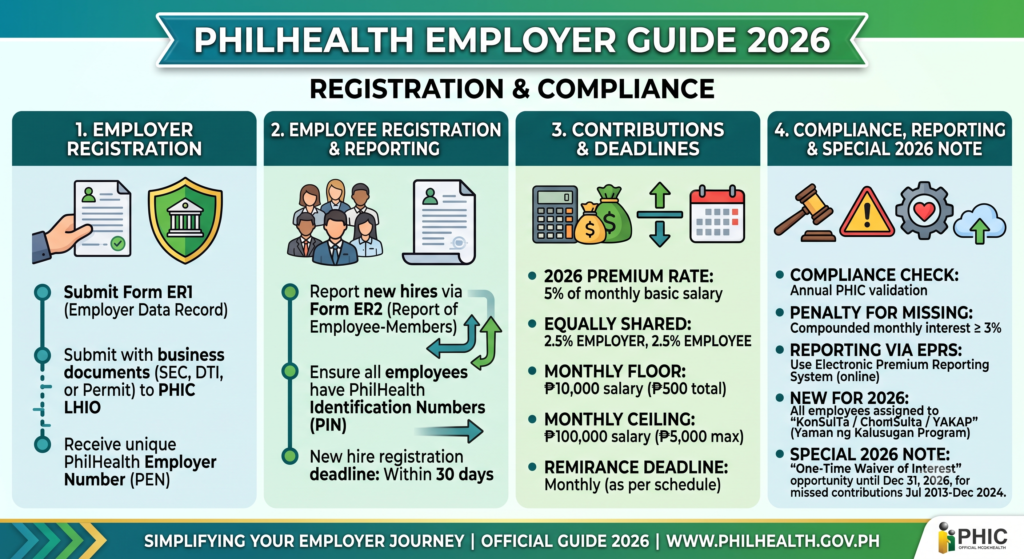
2. What Is a PhilHealth Employer?
A PhilHealth employer is any government office, private business, corporation, partnership, sole proprietorship, or household employer that hires workers and registers with the Philippine Health Insurance Corporation (PhilHealth). After registration, the employer receives a PhilHealth Employer Number (PEN) and becomes responsible for enrolling eligible employees, remitting contributions, and complying with PhilHealth regulations.
Being a registered employer is more than a legal requirement. It ensures employees receive health insurance coverage and can access PhilHealth benefits when they need medical care. Employers must also keep employee records updated and submit required reports within the prescribed deadlines.
Main Responsibilities of a PhilHealth Employer
- Register the business with PhilHealth to obtain a PhilHealth Employer Number (PEN).
- Enrol eligible employees and help them secure a PhilHealth Identification Number (PIN) if they do not already have one.
- Deduct and remit monthly contributions accurately and on time.
- Submit contribution reports and other required documents to PhilHealth.
- Update employee records whenever there are changes in employment status.
- Report resignations, terminations, or business closures within the required reporting period.
PhilHealth Employer Responsibilities at a Glance
| Responsibility | Description |
|---|---|
| Business Registration | Register the company or household employer with PhilHealth and obtain a PhilHealth Employer Number (PEN). |
| Employee Enrolment | Register newly hired employees and ensure they have a valid PhilHealth Identification Number (PIN). |
| Monthly Contributions | Deduct the employee’s share, add the employer’s share, and remit the total contribution. |
| Reporting | Submit required contribution reports and employee information to PhilHealth. |
| Record Updates | Notify PhilHealth of employee hires, resignations, status changes, or business closure. |
By fulfilling these responsibilities, employers remain compliant with PhilHealth requirements while helping employees maintain continuous health insurance coverage and access to essential healthcare benefits.
3. Who Needs to Register as a PhilHealth Employer?
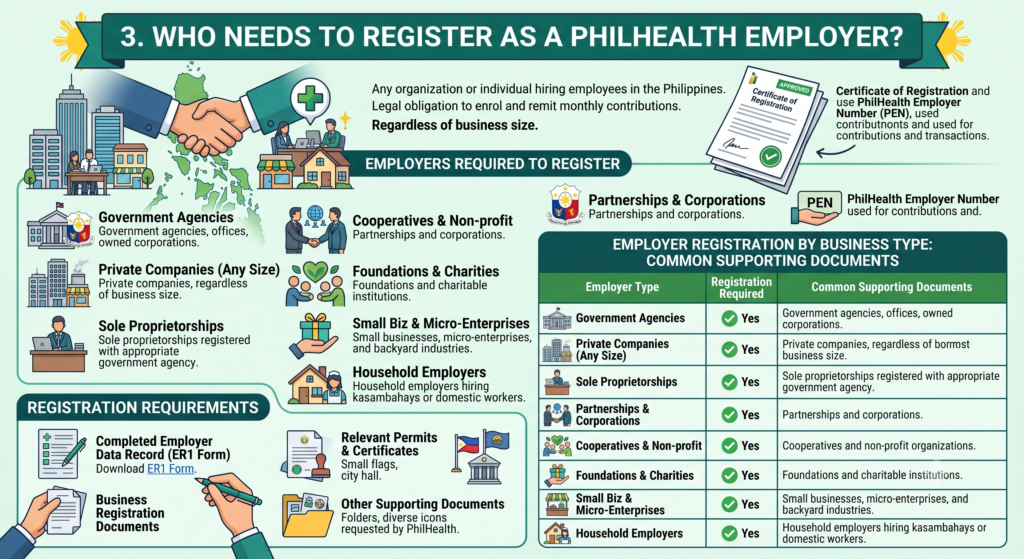
Any organisation or individual that hires employees in the Philippines is generally required to register as a PhilHealth employer. This includes both public and private sector employers, regardless of the size of the business. Registration allows employers to fulfil their legal obligation to enrol employees and remit monthly PhilHealth contributions.
Once registration is approved, the employer receives a PhilHealth Employer Number (PEN) and a Certificate of Registration. These are used for contribution reporting, employee enrolment, and other official PhilHealth transactions.
Employers Required to Register
- Government agencies, offices, and government-owned corporations.
- Private companies, regardless of business size.
- Sole proprietorships registered with the appropriate government agency.
- Partnerships and corporations.
- Cooperatives and non-profit organisations.
- Foundations and charitable institutions.
- Small businesses, micro-enterprises, and backyard industries.
- Household employers who hire kasambahays or domestic workers.
Registration Requirements
To register as a PhilHealth employer, you will generally need:
- A completed Employer Data Record (ER1 Form).
- Business registration documents, depending on your organisation type.
- Relevant permits or certificates issued by the appropriate government authority.
- Other supporting documents requested by PhilHealth during registration.
Employer Registration by Business Type
| Employer Type | Registration Required | Common Supporting Documents |
|---|---|---|
| Government agencies | Yes | Agency registration documents |
| Private companies | Yes | Business registration and permits |
| Sole proprietorships | Yes | DTI registration and local permits |
| Partnerships | Yes | Partnership registration documents |
| Corporations | Yes | SEC registration documents |
| Cooperatives | Yes | CDA registration certificate |
| Non-profit organisations | Yes | Registration and operating permits |
| Household employers | Yes | Valid identification and required supporting documents |
What You Receive After Registration
| Registration Outcome | Purpose |
|---|---|
| PhilHealth Employer Number (PEN) | Permanent employer identification number used for all PhilHealth transactions. |
| Certificate of Registration | Official proof that the employer is registered with PhilHealth. |
Registering as a PhilHealth employer is an important first step toward complying with labour and health insurance regulations. It also ensures your employees receive the PhilHealth coverage and healthcare benefits they are entitled to under Philippine law.
4. Why PhilHealth Employer Compliance Matters
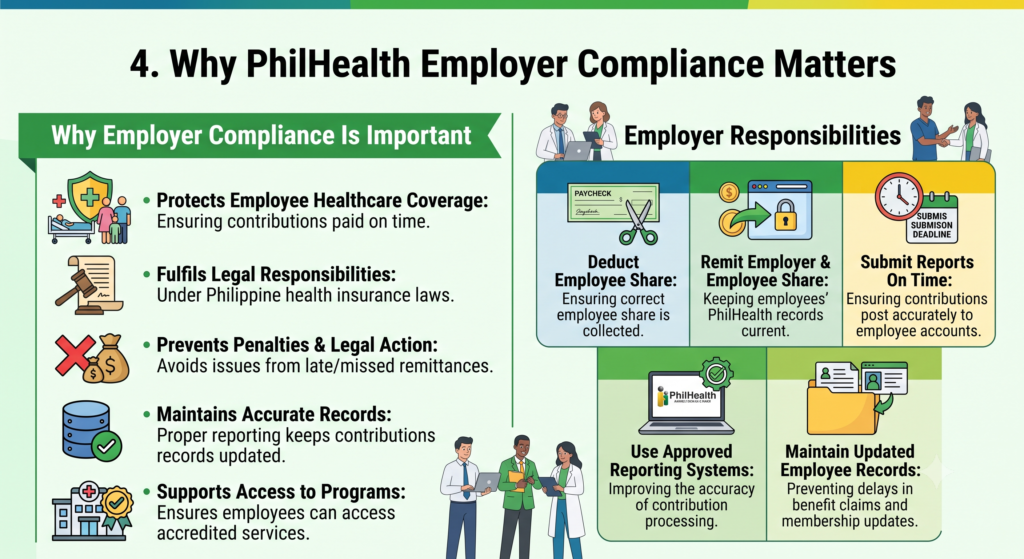
PhilHealth employer compliance is essential because it helps protect employees’ access to healthcare while ensuring businesses meet their legal obligations. Employers who register, report employees correctly, and remit contributions on time help maintain uninterrupted PhilHealth coverage for their workforce. Compliance also reduces the risk of penalties, legal disputes, and administrative issues.
Following PhilHealth regulations benefits both employers and employees. It supports a healthier workforce, promotes responsible business practices, and ensures employees and their qualified dependents can receive PhilHealth benefits when medical care is needed.
Why Employer Compliance Is Important
- Protects employee healthcare coverage by ensuring contributions are paid on time.
- Fulfils legal responsibilities under Philippine health insurance laws.
- Prevents penalties and legal action for late or missed contribution remittances.
- Maintains accurate employee contribution records through proper reporting.
- Supports access to PhilHealth programmes and accredited healthcare services.
Employer Responsibilities
| Responsibility | Why It Matters |
|---|---|
| Deduct employee contributions | Ensures the correct employee share is collected. |
| Remit employer and employee contributions | Keeps employees’ PhilHealth records current. |
| Submit reports on time | Helps contributions post accurately to employee accounts. |
| Use approved PhilHealth reporting systems | Improves the accuracy of contribution processing. |
| Maintain updated employee records | Prevents delays in benefit claims and membership updates. |
Benefits for Employees
Employers who comply with PhilHealth requirements help employees enjoy important healthcare advantages, including:
- Continuous access to PhilHealth medical benefits.
- Coverage for eligible dependents.
- Reduced hospital and medical expenses at accredited healthcare facilities.
- Access to primary healthcare programmes, preventive services, and approved medical packages.
- Greater financial protection during illness, hospitalisation, or medical emergencies.
By staying compliant with PhilHealth regulations, employers not only meet their legal obligations but also create a more secure and supportive workplace where employees can confidently rely on their health insurance benefits when they need them most.
5. PhilHealth Employer Registration Requirements
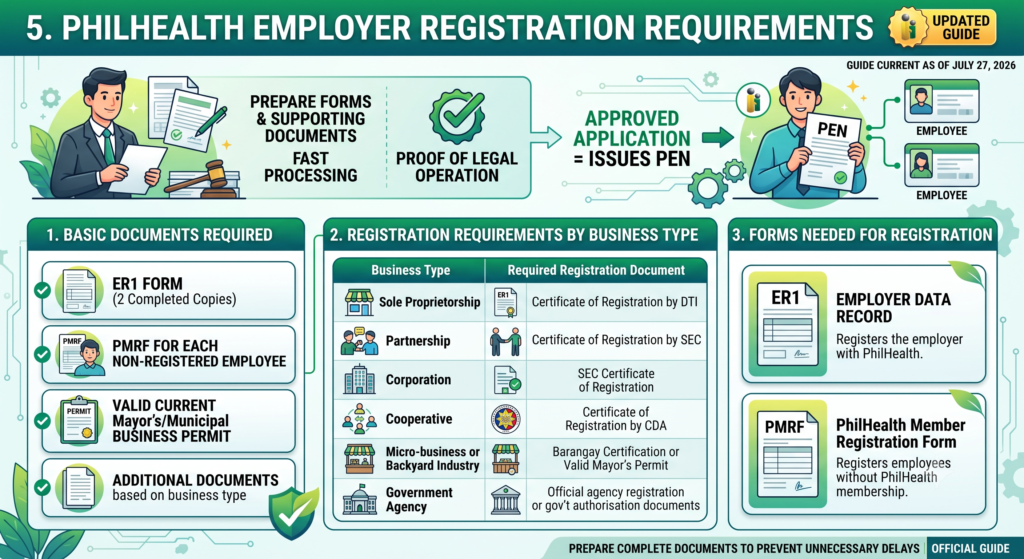
Before registering as a PhilHealth employer, you must prepare the required forms and supporting business documents. The exact requirements depend on your business structure, but every employer must submit the necessary registration forms and proof that the business is legally operating. Providing complete and accurate documents helps speed up the registration process and prevents unnecessary delays.
Once your application is approved, PhilHealth issues a PhilHealth Employer Number (PEN), which you will use for employee enrolment, contribution payments, and future employer transactions.
Basic Documents Required
Prepare the following documents before submitting your application:
- Two completed copies of the Employer Data Record (ER1) Form.
- PhilHealth Member Registration Form (PMRF) for each employee who is not yet registered with PhilHealth.
- Valid business permit or current Mayor’s/Municipal Business Permit.
- Additional supporting documents based on your business type.
Registration Requirements by Business Type
| Business Type | Required Registration Document |
|---|---|
| Sole Proprietorship | Certificate of Registration issued by the Department of Trade and Industry (DTI) |
| Partnership | Certificate of Registration issued by the Securities and Exchange Commission (SEC) |
| Corporation | SEC Certificate of Registration |
| Cooperative | Certificate of Registration issued by the Cooperative Development Authority (CDA) |
| Micro-business or Backyard Industry | Barangay Certification or valid Mayor’s Permit |
| Government Agency | Official agency registration or government authorisation documents |
Forms Needed for Registration
| Form | Purpose |
|---|---|
| Employer Data Record (ER1) | Registers the employer with PhilHealth. |
| PhilHealth Member Registration Form (PMRF) | Registers employees who do not yet have PhilHealth membership. |
Helpful Tips Before You Apply
- Ensure all forms are completed accurately and signed where required.
- Check that your business registration documents are current and valid.
- Prepare the PMRF for every newly hired employee who is not yet registered with PhilHealth.
- Keep photocopies or digital copies of all submitted documents for your records.
- Verify all information before submission to avoid delays in processing.
Submitting complete and accurate registration requirements makes the application process smoother and allows your business to obtain its PhilHealth Employer Number more quickly, helping you fulfil your employer obligations without delay.
6. Documents Needed for PhilHealth Employer Registration
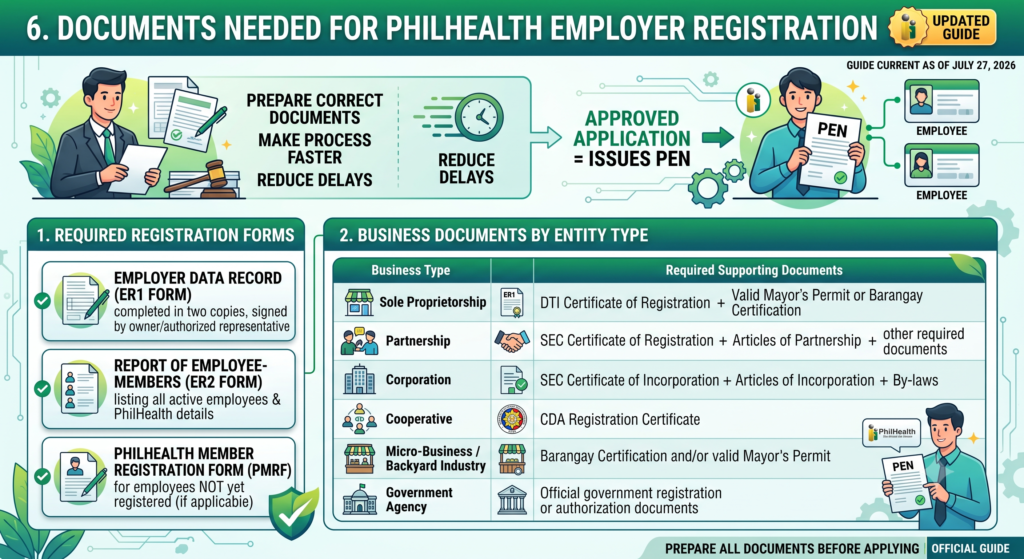
Preparing the correct documents before applying for PhilHealth employer registration helps make the process faster and reduces the chance of delays. Every employer must submit the required registration forms along with business documents that prove the organisation is legally operating. The exact requirements vary depending on the type of business entity.
After PhilHealth verifies your application, your business will receive a PhilHealth Employer Number (PEN), which is required for employee enrolment, contribution remittance, and future employer transactions.
Required Registration Forms
Before submitting your application, prepare the following forms:
- Employer Data Record (ER1 Form) completed in two copies and signed by the business owner or authorised representative.
- Report of Employee-Members (ER2 Form) listing all active employees and their PhilHealth details.
- PhilHealth Member Registration Form (PMRF) for employees who are not yet registered with PhilHealth, if applicable.
Business Documents by Entity Type
| Business Type | Required Supporting Documents |
|---|---|
| Sole Proprietorship | DTI Certificate of Registration and a valid Mayor’s Permit or Barangay Certification |
| Partnership | SEC Certificate of Registration, Articles of Partnership, and other required documents |
| Corporation | SEC Certificate of Incorporation, Articles of Incorporation, and By-laws |
| Cooperative | Cooperative Development Authority (CDA) Registration Certificate |
| Micro-Business / Backyard Industry | Barangay Certification and/or valid Mayor’s Permit |
| Government Agency | Official government registration or authorisation documents |
Registration Document Checklist
| Document | Purpose |
|---|---|
| Employer Data Record (ER1) | Registers the employer with PhilHealth |
| Report of Employee-Members (ER2) | Registers and reports employees under the employer |
| PMRF (if needed) | Registers employees without existing PhilHealth membership |
| Business Registration Documents | Confirms the legal existence of the business |
| Mayor’s Permit or Barangay Certification | Verifies authority to operate, where applicable |
Tips Before Submission
- Complete all forms accurately using updated business information.
- Ensure documents are signed by the authorised owner or company representative.
- Confirm that employee details on the ER2 Form are correct before submission.
- Bring both original documents and photocopies if applying in person.
- Keep copies of all submitted forms for future reference and compliance.
Submitting complete forms and the correct business documents helps PhilHealth process your employer registration more efficiently, allowing you to enrol employees and begin meeting your contribution and reporting obligations without unnecessary delays.
7. How to Register as a PhilHealth Employer
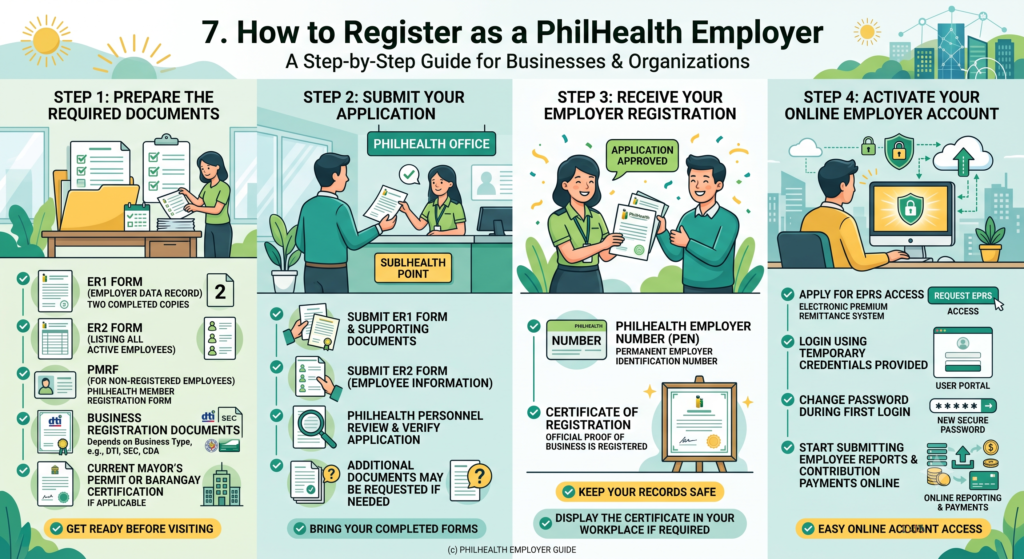
Registering as a PhilHealth employer is a straightforward process when you prepare all the required documents in advance. After submitting your application, PhilHealth will verify your records and issue your PhilHealth Employer Number (PEN). You can then enrol employees, remit contributions, and access PhilHealth’s online employer services.
Whether you own a small business, a corporation, or employ household workers, following the correct registration procedure helps you comply with PhilHealth regulations and ensures your employees receive their health insurance benefits without delay.
Step 1: Prepare the Required Documents
Before visiting a PhilHealth office, make sure you have the following:
- Two completed copies of the Employer Data Record (ER1 Form).
- ER2 Form listing all active employees.
- PhilHealth Member Registration Form (PMRF) for employees who are not yet registered.
- Business registration documents (DTI, SEC, or CDA certificate, depending on your business type).
- Current Mayor’s Permit or Barangay Certification, if applicable.
Step 2: Submit Your Application
Bring your completed forms and supporting documents to the nearest PhilHealth office.
- Submit the ER1 Form together with your supporting business documents.
- Submit the ER2 Form containing your employee information.
- PhilHealth personnel will review and verify your application.
- Additional documents may be requested if needed.
Step 3: Receive Your Employer Registration
Once your application is approved, PhilHealth will issue:
| Registration Output | Purpose |
|---|---|
| PhilHealth Employer Number (PEN) | Permanent employer identification number used for all PhilHealth transactions. |
| Certificate of Registration | Official proof that your business is registered with PhilHealth. |
Keep these records in a safe place, and display the Certificate of Registration in your workplace if required.
Step 4: Activate Your Online Employer Account
After registration, request access to PhilHealth’s online employer services.
- Apply for access to the Electronic Premium Remittance System (EPRS).
- Log in using the temporary credentials provided.
- Change your password during your first login.
- Start submitting employee reports and contribution payments online.
PhilHealth Employer Registration Process
| Step | What to Do |
|---|---|
| 1 | Complete the ER1 Form and ER2 Form. |
| 2 | Gather business registration documents and permits. |
| 3 | Submit the application to a PhilHealth branch. |
| 4 | Receive your PhilHealth Employer Number (PEN) and Certificate of Registration. |
| 5 | Register for the Electronic Premium Remittance System (EPRS). |
| 6 | Begin enrolling employees, reporting contributions, and using online employer services. |
Helpful Tips
- Double-check all business and employee information before submission.
- Ensure your registration documents are current and valid.
- Keep photocopies or digital copies of every document submitted.
- Register newly hired employees as soon as possible to avoid reporting delays.
- Regularly use the online employer portal to manage contributions and employee records efficiently.
Following these steps will help you complete your PhilHealth employer registration smoothly and ensure your business remains compliant with PhilHealth requirements.
8. PhilHealth Employer Number (PEN) and Certificate of Registration
Once your employer registration is approved, PhilHealth issues two important documents: the PhilHealth Employer Number (PEN) and the Certificate of Registration. These confirm that your business is officially registered and authorised to enrol employees, remit contributions, and complete employer transactions with PhilHealth.
The PEN is a permanent reference number assigned to your business. You will use it when submitting employee contribution reports, making premium payments, and accessing PhilHealth’s online employer services. The Certificate of Registration serves as official proof that your business complies with PhilHealth employer registration requirements.
Requirements Before Receiving Your PEN
To obtain your PhilHealth Employer Number and Certificate of Registration, prepare the following:
- Completed Employer Data Record (ER1 Form).
- Valid business registration documents.
- Current Mayor’s Permit or other required local permits, where applicable.
- Report of Employee-Members (ER2 Form).
- PhilHealth Member Registration Forms (PMRF) for employees who are not yet registered.
Registration Documents by Business Type
| Business Type | Required Registration Document |
|---|---|
| Sole Proprietorship | DTI Certificate of Registration and Mayor’s Permit |
| Partnership | SEC Certificate of Registration |
| Corporation | SEC Certificate of Incorporation |
| Cooperative | CDA Registration Certificate |
| Micro-Business | Barangay Certification and/or Mayor’s Permit |
| Government Agency | Official government registration documents |
PEN vs Certificate of Registration
| Document | Purpose |
|---|---|
| PhilHealth Employer Number (PEN) | Permanent employer identification number used for contribution payments, employee reporting, and online transactions. |
| Certificate of Registration | Official document confirming the business is registered with PhilHealth as an employer. |
Employer Compliance After Registration
After receiving your registration documents, employers should:
- Display the Certificate of Registration in a visible location within the workplace.
- Use the PhilHealth Employer Number (PEN) for all employer transactions and contribution reports.
- Keep employee records updated whenever there are new hires, resignations, or employment changes.
- Submit monthly or required contribution reports using PhilHealth’s online employer services.
- Store copies of registration documents for future verification and audits.
Keeping your PhilHealth Employer Number (PEN) and Certificate of Registration secure makes employer transactions faster and helps your business remain compliant with PhilHealth regulations while ensuring employees receive uninterrupted health insurance coverage.
9. PhilHealth Employer Contribution Explained
PhilHealth employer contributions are shared equally between the employer and the employee. The total monthly premium is calculated at 5% of the employee’s monthly basic salary, using a minimum salary base of ₱10,000 and a maximum salary base of ₱100,000. Employers are responsible for deducting the employee’s share, adding the company’s share, and remitting the full contribution to PhilHealth on time.
Accurate contribution payments help employees maintain continuous PhilHealth coverage and ensure they remain eligible for healthcare benefits. Employers must also submit the required remittance reports within the prescribed deadlines to avoid penalties and reporting issues.
How Employer Contributions Are Computed
- The total PhilHealth premium is 5% of the employee’s monthly basic salary.
- The contribution is divided equally:
- Employer pays 2.5%
- Employee pays 2.5%
- The minimum salary used for computation is ₱10,000.
- The maximum salary used for computation is ₱100,000.
PhilHealth Employer Contribution Table
| Monthly Basic Salary | Total Contribution (5%) | Employer Share | Employee Share |
|---|---|---|---|
| ₱10,000 and below | ₱500 | ₱250 | ₱250 |
| ₱20,000 | ₱1,000 | ₱500 | ₱500 |
| ₱50,000 | ₱2,500 | ₱1,250 | ₱1,250 |
| ₱100,000 and above | ₱5,000 | ₱2,500 | ₱2,500 |
Employer Responsibilities
Employers are required to:
- Deduct the employee’s share from their monthly salary.
- Add the employer’s matching contribution.
- Remit the full contribution to PhilHealth or an authorised collecting partner.
- Submit the Employer’s Remittance Report within the required period.
- Maintain accurate payroll and contribution records for every employee.
PhilHealth Contribution Deadlines
| Employer Obligation | Due Date |
|---|---|
| Remit employer and employee contributions | On or before the 10th day of the month following the payroll period |
| Submit Employer’s Remittance Report | On or before the 15th day of the following month |
Tips for Employers
- Verify employee salary information before calculating contributions.
- Remit contributions on time to avoid penalties or delayed posting.
- Keep payroll records and payment receipts for future reference.
- Review contribution reports regularly to ensure employee records remain accurate.
- Use PhilHealth’s online employer services whenever possible to simplify reporting and payment.
By calculating contributions correctly and meeting all reporting deadlines, employers can stay compliant with PhilHealth regulations while ensuring employees receive uninterrupted health insurance coverage and access to medical benefits.
10. Monthly Reporting and Payment Guidelines
PhilHealth employers must remit monthly contributions and submit the required reports on time to keep employee records updated and maintain compliance. The total monthly premium is 5% of the employee’s basic monthly salary, shared equally between the employer and the employee. Using the Electronic Premium Remittance System (EPRS) makes reporting and payment faster and helps reduce processing errors.
Timely remittance ensures employees continue to enjoy uninterrupted PhilHealth coverage and prevents penalties for late payments. Employers should also keep copies of payment receipts and remittance reports for future reference.
Contribution Rules
- The total monthly premium is 5% of the employee’s monthly basic salary.
- The contribution is divided equally:
- Employer pays 2.5%.
- Employee pays 2.5%.
- The minimum contribution is based on a ₱10,000 monthly salary.
- The maximum contribution is based on a ₱100,000 monthly salary.
Monthly Contribution Summary
| Monthly Basic Salary | Total Contribution | Employer Share | Employee Share |
|---|---|---|---|
| ₱10,000 and below | ₱500 | ₱250 | ₱250 |
| ₱10,000.01–₱99,999.99 | 5% of salary | 2.5% | 2.5% |
| ₱100,000 and above | ₱5,000 | ₱2,500 | ₱2,500 |
Payment Schedule
PhilHealth sets remittance deadlines according to the last digit of the employer’s PhilHealth Employer Number (PEN).
| Last Digit of PEN | Payment Due Date |
|---|---|
| 0–4 | 11th to 15th day of the following month |
| 5–9 | 16th to 20th day of the following month |
Reporting Process
Employers should complete the following each month:
- Calculate employee and employer contributions correctly.
- Deduct the employee’s share through payroll.
- Generate the required statement using the Electronic Premium Remittance System (EPRS).
- Submit the monthly remittance report.
- Pay the total contribution before the applicable deadline.
- Keep copies of payment confirmations and reports for record-keeping.
Tips for Timely Compliance
- Mark payment deadlines on your payroll calendar.
- Review employee salary information before preparing contribution reports.
- Use EPRS for faster submission and payment processing.
- Save digital and printed copies of payment receipts.
- Reconcile payroll records with PhilHealth reports each month to identify and correct discrepancies early.
Following these reporting and payment guidelines helps employers remain compliant with PhilHealth requirements while ensuring employees receive continuous healthcare coverage and accurate contribution records.
11. Adding, Updating, or Removing Employees
Employers must keep employee records accurate and up to date in PhilHealth. Whenever you hire a new employee, update personal information, or report an employee’s separation, you should complete the required forms and submit them within the prescribed period. Timely updates help ensure employee contributions are recorded correctly and prevent delays in accessing PhilHealth benefits.
PhilHealth allows employers to manage employee records through the Electronic Premium Remittance System (EPRS) and, when necessary, by submitting forms at a local PhilHealth office. Keeping records current also helps employers remain compliant with PhilHealth regulations.
Adding New Employees
When hiring new staff, employers should:
- Submit the ER-2 Form (Report of Employee-Members).
- Register newly hired employees within 30 days from their employment start date.
- Provide complete employee information, including:
- Full name
- Position or job title
- Monthly salary
- Employment start date
- Encode employee details through the Electronic Premium Remittance System (EPRS) whenever available.
Updating Employee Information
Employee records should be updated whenever personal or employment details change.
Common updates include:
- Change of name
- Civil status update
- Correction of birth date
- Other membership information requiring amendment
Employers may:
- Update employee records through the EPRS if the feature is available.
- Ask employees to complete the PhilHealth Member Registration Form (PMRF) for personal information changes.
- Submit supporting documents to a PhilHealth office if manual processing is required.
Reporting Employee Separation
Employers must also report employees who leave the company.
This applies to employees who:
- Resign
- Retire
- Are terminated
- End their employment contract
These changes should be reported within 30 days of the employee’s separation.
For employees who are temporarily not receiving salaries, employers should indicate the appropriate No Earnings (NE) remark in the required reports.
Employee Management Summary
| Employee Action | Form/System Used | Recommended Timeframe |
|---|---|---|
| Add a new employee | ER-2 Form or EPRS | Within 30 days of hiring |
| Update employee information | PMRF and/or EPRS | As soon as changes occur |
| Report employee separation | RF-1 / Report of Employee-Members or EPRS | Within 30 days of separation |
| Employee with no earnings | EPRS or monthly report | During the applicable reporting period |
Best Practices for Employers
- Register new employees promptly after hiring.
- Verify employee information before submitting reports.
- Update records immediately whenever employee details change.
- Report resignations and retirements without delay.
- Keep copies of submitted forms and confirmation receipts for future reference.
- Review employee records regularly to ensure all information remains accurate.
Maintaining updated employee records helps employers meet PhilHealth requirements while ensuring employees continue to receive uninterrupted health insurance coverage and accurate contribution records.
12. PhilHealth Employer Online Services
PhilHealth provides employers with convenient online services through the Electronic Premium Remittance System (EPRS). This platform allows registered employers to manage employee records, prepare contribution reports, monitor payment history, and complete various employer transactions without visiting a PhilHealth office. Using EPRS helps save time, improves reporting accuracy, and supports timely compliance with PhilHealth requirements.
To access these services, employers need their PhilHealth Employer Number (PEN) and login credentials. Once signed in, they can update company information, manage employee records, generate remittance reports, and track submitted transactions in one secure online portal.
How to Access the Employer Portal
Follow these simple steps to log in:
- Visit the official PhilHealth website.
- Navigate to the Electronic Premium Remittance System (EPRS) or Employer Login page.
- Enter your PhilHealth Employer Number (PEN) and password.
- Access your employer dashboard to manage reports and employee records.
Main Features of the EPRS
- Employer Profile Management for updating business information.
- Employee Management to add new hires and update employee records.
- Contribution Reporting for preparing monthly premium reports.
- Online Payment Support through accredited payment channels.
- Transaction Monitoring to review submitted reports and payment history.
- Remittance Tracking for verifying completed contribution payments.
EPRS Modules and Functions
| Module | Purpose |
|---|---|
| Employer Profile | Update company registration details and contact information. |
| Employee Management | Add, edit, or update employee records and employment status. |
| Contribution Reporting | Generate and submit monthly contribution reports. |
| Payment Management | Prepare premium remittances and coordinate electronic payments. |
| Transaction History | View previously submitted reports and payment records. |
| Status Monitoring | Track processing status and verify completed transactions. |
Benefits of Using PhilHealth Online Services
- Faster submission of contribution reports.
- Easier management of employee information.
- Convenient access to payment and transaction records.
- Reduced paperwork and manual processing.
- Improved accuracy in contribution reporting.
- Better compliance with PhilHealth reporting requirements.
Using the Electronic Premium Remittance System (EPRS) allows employers to manage PhilHealth obligations more efficiently while keeping employee records accurate and ensuring contribution reports and payments are submitted on time.
13. How to Update Employer Information in PhilHealth
Keeping your employer information up to date with PhilHealth helps ensure smooth contribution reporting, accurate business records, and uninterrupted online services. If your business name, ownership, address, authorised signatory, or other company details change, you should report the update promptly by submitting the required amendment form and supporting documents.
PhilHealth processes employer record changes through the Employer Data Amendment Form (ER3). Applications are usually submitted to a PhilHealth Local Health Insurance Office (LHIO), along with supporting documents for the requested changes.
Documents Required
Prepare the following before submitting your request:
- Two completed copies of the Employer Data Amendment Form (ER3).
- Supporting documents based on the type of information being updated.
- An official request letter for any required amendments.
Supporting Documents by Type of Update
| Type of Update | Required Documents |
|---|---|
| Business name change | Updated DTI Certificate, amended SEC registration documents, or CDA registration documents |
| Change of owner | Updated business registration documents and supporting legal papers |
| Business address | Official request letter and proof of the new business address |
| Authorised signatory | Official request letter and identification of the new authorised representative |
| Business closure or cessation | Written notice explaining the closure and supporting documents, if applicable |
How to Submit Your Update
You can update your employer information by following these steps:
- Complete the ER3 Form accurately.
- Attach all required supporting documents.
- Visit the nearest PhilHealth Local Health Insurance Office (LHIO) or PhilHealth branch.
- Submit the application for verification and processing.
- Keep the acknowledgement or receiving copy for your records.
Submitting Through a Representative
If you cannot visit the PhilHealth office yourself, a representative may submit the documents on your behalf. Prepare the following:
- An Authorisation Letter or Special Power of Attorney (SPA).
- A valid government-issued ID of the authorised representative.
- Copies of the employer’s identification documents, if requested.
Employer Information Update Checklist
| Requirement | Purpose |
|---|---|
| ER3 Form | Requests amendment of employer records |
| Supporting documents | Verifies the requested changes |
| Official request letter | Explains certain amendments, such as address or signatory updates |
| Authorisation Letter or SPA | Allows a representative to file the request |
| Valid ID | Confirms the identity of the representative |
Helpful Tips
- Review all information before submitting the ER3 Form.
- Ensure supporting documents reflect the latest business information.
- Submit updates as soon as changes occur to avoid reporting issues.
- Keep photocopies or digital copies of all documents submitted.
- Follow up with your local PhilHealth office if additional documents are requested.
Updating your employer information promptly helps keep your PhilHealth records accurate, simplifies future transactions, and ensures your business continues to meet PhilHealth reporting and compliance requirements.
14. Common Problems Employers Face With PhilHealth
Managing PhilHealth obligations can be challenging, especially for employers handling a growing workforce. Delayed remittances, incorrect contribution amounts, and outdated employee records are among the most common issues. These mistakes can affect employees’ access to benefits and may result in penalties or additional compliance requirements for the employer.
The best way to avoid these problems is to maintain accurate payroll records, submit reports on time, and regularly review employee information. Using PhilHealth’s online employer services can also make reporting and payment management much easier.
Common Employer Problems
- Late contribution remittances that miss the required payment deadline.
- Missed monthly payments, resulting in contribution backlogs.
- Incorrect contribution amounts because of salary computation errors.
- Employees missing from contribution reports or remittance lists.
- Failure to report new hires, resignations, or employment changes on time.
- Outdated employee records that lead to processing delays.
Problems and Recommended Solutions
| Common Problem | Possible Solution |
|---|---|
| Late contribution payments | Set payroll reminders and submit payments before the due date. |
| Under-remitted contributions | Review salary calculations and verify contribution amounts before payment. |
| Missing employee declarations | Update employee records immediately after hiring. |
| Unreported resignations or separations | Submit employee status updates as soon as employment ends. |
| Inaccurate payroll records | Conduct regular payroll and contribution audits. |
| Cash flow difficulties | Contact the nearest PhilHealth office to discuss available payment arrangements, if applicable. |
Possible Consequences
Employers who fail to meet PhilHealth requirements may face:
- Administrative penalties and applicable charges under PhilHealth regulations.
- Additional interest or surcharges on overdue contributions.
- Delays in updating employee contribution records.
- Compliance issues that may affect employee benefit processing.
- Increased administrative work to correct reporting errors.
Best Practices to Prevent Problems
- Use reliable payroll software to calculate contributions accurately.
- Maintain a monthly compliance calendar for reporting and payment deadlines.
- Audit employee records regularly to verify salaries and employment status.
- Update new hires, resignations, and salary adjustments promptly.
- Keep copies of remittance reports, payment receipts, and supporting documents.
- Contact your local PhilHealth office immediately if you encounter payment or reporting difficulties.
Quick Reference Table
| Employer Responsibility | Best Practice |
|---|---|
| Contribution calculation | Verify payroll data before each payroll cycle. |
| Monthly remittance | Pay before the official due date. |
| Employee reporting | Update records immediately after any employment change. |
| Record management | Keep digital and printed copies of all transactions. |
| Compliance monitoring | Review payroll and PhilHealth reports every month. |
By maintaining accurate records, paying contributions on time, and regularly updating employee information, employers can minimise compliance issues, protect employee healthcare coverage, and ensure smooth PhilHealth transactions throughout the year.
15. Penalties for PhilHealth Employer Non-Compliance
Employers are legally required to register with PhilHealth, deduct the correct employee contributions, remit payments on time, and submit accurate reports. Failure to comply with these obligations may result in financial penalties, interest charges, and legal action. Beyond the penalties, non-compliance can also delay employee benefit claims and affect their access to healthcare services.
Maintaining accurate payroll records, submitting reports on schedule, and remitting contributions promptly are the best ways to avoid compliance issues. Employers should also address any reporting or payment errors immediately to minimise additional charges.
Common Penalties for Non-Compliance
- Failure to register as a PhilHealth employer may result in monetary penalties.
- Failure to deduct or remit employee contributions can lead to substantial fines.
- Under-remitting contributions or reporting incorrect amounts may trigger additional assessments.
- Deducting contributions without remitting them may result in administrative and legal consequences.
- Late payments may be subject to applicable interest charges under PhilHealth regulations.
Penalties at a Glance
| Violation | Possible Consequence |
|---|---|
| Failure to register | Financial penalties as provided under applicable laws and regulations. |
| Failure to remit contributions | Fines, interest charges, and possible legal action. |
| Under-remittance | Payment of contribution deficiencies plus applicable penalties. |
| Failure to submit required reports | Administrative sanctions and delayed record processing. |
| Unremitted salary deductions | Employer liability and possible legal proceedings. |
Other Legal Consequences
Employers who repeatedly fail to meet their PhilHealth obligations may also face:
- Interest charges on overdue contributions.
- Administrative investigations and compliance audits.
- Legal action against responsible business owners or company officers in cases of serious violations.
- Delays in employee contribution posting and benefit processing.
- Additional obligations to settle unpaid contributions and related charges.
How to Avoid Penalties
- Register your business with PhilHealth before hiring employees.
- Deduct employee contributions accurately through payroll.
- Remit employer and employee contributions before the required deadline.
- Submit contribution reports completely and on time.
- Regularly reconcile payroll records with PhilHealth reports.
- Correct reporting errors immediately and coordinate with your local PhilHealth office if issues arise.
Compliance Checklist
| Employer Responsibility | Recommended Action |
|---|---|
| Business registration | Register with PhilHealth before operations begin. |
| Contribution remittance | Pay contributions within the prescribed due dates. |
| Employee reporting | Report new hires, resignations, and updates promptly. |
| Payroll verification | Review contribution calculations before submission. |
| Record keeping | Keep copies of reports, receipts, and supporting documents for future reference. |
Staying compliant with PhilHealth requirements protects your business from unnecessary penalties while ensuring employees continue to receive uninterrupted health insurance coverage and timely access to their PhilHealth benefits.
16. Best Practices and Tips for PhilHealth Employers to Stay Compliant
Maintaining PhilHealth compliance is easier when employers establish consistent payroll and reporting procedures. Using PhilHealth’s online systems, keeping employee records accurate, and submitting contributions on time help prevent penalties and ensure employees continue to receive uninterrupted health insurance coverage. Regular monitoring also reduces the risk of reporting errors and delayed contribution postings.
A proactive approach to compliance saves time and avoids unnecessary administrative issues. Reviewing employee information frequently and following PhilHealth reporting requirements will help your business remain in good standing.
Best Practices for PhilHealth Compliance
- Use the Electronic Premium Remittance System (EPRS) for contribution reporting and online payments whenever available.
- Pay the exact amount shown in your Statement of Premium Account (SPA).
- Submit monthly contributions and required reports before the official deadline.
- Keep copies of payment confirmations and submitted reports for future reference.
- Review payroll records before preparing monthly contribution reports.
Manage Employee Records Properly
Employers should regularly:
- Report newly hired employees as soon as they become eligible.
- Update employee information whenever there are changes.
- Report resignations, retirements, or terminations within the required timeframe.
- Mark employees on unpaid leave with the appropriate “No Earnings (NE)” status where applicable.
- Verify employee salary information before calculating contributions.
Compliance Checklist
| Task | Recommended Practice |
|---|---|
| Contribution reporting | Use the Electronic Premium Remittance System (EPRS). |
| Premium payment | Pay the exact amount shown in the Statement of Premium Account (SPA). |
| Employee updates | Record new hires, resignations, and employment changes promptly. |
| Payroll verification | Confirm salary details before computing contributions. |
| Record keeping | Store payment receipts and contribution reports securely. |
Tips to Avoid Compliance Issues
- Maintain a monthly payroll and reporting calendar.
- Perform regular internal audits to compare payroll records with PhilHealth employee records.
- Correct reporting errors immediately after they are identified.
- Monitor contribution postings to ensure payments are reflected accurately.
- Keep business registration details and authorised representative information up to date.
- Contact your local PhilHealth office promptly if you encounter reporting or payment concerns.
Following these practices helps employers meet their PhilHealth obligations efficiently, minimise reporting errors, avoid unnecessary penalties, and ensure employees continue receiving the healthcare benefits they are entitled to.
Also Read:
- PhilHealth Portal Login & Registration 2026: Complete Guide to Membership, Benefits, Contributions & Online Services
- PhilHealth ID: Your Complete July 2026 Guide
- PhilHealth Login 2026: Ultimate Guide to Member Portal, Password Reset & MDR Download
- PhilHealth Online Registration: Why 90% of Filipinos Get This One Step Wrong
- PhilHealth Contribution 2026: Rates, Table, Calculator & Payment Guide
- PhilHealth Online Appointment 2026: Step-by-Step Booking Secrets Revealed
- PhilHealth Requirements 2026: The One Document Everyone Forgets
Conclusion
Being a PhilHealth employer is more than meeting a legal requirement—it’s a commitment to protecting your employees’ health and well-being. By registering your business, enrolling eligible workers, remitting contributions on time, and keeping employee records updated, you help ensure continuous access to valuable PhilHealth benefits while avoiding unnecessary penalties and compliance issues.
Using online services such as the Electronic Premium Remittance System (EPRS), maintaining accurate payroll records, and following reporting deadlines can make employer responsibilities much easier to manage. Staying organised and proactive not only keeps your business compliant but also builds trust with your employees by ensuring they receive the healthcare coverage and financial protection they deserve whenever they need medical care.
Frequently Asked Questions
How do I change my employer in PhilHealth?
If you change jobs, your new employer should update your employment details with PhilHealth. You may also submit an updated PhilHealth Member Registration Form (PMRF) if required. Make sure your records are updated to avoid issues with contribution posting and benefit claims. You can visit the nearest PhilHealth office for assistance.
How do I update my employer information in PhilHealth?
To update your employer information, complete the appropriate PhilHealth forms and provide any required supporting documents. Your employer may also process the update on your behalf. Once approved, your records will reflect your new employment details. Always verify the update through your Member Data Record (MDR).
Can I change my PhilHealth employer online?
Some employer-related updates can be initiated through PhilHealth’s online services, but certain changes may still require submission of documents at a PhilHealth office. Check with your employer first, as they often handle employment updates. Keep a copy of any submitted documents for reference.
How do I know my PhilHealth Employer Number?
Your PhilHealth Employer Number (PEN) is usually provided when your business successfully registers with PhilHealth. Employers can also find it through their registration certificate or the Electronic Premium Remittance System (EPRS). If you cannot locate it, contact the nearest PhilHealth office for assistance.
How much is the PhilHealth contribution for self-employed members?
Self-employed members pay the full monthly premium based on the applicable PhilHealth contribution rate and their declared monthly income. The amount depends on the current contribution schedule set by PhilHealth. Payments can be made monthly, quarterly, semi-annually, or annually through authorised payment channels.
How do I register as a PhilHealth employer?
Employers must submit the required registration forms along with valid business registration documents such as DTI, SEC, or CDA certificates. After approval, PhilHealth issues a permanent Employer Number (PEN). Employers can then enrol employees and begin submitting monthly contributions.
How do I pay PhilHealth contributions as a self-employed member?
Self-employed members can pay through the PhilHealth Member Portal, GCash, Maya, online banking, accredited payment centres, or partner collecting agents. Before paying, generate a Statement of Premium Account (SPA) if required. Always keep your payment receipt for future reference.
How can I check if my employer is paying my PhilHealth contributions?
You can verify your contribution history by logging into the PhilHealth Member Portal using your PhilHealth Identification Number (PIN). Review your posted monthly contributions regularly. If payments are missing, immediately coordinate with your employer or contact PhilHealth.
Is PhilHealth mandatory for employers?
Yes. Employers in both the public and private sectors are legally required to register with PhilHealth and remit contributions for all eligible employees. They must deduct the employee’s share and add the employer’s counterpart before submitting payments on time. Failure to comply may result in penalties and legal action.
Can I change my PhilHealth membership from employed to voluntary?
Yes. If you resign, become self-employed, or stop working, you can update your membership category from employed to voluntary. Submit an accomplished PMRF and any supporting documents to PhilHealth. Once your records are updated, you can continue paying contributions independently to keep your coverage active.