
PhilHealth Requirements 2026: Complete Checklist & Guide
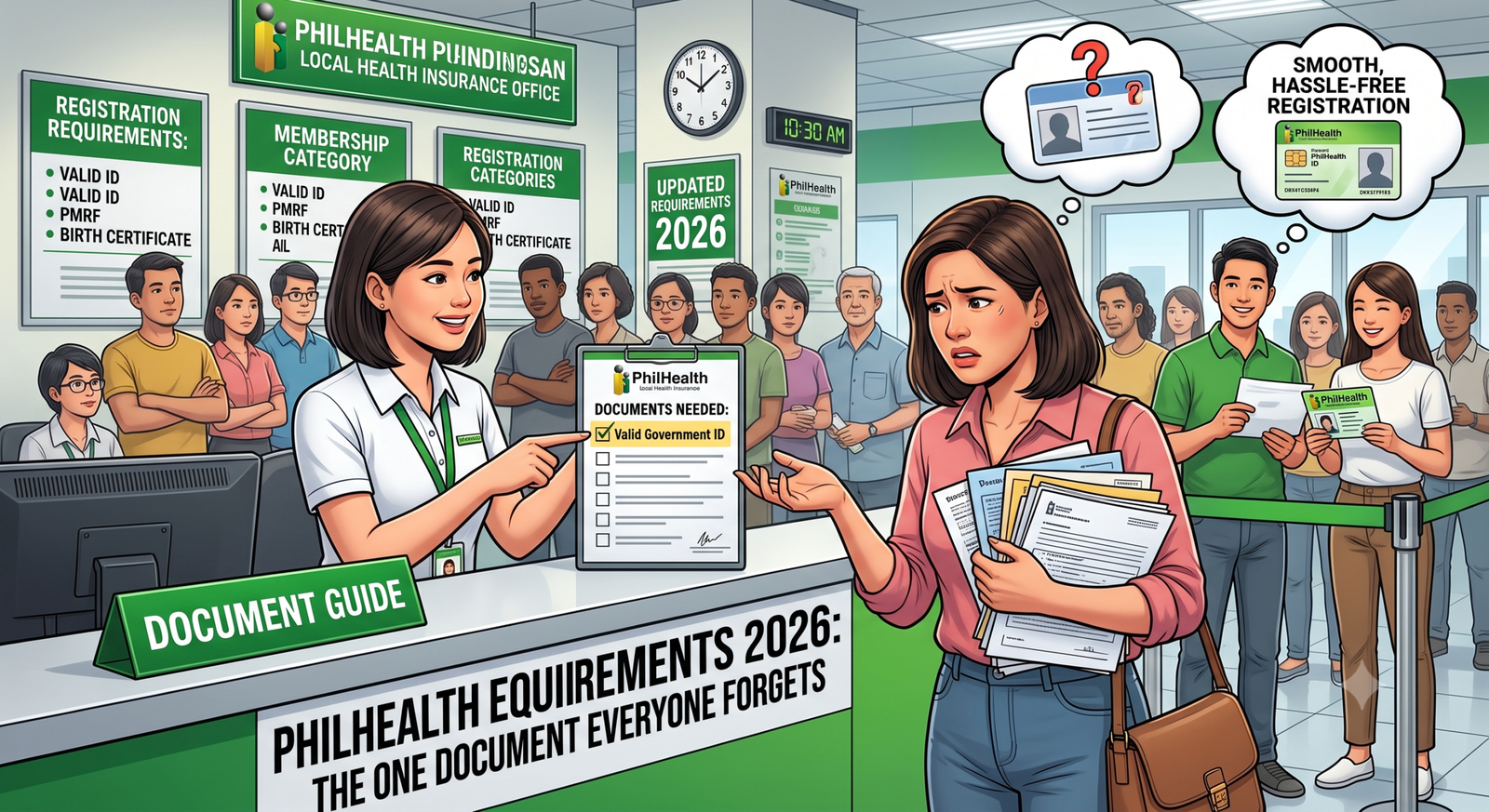
Ever been told “Ma’am, you’re missing an ID” after waiting an hour in line? That single frustrating moment is exactly what this guide prevents. Knowing your exact PhilHealth requirements before you show up, whether online or in person, saves you time, stress, and an unnecessary second trip.
Requirements shift depending on your membership category and what specific transaction you’re trying to complete, which is exactly why so many people get confused. This guide breaks everything down clearly, from valid ID options to document checklists by member type. By the end, you’ll know precisely what to prepare for a smooth, hassle-free registration experience.

2. What Is PhilHealth?
PhilHealth is the national health insurance agency of the Philippines. It is a government-owned corporation responsible for implementing the National Health Insurance Program (NHIP). Its main purpose is to help Filipinos access affordable healthcare by reducing the amount they need to pay for medical treatment.
Main Functions
- Provides health insurance coverage to Filipino citizens.
- Helps lower the cost of hospitalisation and medical care.
- Works to achieve universal health coverage, ensuring that healthcare services are available to everyone.
- Operates under the Department of Health as a government-owned corporation.
Funding
PhilHealth receives financial support through:
- Monthly member contributions, which are based on a percentage of a member’s salary.
- Government subsidies, especially for people who cannot afford to pay contributions.
Member Categories
PhilHealth covers different groups of people, including:
- Employees in the formal sector.
- Self-employed and informal workers.
- Indigent or low-income families.
- Sponsored members supported by the government or organisations.
- Lifetime members such as retirees.
- Senior citizens aged 60 years and above.
Benefits Provided
Members can receive financial assistance for various healthcare services, such as:
- Hospital admission and treatment.
- Maternity and childbirth services.
- Dialysis for kidney patients.
- Treatment for serious and long-term illnesses.
- Other approved medical procedures in accredited healthcare facilities.
How Members Use PhilHealth
- Members present their PhilHealth ID or proof of eligibility at accredited hospitals or clinics.
- PhilHealth pays part of the medical expenses directly to the healthcare provider.
- This reduces the amount that patients need to pay out of their own pocket.
Summary Table
| Aspect | Details |
|---|---|
| Agency | Philippine Health Insurance Corporation (PhilHealth) |
| Type | Government-owned corporation under the Department of Health |
| Main Goal | Provide affordable healthcare and universal health coverage |
| Funding | Member contributions and government subsidies |
| Covered Members | Employees, informal workers, indigent families, sponsored members, retirees, and senior citizens |
| Key Benefits | Hospital care, maternity services, dialysis, treatment for major illnesses |
| How to Use | Present a PhilHealth ID or proof of eligibility at accredited healthcare facilities to receive reduced medical costs |
3. Who Needs PhilHealth Registration?
Under the Universal Health Care (UHC) Law, every Filipino citizen is required to be registered with PhilHealth. Registration ensures that members can receive healthcare benefits and financial support for approved medical services.
Who Must Register?
- All Filipino citizens are expected to be part of the PhilHealth program.
- Registration applies to:
- Employees in both the public and private sectors.
- Self-employed individuals and professionals.
- Overseas Filipino Workers (OFWs).
- Senior citizens.
- Indigent and sponsored members.
- Qualified retirees who become lifetime members.
Registration by Member Category
1. Employed and Formal Workers
- Private and government employees are usually registered by their employers.
- Employers submit the required membership information on behalf of their workers.
- Domestic workers (Kasambahays) and family drivers are also registered as formal members, with employers responsible for managing or assisting with their contributions.
2. Self-Employed and Independent Earners
- Self-employed individuals, freelancers, and professionals must register on their own.
- They may need to provide documents showing their source of income.
- Overseas Filipino Workers (OFWs) are required to keep their membership active by paying contributions through approved online services or authorised payment partners.
3. Special Groups
- Senior citizens are generally enrolled automatically or through their local Office for Senior Citizens Affairs (OSCA) if they are not already registered.
- Lifetime members are retirees who have reached retirement age and have completed the required number of PhilHealth contributions.
- Indigent and sponsored members are enrolled through government social welfare programmes that provide financial assistance.
Summary Table
| Member Category | How Registration Works |
|---|---|
| Private and Government Employees | Registered by their employer. |
| Kasambahays and Family Drivers | Registered as formal members with employer assistance. |
| Self-Employed Individuals | Register independently and provide proof of income if required. |
| Overseas Filipino Workers (OFWs) | Maintain active membership through approved online or authorised payment channels. |
| Senior Citizens | Automatically enrolled or registered through the Office for Senior Citizens Affairs (OSCA). |
| Lifetime Members | Retirees who meet the required age and contribution requirements. |
| Indigent and Sponsored Members | Registered through government-funded social welfare programmes. |
Key Points
- Keeping membership active allows individuals to access PhilHealth benefits and reduce healthcare expenses when receiving medical treatment.
- PhilHealth registration is required for all Filipino citizens under the Universal Health Care Law.
- The registration process varies depending on a person’s employment status or membership category.
4. The Core Document: The PMRF
The PhilHealth Member Registration Form (PMRF) is the official form used to register as a PhilHealth member, update personal information, or correct existing membership records. It gathers important details about the member and eligible dependents to ensure accurate records and access to health insurance benefits.
Main Sections of the PMRF
- Purpose of the Application
- Indicates whether the form is for:
- New member registration.
- Updating or correcting existing membership information.
- Indicates whether the form is for:
- Personal Information
- Records the member’s basic details, including:
- Full name.
- Date of birth.
- Sex.
- Mother’s maiden name.
- Address and contact information.
- Records the member’s basic details, including:
- Membership Category
- Identifies the type of PhilHealth membership, such as:
- Employed worker.
- Self-employed individual.
- Overseas Filipino Worker (OFW).
- Sponsored or other eligible membership category.
- Identifies the type of PhilHealth membership, such as:
- Dependents Information
- List qualified dependents who may receive PhilHealth coverage, including:
- Spouse.
- Eligible children.
- Qualified parents, when applicable.
- List qualified dependents who may receive PhilHealth coverage, including:
Filing Guidelines
- Complete the form using CAPITAL LETTERS (UPPER CASE).
- Enter “N/A” (Not Applicable) in fields that do not apply.
- Ensure all information is accurate and easy to read.
- Attach the required supporting documents:
- Valid identification for new registrations.
- Official documents such as birth or marriage certificates when updating personal records.
- Sign and date the form to confirm that all provided information is true and correct.
Summary Table
| Section | Purpose |
|---|---|
| Purpose of Application | Indicates whether the form is for new registration or updating records. |
| Personal Information | Collects the member’s identity and contact details. |
| Membership Category | Identifies the applicant’s membership type. |
| Dependents Information | Records eligible family members who may receive coverage. |
| Supporting Documents | Provides proof of identity or documents supporting record changes. |
| Signature and Date | Confirms the accuracy of the information submitted. |
Key Points
- Following the filing instructions and submitting the required documents helps ensure faster processing of the application.
- The PMRF is the official document for registration, record updates, and corrections in PhilHealth.
- It requires complete and accurate personal and membership information.
- Eligible dependents should be included to receive health insurance benefits.
5. General PhilHealth Requirements for Registration
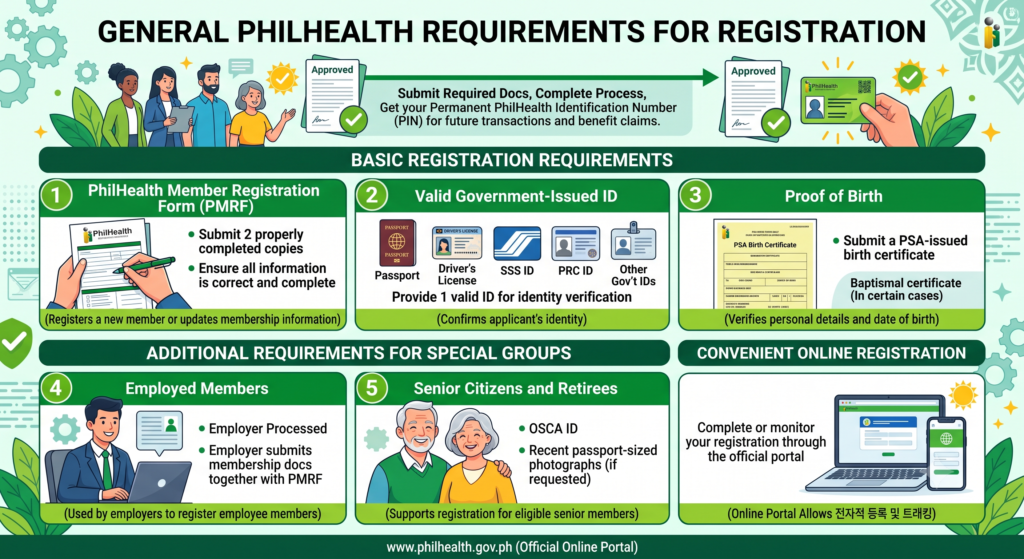
Before diving into category-specific details, here’s what practically everyone needs regardless of their situation.
To register as a PhilHealth member, applicants must submit the required documents and complete the registration process. After approval, each member receives a permanent PhilHealth Identification Number (PIN), which is used for future transactions and benefit claims.
Basic Registration Requirements
- PhilHealth Member Registration Form (PMRF)
- Submit two properly completed copies of the PMRF.
- Ensure all information is correct and complete.
- Valid Government-Issued Identification
- Provide one valid ID for identity verification.
- Accepted examples include:
- Passport.
- Driver’s licence.
- SSS ID.
- PRC ID.
- Other government-issued identification cards.
- Proof of Birth
- Submit a PSA-issued birth certificate.
- A baptismal certificate may be accepted in certain cases where additional verification is needed.
Additional Requirements for Special Groups
Employed Members
- The employer normally processes registration.
- Employers submit the required employee membership documents together with the PMRF.
Senior Citizens and Retirees
- May be required to provide:
- A valid Office for Senior Citizens Affairs (OSCA) ID.
- Recent passport-sized photographs, if requested during registration.
Online Registration
- Applicants may also complete or monitor their registration through the official PhilHealth online registration portal, making the process more convenient.
Summary Table
| Requirement | Purpose |
|---|---|
| PhilHealth Member Registration Form (PMRF) | Registers a new member or updates membership information. |
| Valid Government-Issued ID | Confirms the applicant’s identity. |
| PSA Birth Certificate | Verifies the applicant’s personal details and date of birth. |
| Employer Documents (for employees) | Used by employers to register employee members. |
| OSCA ID or Photos (for senior citizens) | Supports registration for eligible senior members. |
| Online Registration Portal | Allows applicants to register and track their application electronically. |
Key Points
- Once the application is approved, the applicant receives a permanent PhilHealth Identification Number (PIN), which is used to access PhilHealth services and benefits.
- Every applicant must submit the required documents to complete PhilHealth registration.
- The PMRF, a valid government-issued ID, and proof of birth are the main documents needed for most applicants.
- Some membership categories, such as employees and senior citizens, may have additional requirements.
6. PhilHealth Requirements by Member Category (Who Are You?)
Your specific category determines exactly what additional documents you’ll need beyond the basics.
The documents needed for PhilHealth membership vary depending on the applicant’s membership category. Whether you are an employed worker, a self-earning individual, or a senior citizen, you must submit a completed PhilHealth Member Registration Form (PMRF) together with the documents required for your group.
A. Formal Economy (Employed Members)
Applicants working in the public or private sector are usually registered through their employer.
Requirements:
- Two (2) properly completed copies of the PhilHealth Member Registration Form (PMRF).
- One valid government-issued identification card.
- Registration is processed by the employer or the Human Resources (HR) department.
B. Informal Economy (Self-Earning or Individually Paying Members)
Self-employed individuals, freelancers, and other independent earners are responsible for registering themselves.
Requirements:
- Two (2) completed copies of the PMRF.
- A valid government-issued ID.
- One recent 1×1 photograph.
- Proof of income or a self-declaration of monthly earnings. Supporting documents, such as a business permit or professional licence, may be required when applicable.
C. Senior Citizens
Senior citizens can register through their local Office for Senior Citizens Affairs (OSCA) or directly at a PhilHealth office.
Requirements:
- Two (2) completed copies of the PMRF.
- A valid Senior Citizen ID or a birth certificate to verify age.
- One recent 1×1 photograph.
Summary Table
| Member Category | Required Documents | Registration Method |
|---|---|---|
| Formal Economy (Employed) | Two PMRF copies, valid government-issued ID | Processed by the employer or HR department |
| Informal Economy (Self-Earning) | Two PMRF copies, valid ID, recent 1×1 photo, proof or declaration of income | Applicant registers independently |
| Senior Citizens | Two PMRF copies, Senior Citizen ID or birth certificate, recent 1×1 photo | Register through OSCA or a PhilHealth office |
Key Points
- All applicants must submit a properly completed PhilHealth Member Registration Form (PMRF).
- Additional documents depend on the applicant’s membership category.
- Employed workers are generally registered by their employer.
- Self-earning members are responsible for completing their own registration and providing proof of income when required.
- Senior citizens may register through OSCA or a PhilHealth office by submitting proof of age and the required documents.
7. PhilHealth Requirements for Dependents
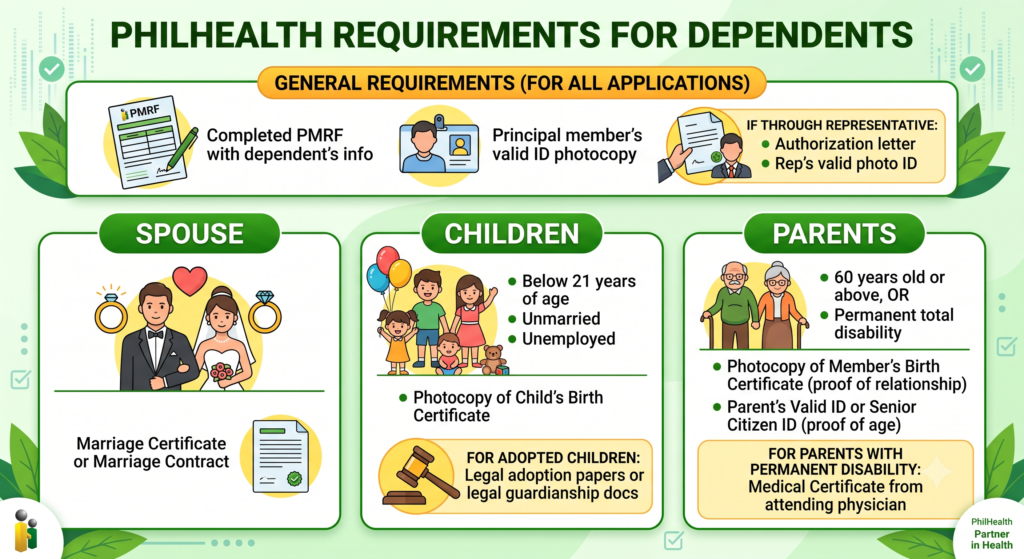
PhilHealth members can add qualified dependents to their membership by submitting the required documents. The supporting documents vary depending on whether the dependent is a spouse, child, or parent.
General Requirements
The following documents are usually required for all dependent applications:
- A completed PhilHealth Member Registration Form (PMRF) with the dependent’s information.
- A photocopy of at least one valid government-issued photo ID of the principal member.
- If another person submits the application on behalf of the member:
- An authorisation letter signed by the principal member.
- A valid photo ID of the authorised representative.
Supporting Documents by Dependent Type
A. Spouse
Submit:
- A photocopy of the Marriage Certificate or Marriage Contract as proof of the marital relationship.
B. Children
Eligible children are generally those who are:
- Below 21 years of age.
- Unmarried.
- Unemployed.
Required documents:
- Photocopy of the child’s Birth Certificate.
- For adopted children, provide legal adoption papers or other recognised proof of legal guardianship.
C. Parents
Parents may qualify if they:
- Are 60 years old or above, or
- Have a permanent total disability.
Required documents:
- Photocopy of the member’s Birth Certificate to establish the parent-child relationship.
- A valid ID or Senior Citizen ID of the parent showing their date of birth.
- If the parent has a permanent disability, submit a medical certificate issued by the attending physician.
Summary Table
| Dependent | Required Documents |
|---|---|
| General Requirements | Completed PMRF, principal member’s valid photo ID, and authorisation letter with representative’s ID (if filed through a representative). |
| Spouse | Marriage Certificate or Marriage Contract. |
| Children | Birth Certificate or legal adoption/guardianship documents for adopted children. |
| Parents | Member’s Birth Certificate, parent’s valid ID or Senior Citizen ID, and a medical certificate for parents with permanent disability. |
Key Points
- Once approved, qualified dependents can receive PhilHealth benefits under the principal member’s coverage according to PhilHealth rules.
- The PMRF must be completed with the dependent’s details before submission.
- Supporting documents must prove the relationship between the member and the dependent.
- Additional documents are required based on the dependent’s category.
- If the application is submitted by someone other than the member, an authorisation letter and the representative’s valid ID must also be provided.
8. Valid IDs Accepted by PhilHealth
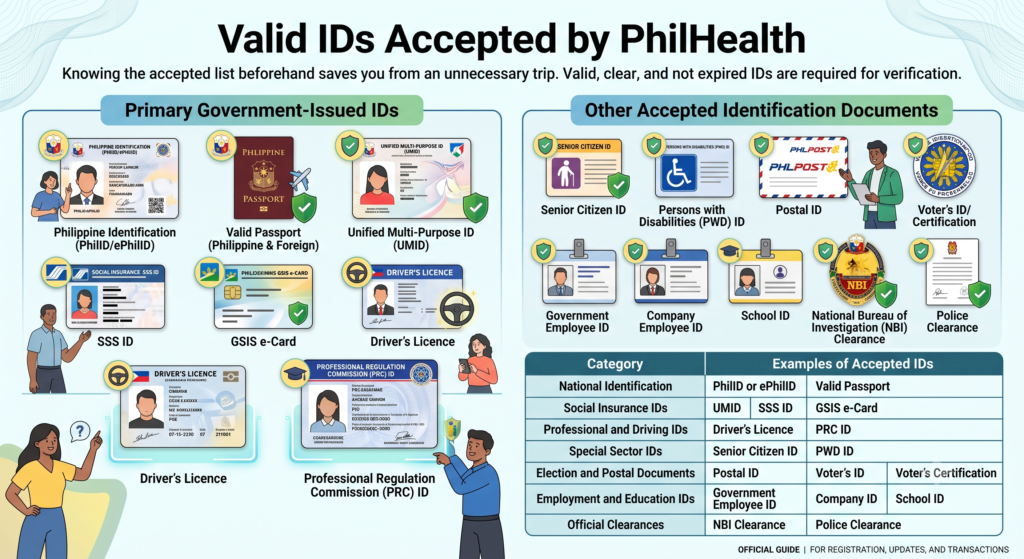
Not every ID works, so knowing the accepted list beforehand saves you from an unnecessary trip.
PhilHealth accepts various government-issued identification cards and official documents to verify a member’s identity during registration, record updates, and other membership transactions. The ID presented should be valid, clear, and not expired whenever applicable.
Primary Government-Issued IDs
The following are commonly accepted as proof of identity:
- Philippine Identification (PhilID or ePhilID) issued under the Philippine National ID System.
- Valid Passport (Philippine or foreign, if applicable).
- Unified Multi-Purpose ID (UMID).
- SSS ID or GSIS e-Card.
- Driver’s Licence issued by the Land Transportation Office (LTO).
- Professional Regulation Commission (PRC) ID for licensed professionals.
Other Accepted Identification Documents
PhilHealth may also accept the following official IDs and documents:
- Senior Citizen ID.
- Persons with Disabilities (PWD) ID.
- Postal ID.
- Voter’s ID or Voter’s Certification issued by the Commission on Elections (COMELEC).
- Government Employee ID.
- Company Employee ID, when accepted for verification.
- Valid School ID for students.
- National Bureau of Investigation (NBI) Clearance.
- Police Clearance.
Summary Table
| Category | Examples of Accepted IDs |
|---|---|
| National Identification | PhilID or ePhilID |
| Travel Document | Valid Passport |
| Social Insurance IDs | UMID, SSS ID, GSIS e-Card |
| Professional and Driving IDs | Driver’s Licence, PRC ID |
| Special Sector IDs | Senior Citizen ID, PWD ID |
| Election and Postal Documents | Postal ID, Voter’s ID, Voter’s Certification |
| Employment and Education IDs | Government Employee ID, Company ID, School ID |
| Official Clearances | NBI Clearance, Police Clearance |
Key Points
- PhilHealth accepts a wide range of government-issued and official identification documents for identity verification.
- A PhilID, Passport, UMID, SSS ID, GSIS e-Card, Driver’s Licence, or PRC ID are among the most commonly used primary IDs.
- Other official IDs, such as Senior Citizen ID, PWD ID, Postal ID, Voter’s Certification, Employee IDs, School IDs, NBI Clearance, and Police Clearance, may also be accepted depending on the transaction.
- Always present an original, valid, and legible identification document to help ensure smooth processing of your PhilHealth application or request.
9. PhilHealth Requirements by Transaction (What Do You Want to Do?)
The documents required for a PhilHealth transaction depend on the service you need. Whether you are applying for membership, requesting an ID card, paying contributions, or claiming benefits, you must submit the appropriate forms and supporting documents.
A. New Membership Registration
To register as a new PhilHealth member, prepare the following:
- A duly completed PhilHealth Member Registration Form (PMRF).
- A photocopy of your PSA-issued Birth Certificate.
- At least one valid government-issued photo ID, such as:
- Passport.
- SSS ID.
- TIN ID.
- Other accepted government-issued IDs.
- Applicants may also register through the PhilHealth Electronic Registration System, where a PhilHealth Identification Number (PIN) is issued after successful processing.
B. PhilHealth ID Card Application
Members applying for a PhilHealth ID card should provide:
- One (1) completed copy of the PMRF.
- Two (2) recent 1×1-inch ID photographs with a white background.
- A copy of the member’s 12-digit PhilHealth Identification Number (PIN) or registration confirmation.
- One original valid government-issued ID for identity verification at the PhilHealth office.
C. Premium Payment and Statement of Premium Account (SPA)
For voluntary or self-paying members:
- Generate a Statement of Premium Account (SPA) through the PhilHealth online system.
- The SPA contains a unique reference or QR code used for payment.
- Present the SPA when paying contributions at:
- Authorised collecting agents.
- Accredited payment centres.
- PhilHealth local offices.
D. Benefit Claims and Hospital Confinement
Members who wish to claim PhilHealth benefits during hospitalisation should prepare the following:
- Be eligible based on the required premium contribution rules.
- Submit a properly completed and signed Claim Form 1 (CF1).
- Provide a signed Claim Signature Form (CSF) when required.
- Ensure that the Member Data Record (MDR) is updated with accurate personal and dependent information.
Summary Table
| Transaction | Required Documents |
|---|---|
| New Membership Registration | Completed PMRF, PSA Birth Certificate, valid government-issued photo ID |
| PhilHealth ID Card Application | PMRF, two recent 1×1 photos, 12-digit PIN or registration confirmation, original valid ID |
| Premium Payment (Voluntary Members) | Statement of Premium Account (SPA) and payment through authorised collection channels |
| Benefit Claim / Hospital Confinement | Updated MDR, Claim Form 1 (CF1), Claim Signature Form (CSF), and eligibility based on contribution requirements |
Key Points
- Preparing the correct documents in advance helps speed up PhilHealth transactions and reduces delays during processing.
- The PMRF is the primary form used for most PhilHealth transactions.
- A valid government-issued ID is commonly required to verify the member’s identity.
- Voluntary members should obtain a Statement of Premium Account (SPA) before making contribution payments.
- Members claiming benefits should ensure that their premium contributions are up to date and that their Member Data Record (MDR) contains accurate information before receiving medical services.
10. PhilHealth Online Registration Requirements
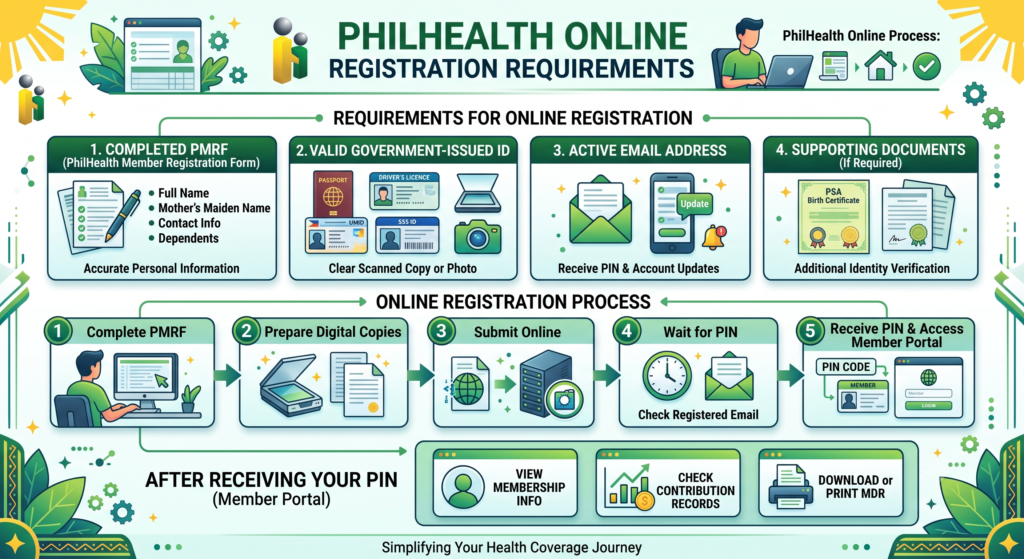
PhilHealth offers an online registration process that allows eligible applicants to apply for membership without visiting a local office. Applicants must prepare the required information and documents before submitting their application.
Requirements for Online Registration
- Completed PhilHealth Member Registration Form (PMRF)
- Fill in all required personal information accurately.
- Include details such as your full name, mother’s maiden name, contact information, and eligible dependents, if applicable.
- Valid Government-Issued ID
- Prepare a clear scanned copy or photo of an accepted identification document.
- Examples include:
- Passport.
- Driver’s Licence.
- UMID.
- SSS ID.
- Other accepted government-issued IDs.
- Active Email Address
- Provide a valid email address during registration.
- PhilHealth uses this email to send your PhilHealth Identification Number (PIN) and other registration updates.
- Supporting Documents (If Required)
- We may request additional documents to verify your identity.
- These may include a PSA-issued Birth Certificate or other official records when necessary.
Online Registration Process
- Complete the PMRF with accurate information.
- Prepare digital copies of the required identification and supporting documents.
- Submit your application through the official PhilHealth online registration service.
- Wait for your PhilHealth Identification Number (PIN) to be sent to your registered email address.
- After receiving your PIN, create or access your PhilHealth Member Portal account.
- Use the portal to:
- View your membership information.
- Check contribution records.
- Download or print your Member Data Record (MDR).
Summary Table
| Requirement | Purpose |
|---|---|
| Completed PMRF | Provides personal, membership, and dependent information. |
| Valid Government-Issued ID | Verifies the applicant’s identity. |
| Active Email Address | Receives the PhilHealth Identification Number (PIN) and account notifications. |
| Supporting Documents (if requested) | Confirms identity or personal information when additional verification is needed. |
Key Points
- Members can then access the PhilHealth Member Portal to manage their account, monitor contributions, and print their Member Data Record (MDR) whenever needed.
- A completed PMRF, a valid government-issued ID, and an active email address are the main requirements for online registration.
- Some applicants may be asked to submit additional documents, such as a PSA Birth Certificate, for identity verification.
- After registration is approved, the applicant receives a PhilHealth Identification Number (PIN) by email.
11. PhilHealth ID Requirements
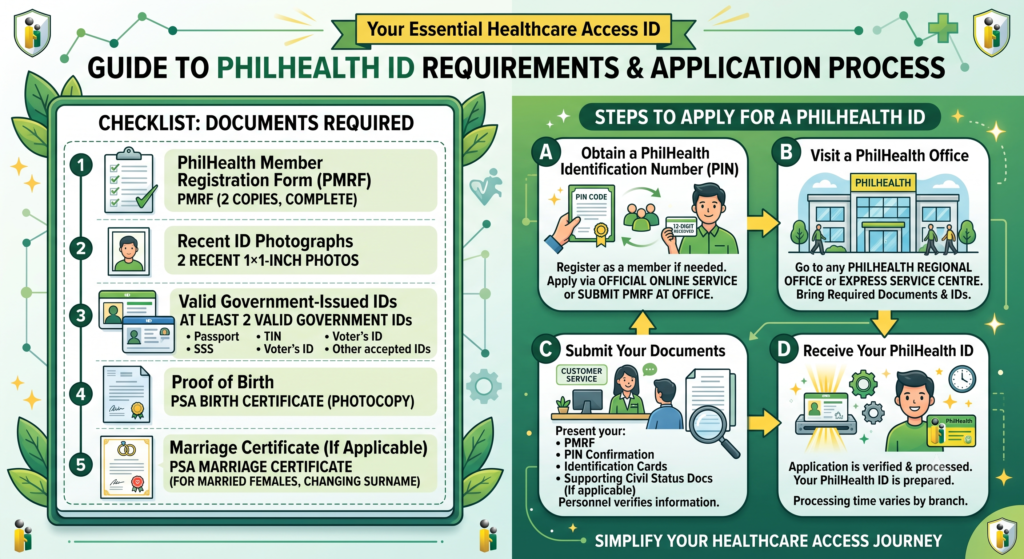
A PhilHealth ID serves as proof of PhilHealth membership and may be requested when accessing healthcare services or completing membership transactions. Before applying, ensure you have all the required documents.
Documents Required
- PhilHealth Member Registration Form (PMRF)
- Submit two (2) properly completed copies of the PMRF.
- Recent ID Photographs
- Provide two (2) recent 1×1-inch photographs.
- Valid Government-Issued IDs
- Present at least two valid identification cards for identity verification.
- Examples include:
- Passport.
- SSS ID.
- TIN ID.
- Voter’s ID.
- Other accepted government-issued IDs.
- Proof of Birth
- Submit a photocopy of your PSA-issued Birth Certificate.
- Marriage Certificate (If Applicable)
- Married female applicants may be required to submit a PSA-issued Marriage Certificate to support any change in surname or civil status.
Steps to Apply for a PhilHealth ID
A. Obtain a PhilHealth Identification Number (PIN)
- Register as a PhilHealth member if you do not already have a PIN.
- You can:
- Apply through the official PhilHealth online registration service, or
- Submit your PMRF at a PhilHealth office.
- Once approved, you will receive your 12-digit PhilHealth Identification Number (PIN).
B. Visit a PhilHealth Office
- Go to any PhilHealth Regional Office or PhilHealth Express service centre.
- Bring all the required documents and identification.
C. Submit Your Documents
- Present your:
- PMRF.
- PIN confirmation or registration record.
- Required identification cards.
- Supporting civil status documents, if applicable.
- PhilHealth personnel will verify your information before processing your request.
D. Receive Your PhilHealth ID
- After your application is verified and processed, your PhilHealth ID will be prepared according to the office’s procedures.
- Processing time may vary depending on the branch.
Summary Table
| Requirement | Purpose |
|---|---|
| Two completed PMRF copies | Used to process the ID application. |
| Two recent 1×1 photographs | Required for identification purposes. |
| Two valid government-issued IDs | Confirms the applicant’s identity. |
| PSA Birth Certificate | Verifies personal information and date of birth. |
| Marriage Certificate (if applicable) | Confirms change of surname or civil status. |
| 12-digit PhilHealth PIN | Confirms active PhilHealth membership before ID issuance. |
Key Points
- Keeping your membership information accurate and complete helps ensure a smooth and faster ID application process.
- You must first become a registered PhilHealth member and obtain a 12-digit PhilHealth Identification Number (PIN) before applying for a PhilHealth ID.
- Prepare the PMRF, recent photographs, valid government-issued IDs, and any required civil status documents before visiting a PhilHealth office.
- Submit all required documents at a PhilHealth Regional Office or PhilHealth Express service centre for verification and processing.
12. PhilHealth Contribution Requirements
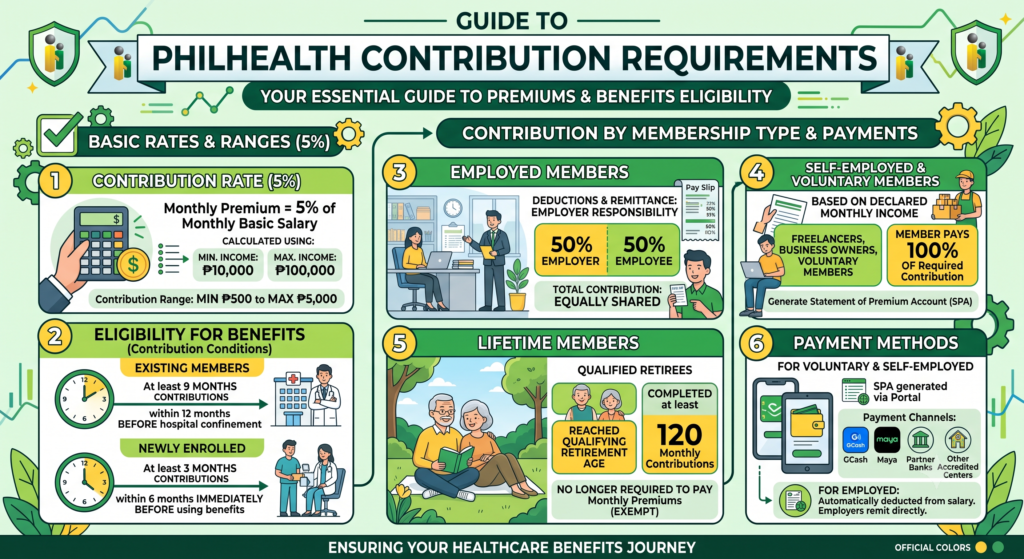
PhilHealth members are required to pay monthly premium contributions to maintain their membership and remain eligible for healthcare benefits. The amount payable depends on the member’s monthly income and membership category.
Contribution Rate
- The premium contribution is 5% of the member’s monthly basic salary.
- Contributions are calculated using:
- Minimum monthly income: ₱10,000
- Maximum monthly income: ₱100,000
- This means the monthly contribution ranges from:
- Minimum: ₱500
- Maximum: ₱5,000
Contribution by Membership Type
Employed Members
- The monthly premium is shared equally between the employer and the employee.
- Each pays 50% of the total contribution.
- Employers are responsible for deducting and remitting the contributions to PhilHealth.
Self-Employed and Voluntary Members
- Self-employed individuals, freelancers, and voluntary members pay 100% of the required contribution.
- The amount is based on the member’s declared monthly income.
Lifetime Members
- Members who qualify as lifetime members are no longer required to pay monthly premiums.
- This generally applies to retirees who:
- Have reached the qualifying retirement age, and
- Have completed at least 120 monthly PhilHealth contributions.
Eligibility for Benefits
To receive PhilHealth benefits, members should meet the required contribution conditions.
- Existing members are generally expected to have at least 9 months of premium contributions within the 12 months before hospital confinement or benefit availment.
- Newly enrolled members may qualify under special rules that require at least 3 months of contributions within the 6 months immediately before using benefits.
Payment Methods
Employed Members
- Contributions are automatically deducted from the employee’s salary.
- Employers remit the payments directly to PhilHealth.
Voluntary and Self-Employed Members
- Members can generate a Statement of Premium Account (SPA) through the PhilHealth Member Portal.
- Payments may then be made using authorised payment channels, including:
- GCash.
- Maya.
- Partner banks.
- Other accredited payment centres.
Summary Table
| Category | Contribution Requirement |
|---|---|
| Contribution Rate | 5% of the monthly basic salary |
| Minimum Monthly Income | ₱10,000 |
| Maximum Monthly Income | ₱100,000 |
| Monthly Contribution Range | ₱500 to ₱5,000 |
| Employed Members | Contribution shared equally between employer and employee |
| Self-Employed / Voluntary Members | Member pays the full contribution based on declared income |
| Lifetime Members | No further premium payments after meeting qualification requirements |
| Benefit Eligibility | Generally requires 9 months of contributions within the previous 12 months |
| Payment Methods | Employer remittance or payment through SPA using authorised online and banking channels |
Key Points
- Voluntary members can conveniently pay their contributions by generating an SPA and using authorised digital payment services or accredited financial institutions.
- PhilHealth contributions are calculated at 5% of the member’s monthly basic salary, subject to the minimum and maximum income limits.
- Employees share the contribution equally with their employer, while self-employed and voluntary members pay the full amount themselves.
- Members must keep their contributions up to date to remain eligible for most PhilHealth benefits.
- Qualified lifetime members are exempt from paying future premiums after satisfying the required contribution and retirement conditions.
13. PhilHealth Requirements for Updating or Reactivating Membership
PhilHealth members can update their membership records or reactivate an inactive account by submitting the required forms and supporting documents. The documents needed may vary depending on the type of information being changed.
Basic Requirements
- Completed PhilHealth Member Registration Form (PMRF)
- Fill out the PMRF completely.
- Tick the “For Updating” option if you are requesting changes to your membership information.
- Valid Government-Issued Photo ID
- Submit a photocopy or scanned copy of at least one valid government-issued ID.
- Ensure that the ID is clear and readable.
- Supporting Documents
- Provide documents that match the type of update being requested.
- Examples include:
- PSA Marriage Certificate for a change of surname after marriage.
- PSA Birth Certificate when adding or correcting dependent information.
- Other official documents required to support specific record changes.
- Proof of Premium Payment (For Reactivation)
- Members reactivating an inactive account or changing to a self-paying or informal membership category may need to provide proof of a recent premium payment.
Ways to Submit the Application
1. Walk-in Application
- Visit the nearest PhilHealth Local Health Insurance Office (LHIO).
- Bring:
- The completed PMRF.
- Original valid ID for verification.
- Photocopies of all required supporting documents.
2. Online or Email Submission
- Scan the completed PMRF and supporting documents.
- Ensure all copies are clear and legible.
- Submit the documents through:
- The designated PhilHealth regional office email, or
- The PhilHealth Member Portal, where available.
Summary Table
| Requirement | Purpose |
|---|---|
| Completed PMRF | Requests an update or reactivation of membership records. |
| Valid Government-Issued ID | Confirms the member’s identity. |
| Supporting Documents | Verifies the requested changes, such as name, civil status, or dependents. |
| Proof of Premium Payment | Supports the reactivation of inactive or self-paying memberships. |
| Walk-in or Online Submission | Provides different methods for submitting the application. |
Key Points
- Applications can be submitted either in person at a PhilHealth Local Health Insurance Office (LHIO) or through approved online or email channels, depending on the available services.
- Use the PhilHealth Member Registration Form (PMRF) when updating or reactivating your membership.
- Always attach at least one valid government-issued photo ID.
- Submit supporting documents that match the specific information you want to update.
- Members reactivating inactive accounts may need to provide proof of a recent premium payment.
14. How to Apply for PhilHealth Online
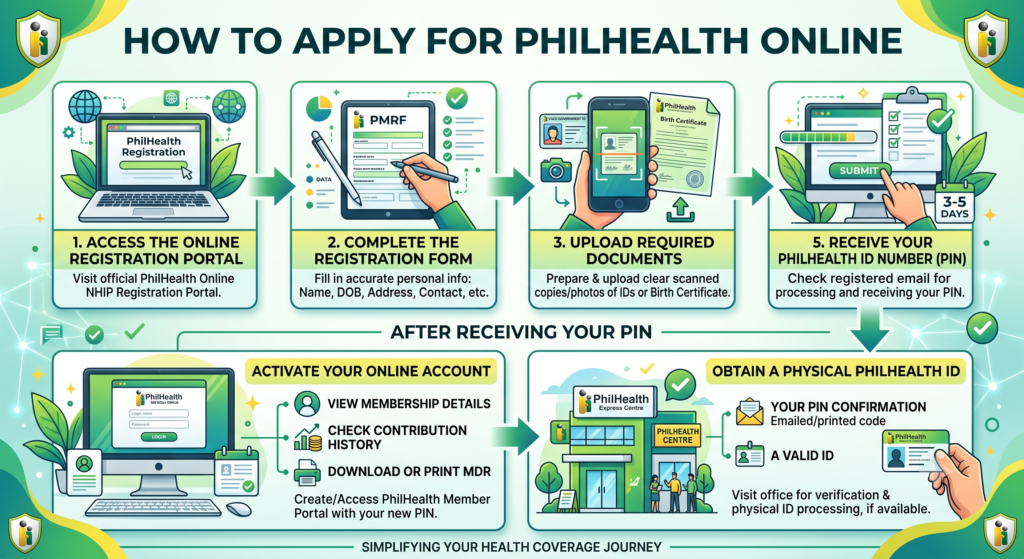
PhilHealth allows eligible applicants to register online by submitting their personal information and required documents through its electronic registration system. Once the application is approved, the member receives a PhilHealth Identification Number (PIN) by email.
Steps for Online Application
A. Access the Online Registration Portal
- Visit the official PhilHealth Online NHIP Registration Portal.
- Open the online registration page to begin your application.
B. Complete the Registration Form
- Fill in the PhilHealth Member Registration Form (PMRF) with accurate information.
- Provide details such as:
- Full name.
- Date of birth.
- Address.
- Contact information.
- Other required personal details.
C. Upload Required Documents
Prepare and upload clear scanned copies or photographs of the required documents, such as:
- A valid government-issued ID, or
- A PSA-issued Birth Certificate, if required for identity verification.
D. Submit the Application
- Review all the information before submitting.
- Send the completed application through the online system.
E. Receive Your PhilHealth Identification Number (PIN)
- After your application is processed, your 12-digit PhilHealth Identification Number (PIN) will be sent to your registered email address.
- Processing generally takes 3 to 5 working days, although it may vary depending on the volume of applications.
After Receiving Your PIN
Activate Your Online Account
- Use your new PIN to create or access your PhilHealth Member Portal account.
- Through the portal, you can:
- View your membership details.
- Check your contribution history.
- Download or print your Member Data Record (MDR).
Obtain a Physical PhilHealth ID
- Visit a PhilHealth Regional Office or PhilHealth Express service centre.
- Bring:
- Your PIN confirmation (printed or shown from your email).
- A valid government-issued ID.
- The office will verify your membership and process your physical PhilHealth ID, if available.
Summary Table
| Step | What to Do |
|---|---|
| 1. Access the Portal | Open the official PhilHealth Online NHIP Registration Portal. |
| 2. Complete the PMRF | Enter accurate personal and contact information. |
| 3. Upload Documents | Submit a valid government-issued ID or PSA Birth Certificate, if required. |
| 4. Submit Application | Review and send the completed online registration. |
| 5. Receive PIN | Wait for your 12-digit PhilHealth Identification Number (PIN) by email. |
| 6. Activate Account | Log in to the PhilHealth Member Portal to manage your membership. |
| 7. Get Your PhilHealth ID | Visit a PhilHealth office with your PIN confirmation and valid ID to request a physical ID. |
Key Points
- If you need a physical PhilHealth ID, visit a PhilHealth office with your PIN confirmation and a valid government-issued ID for verification.
- Complete the PhilHealth Member Registration Form (PMRF) accurately before submitting your application.
- Upload clear copies of the required identification documents to avoid delays.
- Your PhilHealth Identification Number (PIN) is usually sent by email after successful processing.
- Once you receive your PIN, you can access the PhilHealth Member Portal to manage your account and print your Member Data Record (MDR).
15. How to Update PhilHealth Information
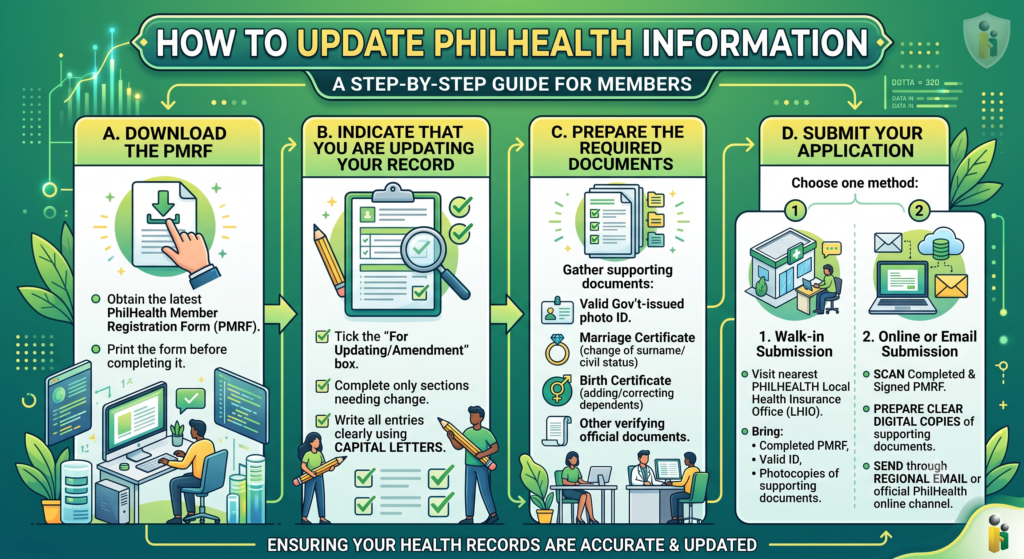
PhilHealth members can update their personal or membership records by submitting a PhilHealth Member Registration Form (PMRF) together with the necessary supporting documents. Updates can be made either in person or through approved online/email submission channels.
Steps to Update Your Information
A. Download the PMRF
- Obtain the latest PhilHealth Member Registration Form (PMRF).
- Print the form before completing it.
B. Indicate That You Are Updating Your Record
- Tick the “For Updating/Amendment” box on the form.
- Complete only the sections that need to be changed.
- Write all entries clearly using CAPITAL LETTERS.
C. Prepare the Required Documents
Gather the documents needed to support your request, such as:
- A valid government-issued photo ID.
- Additional documents based on the type of update, for example:
- Marriage Certificate for a change of surname or civil status.
- Birth Certificate when adding or correcting dependent information.
- Other official documents that verify the requested changes.
D. Submit Your Application
You can submit your documents using either of the following methods:
Walk-in Submission
- Visit the nearest PhilHealth Local Health Insurance Office (LHIO).
- Bring:
- The completed PMRF.
- Your valid ID.
- Photocopies of all required supporting documents.
Online or Email Submission
- Scan the completed and signed PMRF.
- Prepare clear digital copies of your supporting documents.
- Send them through the designated PhilHealth regional office email or another official PhilHealth online submission channel, where available.
Summary Table
| Step | What You Need to Do |
|---|---|
| Download the PMRF | Obtain and print the PhilHealth Member Registration Form. |
| Mark the Form | Tick the “For Updating/Amendment” box and complete only the fields that require changes. |
| Prepare Documents | Gather a valid ID and supporting documents related to the requested update. |
| Submit the Application | File the documents at an LHIO or send scanned copies through an approved PhilHealth email or online channel. |
Common Supporting Documents
| Type of Update | Supporting Document |
|---|---|
| Change of name or civil status | Marriage Certificate |
| Add or update dependents | Birth Certificate or other required proof of relationship |
| Identity verification | Valid government-issued photo ID |
| Other personal information | Appropriate official document supporting the requested change |
Key Points
- Providing complete and accurate documents helps ensure that your membership records are updated without unnecessary delays.
- Use the PhilHealth Member Registration Form (PMRF) for any update or amendment to your membership records.
- Tick the “For Updating/Amendment” option before completing the form.
- Submit only the documents needed for the specific information you want to change.
- Applications may be submitted personally at a PhilHealth Local Health Insurance Office (LHIO) or through official email or online submission channels, depending on the available service.
16. Common Mistakes to Avoid
Completing the PhilHealth Member Registration Form (PMRF) correctly is important to avoid delays in registration, record updates, or benefit claims. Many applications are delayed because of incomplete or incorrect information.
Common Personal Information Errors
- Name does not match official records.
- Writing a name that is different from the one shown on the PSA Birth Certificate or other official documents.
- Always use the exact spelling of your legal name.
- Mother’s maiden name is incomplete
- Leaving out the mother’s first name, middle name, or maiden surname.
- Enter the complete maiden name exactly as shown on official records.
- Incomplete contact details
- Omitting important parts of your permanent or mailing address.
- Providing an inactive or incorrect phone number or email address.
Membership Information Errors
- Selecting the wrong membership category
- Choosing the wrong membership type, such as employed, self-employed, voluntary, or sponsored.
- Ensure the selected category matches your current status.
- Missing or incorrect income information
- Leaving the monthly income section blank.
- Providing incorrect income details or failing to submit supporting documents when required for self-employed members.
- Forgetting to tick the “For Updating/Amendment” box
- Members updating existing records sometimes forget to indicate that the application is for an update instead of a new registration.
Dependent Information Errors
- Adding ineligible dependents
- Listing family members who do not meet PhilHealth’s eligibility requirements.
- Check that each dependent qualifies before including them on the form.
- Incorrect registration of dependents with disabilities
- Not following the applicable PhilHealth rules for dependents with permanent disabilities when registration requirements differ.
Form Completion Errors
- Missing signature
- Forgetting to sign and date the PMRF before submission.
- If the applicant cannot sign, the required thumbmark should be provided according to PhilHealth procedures.
- Incomplete fields
- Leaving required sections blank without indicating “N/A” (Not Applicable) where appropriate.
- Unreadable handwriting
- Writing information that is difficult to read.
- Complete the form clearly using CAPITAL LETTERS.
Summary Table
| Common Mistake | How to Avoid It |
|---|---|
| Name differs from official documents | Use the exact name shown on your official records. |
| Incomplete mother’s maiden name | Write the complete first name, middle name, and maiden surname. |
| Incomplete address or contact details | Provide your full address and active contact information. |
| Wrong membership category | Select the membership type that matches your current status. |
| Missing income information | Declare your monthly income and attach supporting documents when required. |
| Forgot the “For Updating/Amendment” box | Tick the box when updating existing membership records. |
| Declaring ineligible dependents | Include only dependents who meet PhilHealth eligibility rules. |
| Missing signature or thumbmark | Sign and date the form before submitting it. |
| Blank required fields | Complete all required sections or write “N/A” where applicable. |
| Unclear handwriting | Write neatly using CAPITAL LETTERS. |
Tips for a Successful PMRF Submission
- Review every entry before submitting the form.
- Ensure your personal details match your official documents.
- Attach all required supporting documents.
- Use CAPITAL LETTERS and write clearly.
- Sign and date the form before submission.
- Verify that all declared dependents meet PhilHealth’s eligibility requirements.
Following these guidelines can help ensure that your PhilHealth Member Registration Form (PMRF) is processed accurately and without unnecessary delays.
17. Common Problems When Submitting PhilHealth Requirements
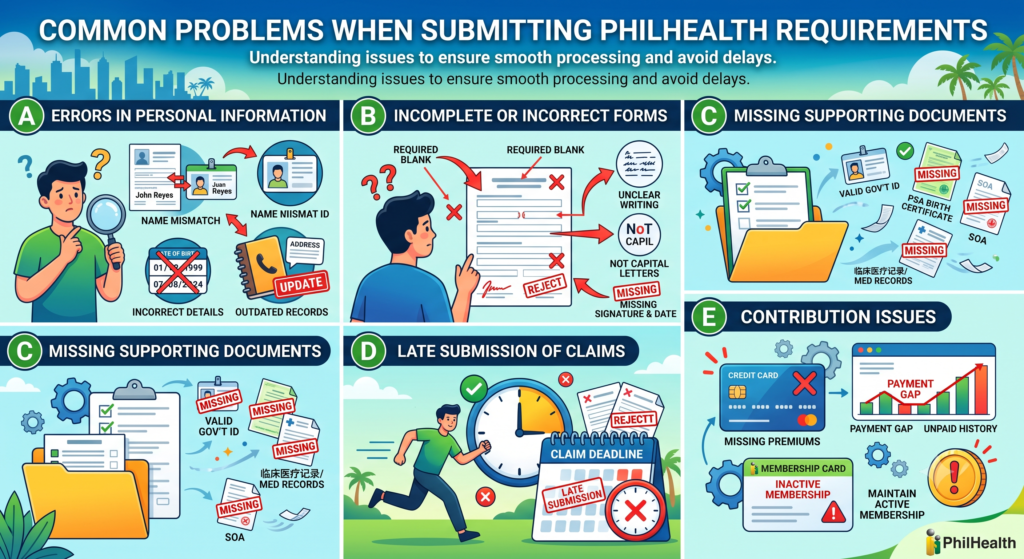
Submitting PhilHealth requirements can sometimes result in delays if the forms or supporting documents are incomplete or incorrect. Understanding these common issues can help ensure that your application or claim is processed more smoothly.
A. Errors in Personal Information
The most common problem is providing information that does not match official records.
- Name mismatch
- The name on the PMRF is different from the one on the birth certificate or valid ID.
- Incorrect birth date or personal details
- Dates of birth or other personal information do not match official documents.
- Outdated membership records
- Changes in marital status, address, or contact details have not been updated before submitting a request.
B. Incomplete or Incorrect Forms
Applications may be delayed when forms are not completed properly.
- Leaving required fields blank.
- Writing unclear or incomplete information.
- Not using CAPITAL LETTERS when required.
- Forgetting to sign and date the form before submission.
C. Missing Supporting Documents
Many applications are returned because important documents are not included.
Examples include:
- Valid government-issued ID.
- PSA Birth Certificate.
- Marriage Certificate for name or civil status changes.
- Statement of Account (SOA), when required.
- Clinical records or medical documents for benefit claims.
- Other documents requested for a specific transaction.
D. Late Submission of Claims
Benefit claims must be filed within the required period.
- Submitting hospital or medical claims after the allowed filing deadline may result in delayed processing or non-acceptance.
- Members should prepare and submit all claim documents as soon as possible after treatment or hospital discharge.
E. Contribution Issues
Benefit applications may be affected if contribution records are incomplete.
- Missing or unpaid premium contributions.
- Gaps in payment history for self-employed or voluntary members.
- Failure to maintain active membership before claiming benefits.
Summary Table
| Common Problem | Possible Result | How to Avoid It |
|---|---|---|
| Personal information does not match official records | Processing delays or requests for correction | Ensure all details match your official documents. |
| Incomplete application form | Application may be returned | Complete every required field and sign the form. |
| Missing supporting documents | Processing cannot continue | Attach all required documents before submission. |
| Late filing of benefit claims | Claim may be delayed or rejected | Submit claims within the required filing period. |
| Missing premium contributions | Benefits may not be available | Keep contribution payments up to date. |
| Outdated membership information | Records may require correction before processing | Update your membership information whenever personal details change. |
Tips to Avoid Problems
- Check all information before submitting your application.
- Make sure your personal details are consistent across all documents.
- Include every required supporting document.
- Keep your PhilHealth membership records updated.
- Ensure your premium contributions are current before applying for benefits.
- Submit applications and claims within the required deadlines.
Where to Get Help
If you experience problems or need clarification:
Reach out through the official PhilHealth website or customer support channels for updates on requirements and application procedures.
Review the official PhilHealth guidelines for the specific transaction you are processing.
Contact your nearest PhilHealth Local Health Insurance Office (LHIO) for assistance.
18. Tips for a Smooth Application / Faster Processing
Following the correct procedures and preparing all required documents in advance can help prevent delays when applying for or updating your PhilHealth membership. Careful preparation also makes the application process faster and more efficient.
Before You Apply
- Complete the PhilHealth Member Registration Form (PMRF) carefully
- Fill in all required fields.
- Do not leave mandatory sections blank.
- Write “N/A” (Not Applicable) in fields that do not apply.
- Use CAPITAL LETTERS for all entries.
- Ensure your personal information is accurate.
- Check that your:
- Full name.
- Date of birth.
- Mother’s maiden name.
- These details should exactly match your PSA-issued civil records and other official documents.
- Check that your:
- Prepare clear copies of your documents
- Bring or upload clear and readable copies of:
- A valid government-issued ID.
- PSA Birth Certificate.
- Marriage Certificate, if required.
- Other supporting documents related to your application.
- Bring or upload clear and readable copies of:
During the Application Process
- Apply online whenever possible.e
- Use the official PhilHealth online registration service to submit your application.
- This allows you to receive your PhilHealth Identification Number (PIN) and monitor your application before visiting a PhilHealth office if necessary.
- Use your own active email address
- Provide a personal email account that you can access regularly.
- Make sure the email address has not been used for another PhilHealth online registration, if required.
- Review all submitted information
- Double-check every detail before submitting your application.
- Correct any spelling mistakes or incorrect information immediately.
After Submission
- Check your records
- Review your Member Data Record (MDR) or transaction receipt once it is available.
- Verify that all personal information is correct.
- Request corrections immediately
- If you notice any errors, report them to PhilHealth as soon as possible to avoid future problems with membership records or benefit claims.
Summary Table
| Best Practice | Benefit |
|---|---|
| Complete the PMRF accurately | Reduces processing delays caused by incomplete forms. |
| Match personal details with official records | Prevents identity verification issues. |
| Prepare clear copies of supporting documents | Makes document verification easier. |
| Apply through the online registration system | Speeds up registration and allows application tracking. |
| Use an active personal email address | Ensures you receive your PIN and important notifications. |
| Review all information before submission | Helps identify and correct mistakes early. |
| Verify your Member Data Record (MDR) | Confirms that your membership details are accurate. |
| Report errors immediately | Prevents future issues with PhilHealth transactions and benefit claims. |
Helpful Tips
- Updating mistakes as soon as they are discovered can help avoid delays when using PhilHealth services in the future.
- Gather all required documents before starting your application.
- Ensure that every document is clear, complete, and up to date.
- Keep copies of all submitted forms and supporting documents for your records.
- Monitor your email regularly for updates about your application.
- Review your Member Data Record (MDR) after approval to confirm that all information is accurate.
19. Tips to Prepare Your PhilHealth Requirements Easily
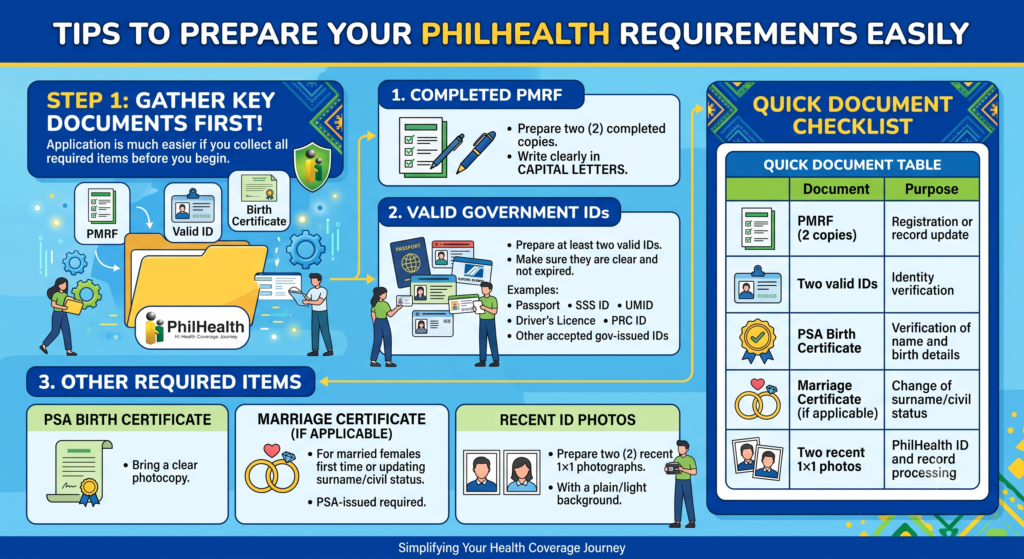
Preparing your PhilHealth documents is much easier if you gather everything before you start the application. The most important items are the PhilHealth Member Registration Form (PMRF), a valid government-issued ID, and a PSA Birth Certificate.
What to Prepare
- PhilHealth Member Registration Form (PMRF)
- Prepare two (2) completed copies.
- Write all entries clearly in CAPITAL LETTERS.
- Valid Government-Issued IDs
- Prepare at least two valid IDs.
- Common examples:
- Passport
- SSS ID
- UMID
- Driver’s Licence
- PRC ID
- Other accepted government-issued IDs
- PSA Birth Certificate
- Bring a clear photocopy of your PSA-issued Birth Certificate.
- Marriage Certificate (if applicable)
- If you are a married female and are registering for the first time or updating your surname/civil status, bring a PSA-issued Marriage Certificate.
- Recent ID Photos
- Prepare two (2) recent 1×1 ID photographs with a plain/light background.
Quick Document Table
| Document | Purpose |
|---|---|
| PMRF (2 copies) | Registration or record update |
| Two valid IDs | Identity verification |
| PSA Birth Certificate | Verification of name and birth details |
| Marriage Certificate (if applicable) | Change of surname/civil status |
| Two recent 1×1 photos | PhilHealth ID and record processing |
Easy Preparation Steps
Complete the PMRF carefully
- Fill in all required fields.
- Use “N/A” for items that do not apply.
- Avoid leaving mandatory sections blank.
Match your official records.
Make sure these details are the same as those on your PSA Birth Certificate:
- Full name
- Date of birth
- Mother’s full maiden name (first, middle, and maiden surname)
Prepare your dependents’ information early
Gather the correct details for eligible dependents, such as:
- Legal spouse
- Children below 21 years old (if qualified)
- Parents aged 60 and above (if qualified)
Have their full names and birth dates ready before filling out the PMRF.
Keep clear photocopies
- Use clear, readable photocopies of all documents.
- Blurry or cut-off copies are a common cause of processing delays.
Save digital backups
Keep PDF or photocopies of your:
- Valid IDs
- PSA Birth Certificate
- Marriage Certificate (if applicable)
- Completed PMRF
Store them on your phone, computer, or cloud storage so they are easy to upload or reprint.
Use the online portal to save time.
If available, you can submit your application through the official PhilHealth online registration system. This can help you:
- Receive your PhilHealth Identification Number (PIN) by email
- Track your application status
- Download or print your Member Data Record (MDR) later
Final checklist before submission
Use this quick check:
- Completed 2 PMRF copies
- 2 valid government-issued IDs
- PSA Birth Certificate
- Marriage Certificate (if applicable)
- 2 recent 1×1 photos
- Correct spelling of your name, birth date, and mother’s maiden name
- Dependents’ details prepared
- Clear digital backups saved
Following this checklist usually results in the fastest and smoothest PhilHealth registration or update process.
20. Editor’s Analysis: The Unspoken Requirement — Patience and Preparation
Here’s what no official checklist tells you directly. Beyond documents and forms, PhilHealth transactions genuinely reward patience. Systems occasionally lag, staff occasionally make mistakes, and verification occasionally takes longer than promised.
The real secret isn’t finding some hidden shortcut. It’s simply showing up prepared, staying calm through minor delays, and treating each requirement as a small investment toward long-term health benefits. A worry-free, hassle-free PhilHealth experience isn’t about luck. It’s about doing the boring preparation work most people skip, then reaping the reward when everything moves smoothly because you actually did your homework.
Also Read:
- PhilHealth Portal Login & Registration 2026: Complete Guide to Membership, Benefits, Contributions & Online Services
- PhilHealth ID: Your Complete July 2026 Guide
- PhilHealth Login 2026: Ultimate Guide to Member Portal, Password Reset & MDR Download
- PhilHealth Online Registration: Why 90% of Filipinos Get This One Step Wrong
- PhilHealth Contribution 2026: Rates, Table, Calculator & Payment Guide
- PhilHealth Online Appointment 2026: Step-by-Step Booking Secrets Revealed
- PhilHealth Employer Guide 2026: Registration & Compliance
Frequently Asked Questions
Can I get a PhilHealth ID the same day?
Yes, in many PhilHealth branches, you may receive a regular PhilHealth ID on the same day if your membership is active and all required documents are complete. Processing time may vary depending on the branch and the number of applicants. It is best to bring your valid ID and PhilHealth Identification Number (PIN).
Is a barangay certificate needed for PhilHealth?
No, a barangay certificate is generally not required for PhilHealth registration. Most applicants only need a completed PMRF, a valid government-issued ID, and supporting documents such as a PSA Birth Certificate or Marriage Certificate, if applicable.
Can I get a PhilHealth ID without a valid ID?
Generally, no. PhilHealth usually requires at least one valid government-issued ID to verify your identity before issuing a PhilHealth ID. If you do not have one, you may need to provide other acceptable identification documents, subject to PhilHealth’s requirements.
Can I go directly to PhilHealth without an appointment?
Yes, most PhilHealth Local Health Insurance Offices (LHIOs) accept walk-in applicants for registration and other transactions. However, some branches may implement appointment or queue systems, so checking with your local office beforehand is recommended.
Can I apply for PhilHealth even if I’m unemployed?
Yes. Unemployed individuals can register as voluntary or self-paying members. You need to complete the PMRF, submit the required documents, and pay the applicable premium contributions to activate your membership.
How much is PhilHealth for the first time?
There is no separate registration fee for first-time applicants. However, members are required to pay the applicable premium contribution based on their membership category and declared monthly income.
How to avail ₱20,000 PhilHealth benefits?
To receive PhilHealth benefits, you must be an active member with the required premium contributions and receive treatment at a PhilHealth-accredited healthcare facility. The amount of benefits depends on your illness, treatment, and PhilHealth’s benefit package, not a fixed ₱20,000 for all members.
How much is PhilHealth monthly?
PhilHealth contributions are 5% of the monthly basic salary, with a minimum monthly contribution of ₱500 and a maximum of ₱5,000. Employees share the contribution equally with their employer, while self-employed and voluntary members pay the full amount themselves.
Meeting every PhilHealth requirement doesn’t have to feel overwhelming once you know exactly what applies to your situation. Gather your documents, double-check every detail, and approach the process with a bit of patience. That preparation is what actually turns a stressful bureaucratic task into a quick, straightforward one.