
PhilHealth Online Appointment 2026: Easy Booking Guide
PhilHealth Online Appointment system allows Filipino members to schedule visits to PhilHealth branches without the hassle of long queues. Through the official PhilHealth website or the PhilHealth Konsulta portal, members can book a preferred date and time for transactions such as membership registration, updating personal information, claims processing, or resolving contribution issues.
This digital booking service was introduced to make healthcare-related government transactions faster, more organized, and more accessible, especially for OFWs, senior citizens, and employed or self-employed individuals. By reserving a slot in advance, members avoid overcrowded offices and reduce waiting time significantly. The appointment system reflects PhilHealth’s ongoing shift toward digital services, aligning with the government’s broader push for efficient, paperless, and citizen-friendly public service delivery nationwide.

1. What Is PhilHealth?
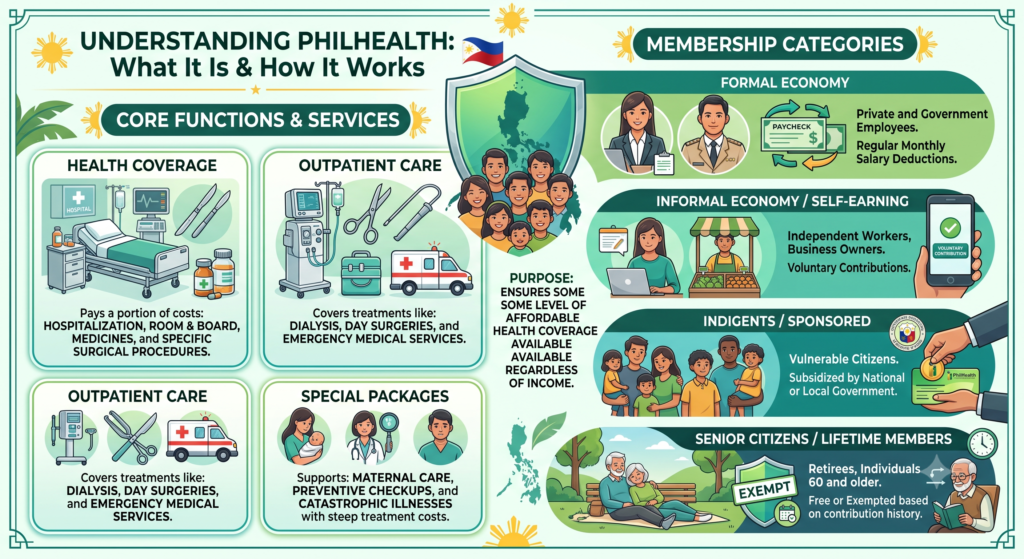
PhilHealth, formally known as the Philippine Health Insurance Corporation, is a government-run agency responsible for administering the National Health Insurance Program. Its whole purpose boils down to one thing: making sure every Filipino, regardless of income, has some level of affordable health coverage available.
Here’s a closer look at what the agency actually does, and who qualifies under its umbrella.
Core functions and services include:
- Health coverage — pays a portion of hospitalization costs, room and board, medicines, and specific surgical procedures
- Outpatient care — covers treatments like dialysis, day surgeries, and emergency medical services
- Special packages — supports maternal care, preventive checkups, and catastrophic illnesses that come with steep treatment costs
Membership breaks down into four main categories:
| Category | Who Qualifies | How They Pay |
|---|---|---|
| Formal Economy | Private and government employees | Regular monthly salary deductions |
| Informal Economy / Self-Earning | Independent workers, business owners | Voluntary contributions |
| Indigents / Sponsored | Vulnerable citizens | Subsidized by national or local government |
| Senior Citizens / Lifetime Members | Retirees, individuals 60 and older | Free or exempted based on contribution history |
Understanding which category applies to you matters, since it directly affects how much you pay and how your coverage actually works.
2. Understanding the PhilHealth Online Appointment System
The PhilHealth Online Appointment System lets you book a branch visit ahead of time, cutting out the long wait that used to define every PhilHealth trip. Whether you need new registration, an updated profile, or a fresh ID card, you can arrange it all through the Official PhilHealth Website before ever setting foot in a branch.
Here’s a breakdown of exactly how the process plays out, from booking to actually walking in the door.
The booking process works like this:
- Visit the online appointment portal
- Choose your required service, whether that’s a profile update, ID replacement, or something else
- Provide your personal contact details
- Select your preferred local branch, along with your date and time slot
Once you’re done, here’s what happens:
- The system generates a digital confirmation slip showing your scheduled time and branch location
- Save or print this slip, since you’ll need it on the actual appointment day
On your visit itself:
- Bring your confirmation slip, printed or saved digitally, along with a valid ID
- Present both at your selected time slot for prioritized assistance
Why this actually matters:
Organized flow — staff already know what you need before you even arrive, whether it’s a claim, a data change, or a contribution concern, which means faster, more focused service
Time savings — no more burning hours in physical lines at Local Health Insurance Offices
3. Do I Need an Appointment for PhilHealth? (Book vs. Walk-In)
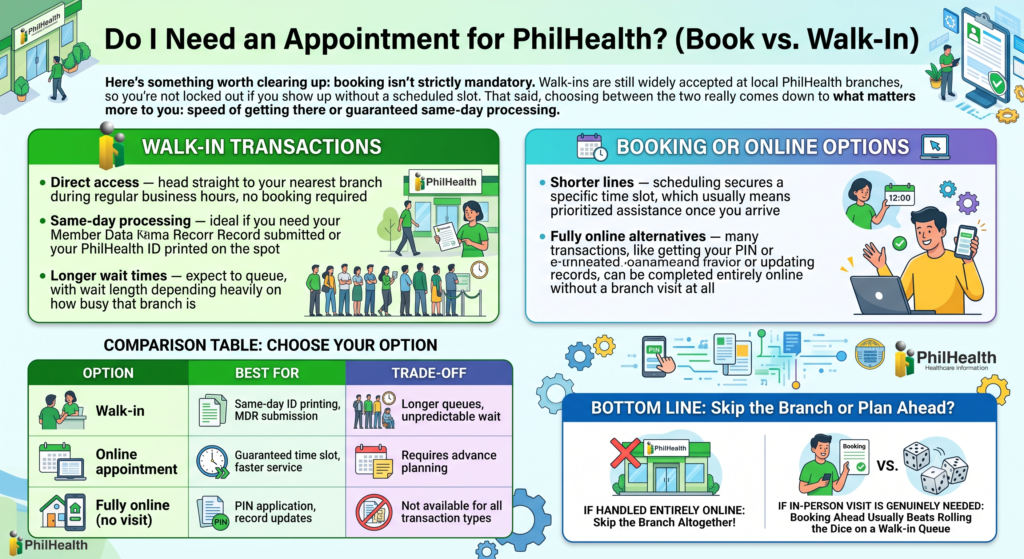
Here’s something worth clearing up: booking isn’t strictly mandatory. Walk-ins are still widely accepted at local PhilHealth branches, so you’re not locked out if you show up without a scheduled slot. That said, choosing between the two really comes down to what matters more to you: speed of getting there or guaranteed same-day processing.
Let’s break down what each option actually offers.
Walk-in transactions give you:
- Direct access — head straight to your nearest branch during regular business hours, no booking required
- Same-day processing — ideal if you need your Member Data Record submitted or your PhilHealth ID printed on the spot
- Longer wait times — expect to queue, with wait length depending heavily on how busy that branch is
Booking or online options give you:
- Shorter lines — scheduling secures a specific time slot, which usually means prioritized assistance once you arrive
- Fully online alternatives — many transactions, like getting your PIN or updating records, can be completed entirely online without a branch visit at all
| Option | Best For | Trade-Off |
|---|---|---|
| Walk-in | Same-day ID printing, MDR submission | Longer queues, unpredictable wait |
| Online appointment | Guaranteed time slot, faster service | Requires advance planning |
| Fully online (no visit) | PIN application, record updates | Not available for all transaction types |
Bottom line: if your transaction can be handled entirely online, skip the branch altogether. If it genuinely needs an in-person visit, booking ahead usually beats rolling the dice on a walk-in queue.
4. Benefits of Booking a PhilHealth Appointment Online
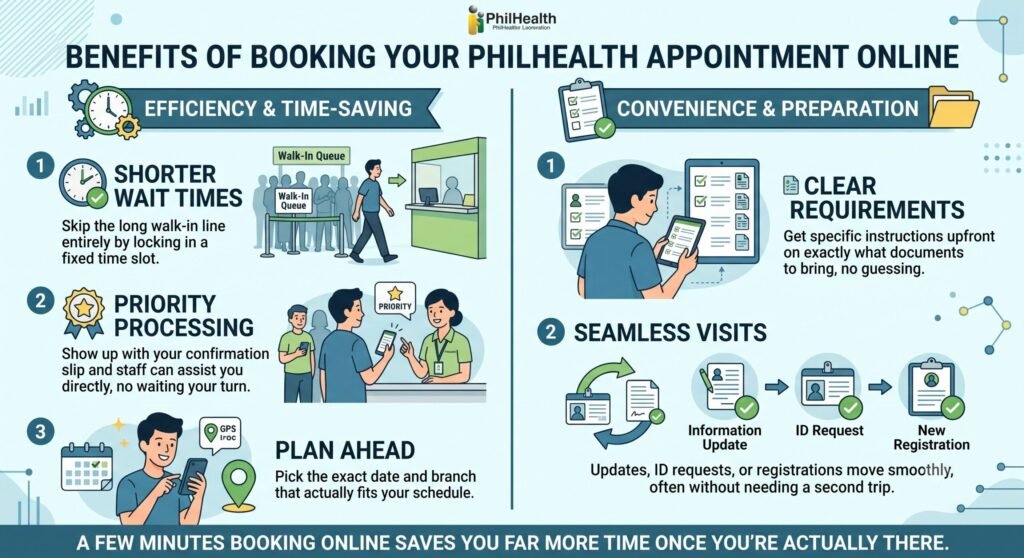
Booking a PhilHealth appointment online isn’t just about convenience. It genuinely cuts down your wait time and puts you ahead of the walk-in crowd once you arrive. Members who secure a confirmed schedule walk into their branch already knowing exactly what to expect.
Here’s what that actually looks like in practice.
On the efficiency and time-saving side:
- Shorter wait times — skip the long walk-in queue entirely by locking in a fixed time slot
- Priority processing — show up with your confirmation slip, and staff can assist you directly, no waiting your turn behind unbooked visitors
- Plan ahead — pick the exact date and branch that actually fits your schedule, instead of hoping you catch a good day
On the convenience and preparation side:
- Clear requirements — you get specific instructions upfront on exactly what documents to bring, so there’s no guessing
- Seamless visits — updates, ID requests, or new registrations all move smoothly, often without needing a second trip back
Bottom line: a few minutes spent booking online usually saves you far more time once you’re actually standing in that branch.
5. Services Available Through PhilHealth Online Appointment
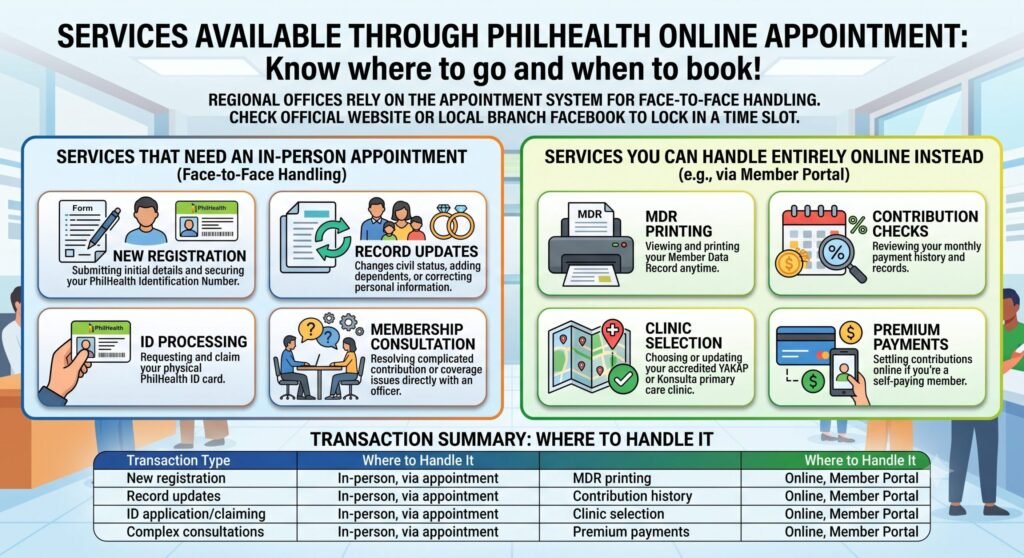
PhilHealth regional offices rely on the appointment system specifically for transactions that genuinely need face-to-face handling. New membership registration, profile updates, and ID applications all fall into this category. Check the official PhilHealth website or your local branch’s Facebook page to lock in a time slot before heading out.
Here’s a clearer picture of what actually requires a branch visit, versus what you can knock out entirely from home.
Services that need an in-person appointment:
- New registration — submitting your initial membership details and securing your PhilHealth Identification Number
- Record updates — changing civil status, adding dependents, or correcting personal information
- ID processing — requesting and claiming your physical PhilHealth ID card
- Membership consultation — resolving complicated contribution or coverage issues directly with an officer
Services you can handle entirely online instead:
- MDR printing — viewing and printing your Member Data Record anytime
- Contribution checks — reviewing your monthly payment history and records
- Clinic selection — choosing or updating your accredited YAKAP or Konsulta primary care clinic
- Premium payments — settling contributions online if you’re a self-paying member
| Transaction Type | Where to Handle It |
|---|---|
| New registration | In-person, via appointment |
| Record updates | In-person, via appointment |
| ID application/claiming | In-person, via appointment |
| Complex consultations | In-person, via appointment |
| MDR printing | Online, Member Portal |
| Contribution history | Online, Member Portal |
| Clinic selection | Online, Member Portal |
| Premium payments | Online, Member Portal |
Knowing this split saves you a wasted trip. If your need fits the second list, skip the appointment entirely and just log in from home.
6. PhilHealth Online Appointment Requirements
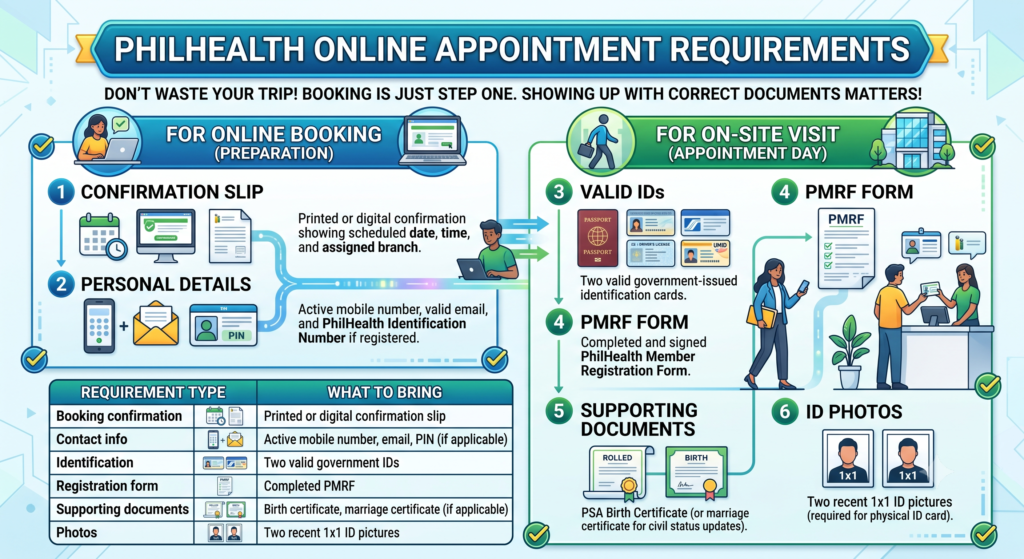
Booking your PhilHealth appointment is only step one. Showing up with the right documents matters just as much, and skipping this part is exactly how appointments turn into wasted trips. Let’s break down what’s needed at each stage.
For the online booking itself, you’ll need:
- Confirmation slip — printed or saved digitally, showing your scheduled date, time, and assigned branch
- Personal details — an active mobile number, valid email address, and your PhilHealth Identification Number if you’re already registered
For the actual on-site visit, come prepared with:
- Valid IDs — at least two primary government-issued identification cards
- PMRF form — a duly accomplished PhilHealth Member Registration Form
- Supporting documents — a PSA birth certificate, or marriage certificate if you’re updating your civil status
- ID photos — recent 1×1 pictures, required if you’re requesting a physical ID card
| Requirement Type | What to Bring |
|---|---|
| Booking confirmation | Printed or digital confirmation slip |
| Contact info | Active mobile number, email, PIN (if applicable) |
| Identification | Two valid government IDs |
| Registration form | Completed PMRF |
| Supporting documents | Birth certificate, marriage certificate (if applicable) |
| Photos | Two recent 1×1 ID pictures |
Double-checking this list before you leave home saves you from the frustration of being turned away, or worse, having to rebook an entirely new slot.
7. How to Book a PhilHealth Online Appointment (Step-by-Step Guide)
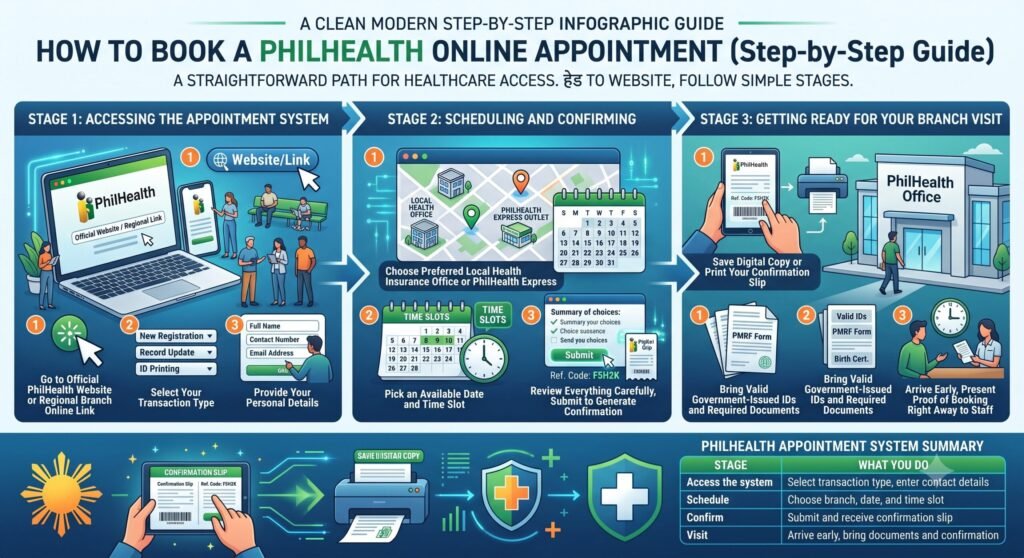
Booking a PhilHealth appointment follows a fairly straightforward path once you know where to look. Head to the official PhilHealth website or your regional branch’s designated appointment link, then work through a few simple stages before you’re all set.
Here’s the full process, broken into the three stages that matter.
Accessing the appointment system:
- Go to the official PhilHealth website or your regional branch’s online appointment link
- Select your transaction type, whether that’s new registration, a record update, or ID printing
- Provide your personal details, including full name, contact number, and email address
Scheduling and confirming:
- Choose your preferred Local Health Insurance Office or PhilHealth Express outlet
- Pick an available date and time slot from the calendar
- Review everything carefully, then submit to generate your digital confirmation slip or reference code
Getting ready for your branch visit:
- Save a digital copy or print your confirmation slip
- Bring valid government-issued IDs and any required supporting documents, like your PMRF form or birth certificate
- Arrive a few minutes before your scheduled time slot, and present your proof of booking right away to staff
| Stage | What You Do |
|---|---|
| Access the system | Select transaction type, enter contact details |
| Schedule | Choose branch, date, and time slot |
| Confirm | Submit and receive confirmation slip |
| Visit | Arrive early, bring documents and confirmation |
One habit worth keeping: double-check your details before hitting submit. A single typo in your contact info can mean missing important updates about your booking later.
8. What to Prepare Before Your PhilHealth Appointment
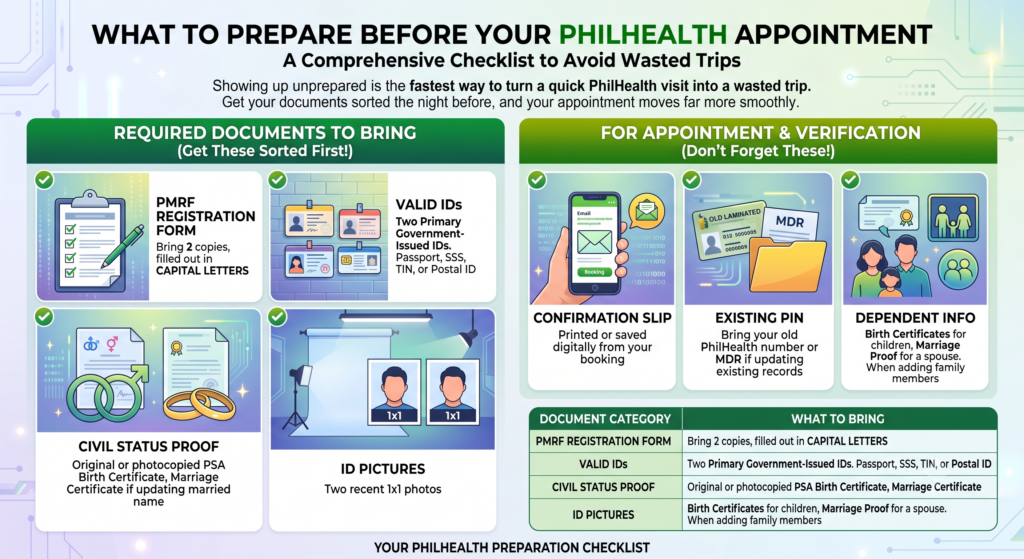
Showing up unprepared is the fastest way to turn a quick PhilHealth visit into a wasted trip. Get your documents sorted the night before, and your appointment moves far more smoothly.
Here’s the full checklist, broken down by category.
Required documents to bring:
- Registration form — two copies of the PMRF, filled out in capital letters
- Valid IDs — two primary government-issued IDs, such as a Passport, SSS, TIN, or Postal ID
- Civil status proof — your original or photocopied PSA Birth Certificate, plus a Marriage Certificate if you’re updating a married name
- ID pictures — two recent 1×1 photos
For appointment and verification purposes:
- Confirmation slip — printed or saved digitally from your booking
- Existing PIN — bring your old PhilHealth number or MDR if you’re updating existing records
- Dependent info — birth certificates for children, or marriage proof for a spouse, if you’re adding family members to your coverage
| Document Category | What to Bring |
|---|---|
| Registration | 2 copies of completed PMRF |
| Identification | 2 valid government-issued IDs |
| Civil status | PSA Birth Certificate, Marriage Certificate (if applicable) |
| Photos | 2 recent 1×1 ID pictures |
| Booking proof | Confirmation slip |
| Existing membership | Old PIN or MDR |
| Dependents | Birth or marriage certificates |
A quick tip: photocopy everything before you leave home. Some branches ask for extras on the spot, and having backups ready saves you a scramble at the counter.
9. How to Reschedule or Cancel a PhilHealth Appointment
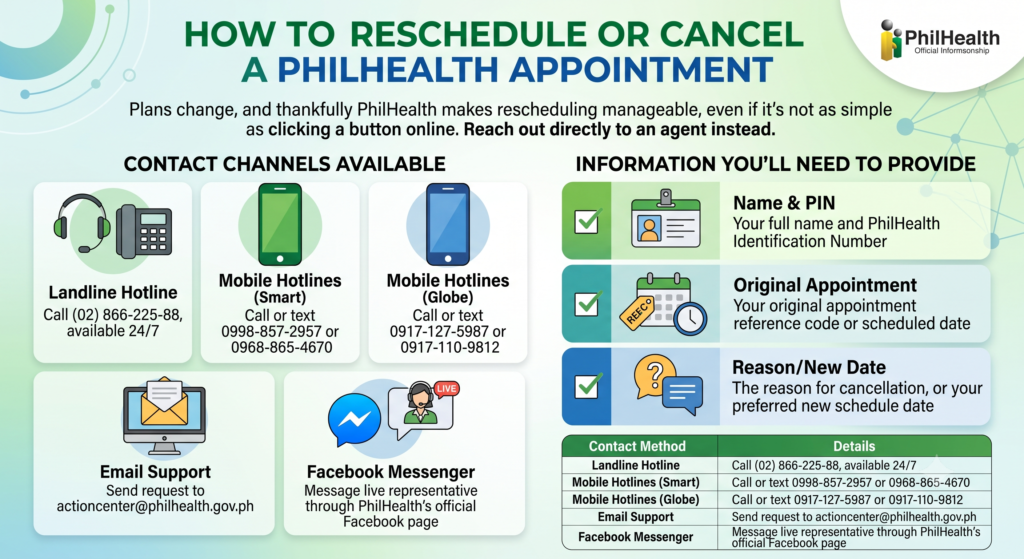
Plans change, and thankfully PhilHealth makes rescheduling manageable, even if it’s not as simple as clicking a button online. There’s no universal self-service cancel option built into the portal, so you’ll need to reach out directly to an agent instead.
Here’s exactly who to contact and what to have ready.
Contact channels available to you:
- Landline hotline — call (02) 866-225-88, available 24/7
- Mobile hotlines (Smart) — call or text 0998-857-2957 or 0968-865-4670
- Mobile hotlines (Globe) — call or text 0917-127-5987 or 0917-110-9812
- Email support — send your request to actioncenter@philhealth.gov.ph
- Facebook Messenger — message a live representative through PhilHealth’s official Facebook page
Information you’ll need to provide:
- Your full name and PhilHealth Identification Number
- Your original appointment reference code or scheduled date
- The reason for cancellation, or your preferred new schedule date
| Contact Method | Details |
|---|---|
| Landline | (02) 866-225-88, 24/7 |
| Smart mobile | 0998-857-2957 / 0968-865-4670 |
| Globe mobile | 0917-127-5987 / 0917-110-9812 |
| actioncenter@philhealth.gov.ph | |
| Facebook Messenger | Official PhilHealth Facebook Page |
A quick tip: reach out as early as possible once you know you need to reschedule. Acting fast gives you a much better shot at grabbing a convenient replacement slot before it fills up.
10. PhilHealth Online Appointment for New Members
Just starting your PhilHealth journey? You’ve got two paths available. Book a visit through the official PhilHealth website, or register entirely online using the PhilHealth Member Inquiry Facility if you’d rather skip the branch altogether.
Here’s how the in-person booking route actually works, step by step.
Booking steps to follow:
- Visit the portal — head to the online appointment or registration page on the official site
- Input your details — provide your full name, active email, and phone number
- Select your service — choose new member registration or ID creation specifically
- Pick your schedule — select your preferred local branch, date, and time slot
What to bring along once you’re set:
- Confirmation slip — print or save the digital version sent after booking
- Registration form — your completed PMRF, filled out ahead of time
- Valid ID — a government-issued identification document, along with your birth certificate
One thing worth remembering: as a first-timer, your PMRF and supporting documents get processed right there during your visit, generating your official PhilHealth number on the spot. Coming prepared genuinely speeds this whole thing up.
11. PhilHealth Online Appointment for Existing Members
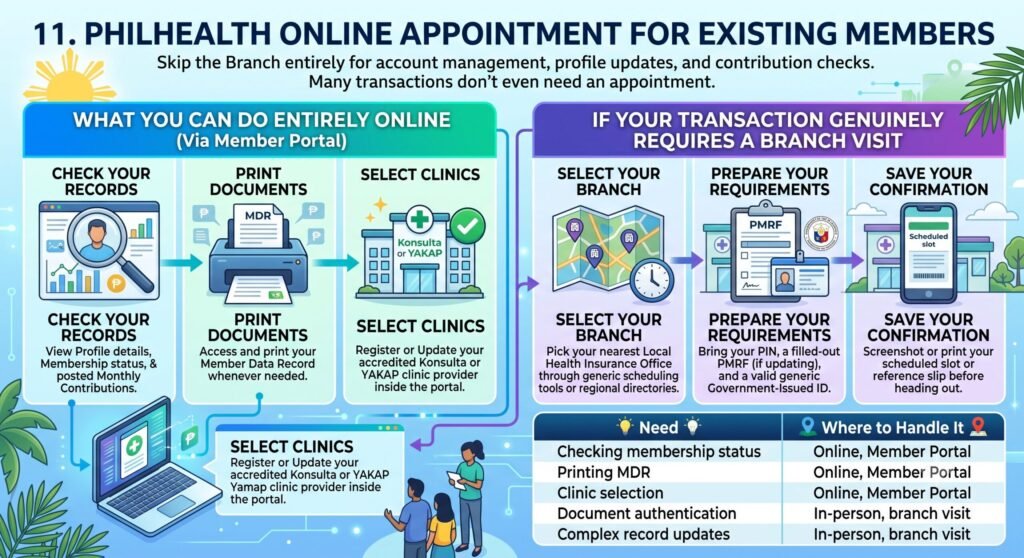
If you’re already registered, chances are good you can skip the branch entirely. Most account management, profile updates, and contribution checks are handled directly through the PhilHealth Member Portal, meaning a physical appointment often isn’t even necessary unless your transaction specifically requires document authentication.
Let’s look at what you can handle online first, then what still requires an actual visit.
What you can do entirely online:
- Check your records — view your profile details, membership status, and posted monthly contributions
- Print documents — access and print your Member Data Record whenever needed
- Select clinics — register or update your accredited Konsulta or YAKAP clinic provider right inside the portal
If your transaction genuinely requires a branch visit, here’s what to do:
- Select your branch — pick your nearest Local Health Insurance Office through local scheduling tools or regional directories
- Prepare your requirements — bring your PIN, a filled-out PMRF if updating records, and a valid government-issued ID
- Save your confirmation — screenshot or print your scheduled slot or reference slip before heading out
| Need | Where to Handle It |
|---|---|
| Checking membership status | Online, Member Portal |
| Printing MDR | Online, Member Portal |
| Clinic selection | Online, Member Portal |
| Document authentication | In-person, branch visit |
| Complex record updates | In-person, branch visit |
Before booking anything, check if the Member Portal can already solve your problem. It often can, and skipping the branch entirely saves you a trip you didn’t actually need to make.
12. PhilHealth Online Appointment for OFWs
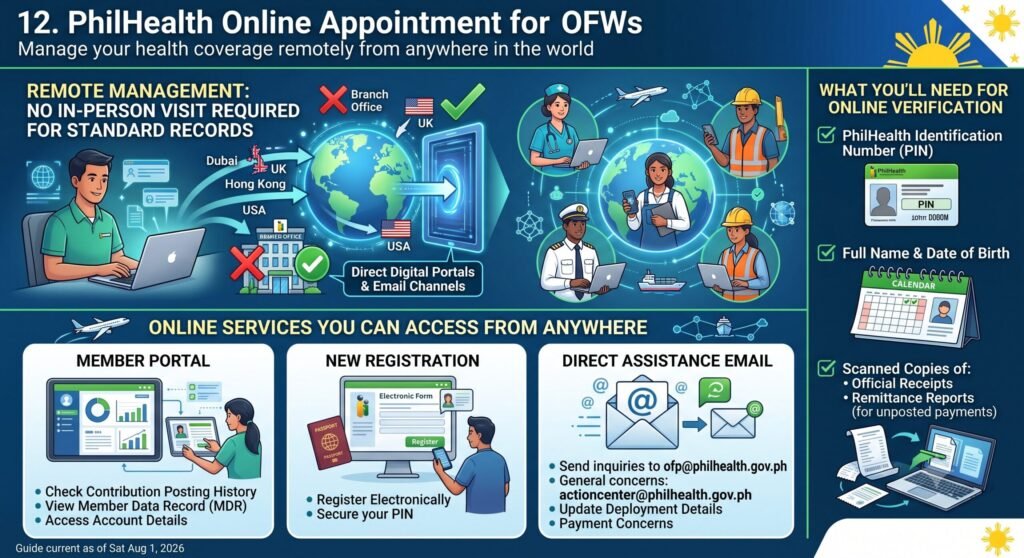
Being an OFW doesn’t mean juggling appointment slots from thousands of miles away. Most transactions happen entirely online, and there’s no strict requirement for an in-person visit just to check your standard records. Instead of a dedicated booking system for field offices, you’ve got direct digital portals and email channels to work with.
Here’s how to manage everything remotely.
Online services you can access from anywhere:
- Member Portal — check your contribution posting history, view your Member Data Record, and access your account details
- New registration — register and secure your PhilHealth Identification Number electronically through the Online NHIP Registration page
- Direct assistance email — send specific inquiries, deployment details, or payment concerns straight to the Overseas Filipinos Program at ofp@philhealth.gov.ph, or the general action center at actioncenter@philhealth.gov.ph
What you’ll need for online verification:
- Your PhilHealth Identification Number
- Your full name and date of birth
- Scanned copies of Official Receipts or remittance reports, if you’re validating payments that haven’t posted yet
The takeaway here: unless something genuinely requires physical document authentication, there’s rarely a reason to wait until you’re back home to sort out your PhilHealth concerns. Most of it can be handled from wherever you’re working.
13. Common Problems During PhilHealth Online Appointment Booking
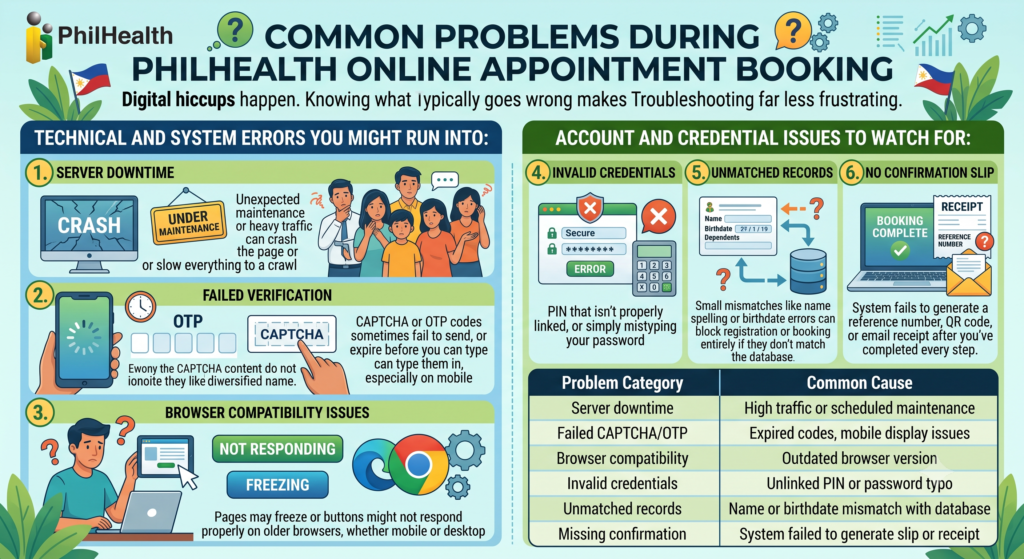
Digital hiccups happen, especially with government systems handling heavy daily traffic. Knowing what typically goes wrong makes troubleshooting far less frustrating when it actually happens to you.
Technical and system errors you might run into:
- Server downtime — unexpected maintenance or heavy traffic can crash the page or slow everything to a crawl
- Failed verification — CAPTCHA or OTP codes sometimes fail to send, or expire before you can type them in, especially on mobile
- Browser compatibility issues — pages may freeze or buttons might not respond properly on older browsers, whether mobile or desktop
Account and credential issues to watch for:
- Invalid credentials — entering a PIN that isn’t properly linked, or simply mistyping your password
- Unmatched records — small mismatches like name spelling or birthdate errors can block registration or booking entirely if they don’t match the database
- No confirmation slip — sometimes the system fails to generate a reference number, QR code, or email receipt after you’ve completed every step
| Problem Category | Common Cause |
|---|---|
| Server downtime | High traffic or scheduled maintenance |
| Failed CAPTCHA/OTP | Expired codes, mobile display issues |
| Browser compatibility | Outdated browser version |
| Invalid credentials | Unlinked PIN or password typo |
| Unmatched records | Name or birthdate mismatch with database |
| Missing confirmation | System failed to generate slip or receipt |
If you hit any of these, the fix is usually simple: retry during off-peak hours, double-check your details against your official documents, or switch to a different browser before trying again.
14. Tips for a Successful PhilHealth Online Appointment
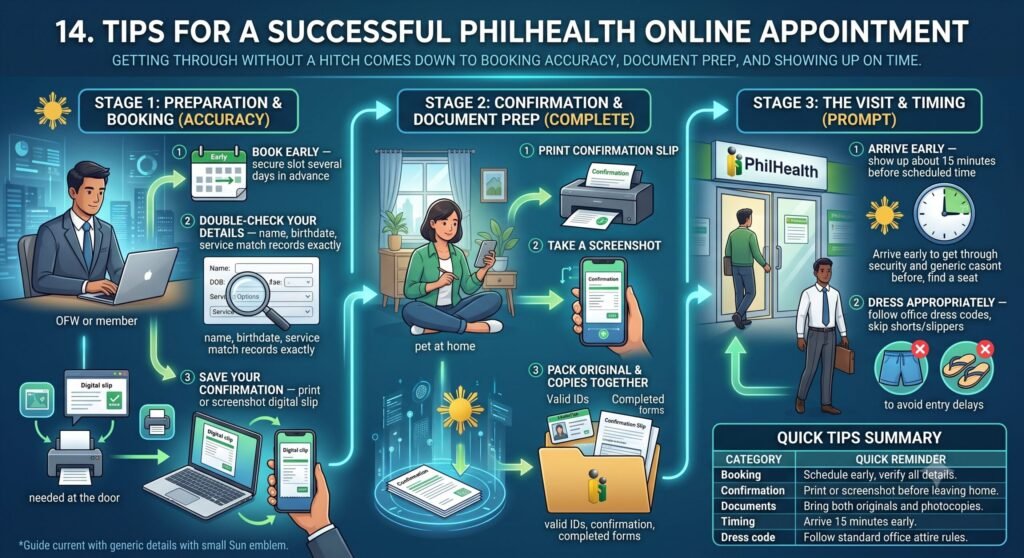
Getting through your PhilHealth transaction without a hitch really comes down to three things: booking accuracy, document prep, and showing up on time. A few minutes of extra care before you leave home makes a real difference once you’re actually there.
Preparation tips worth following:
- Book early — secure your slot several days in advance rather than waiting until the last minute
- Double-check your details — make sure your name, birthdate, and requested service all match your official records exactly
- Save your confirmation — print or screenshot your digital slip, since staff will ask for it right at the door
Document and visit tips to keep in mind:
- Bring originals and copies — pack your valid IDs, printed confirmation slip, and any completed forms together
- Arrive early — show up about 15 minutes before your scheduled time to get through security and find a seat
- Dress appropriately — follow standard government office dress codes, skipping shorts or slippers to avoid entry delays
| Category | Quick Reminder |
|---|---|
| Booking | Schedule early, verify all details |
| Confirmation | Print or screenshot before leaving home |
| Documents | Bring both originals and photocopies |
| Timing | Arrive 15 minutes early |
| Dress code | Follow standard office attire rules |
A little prep really does go a long way here. Getting these basics right means fewer surprises and a much faster visit overall.
15. PhilHealth Online Appointment vs. Walk-In Transactions
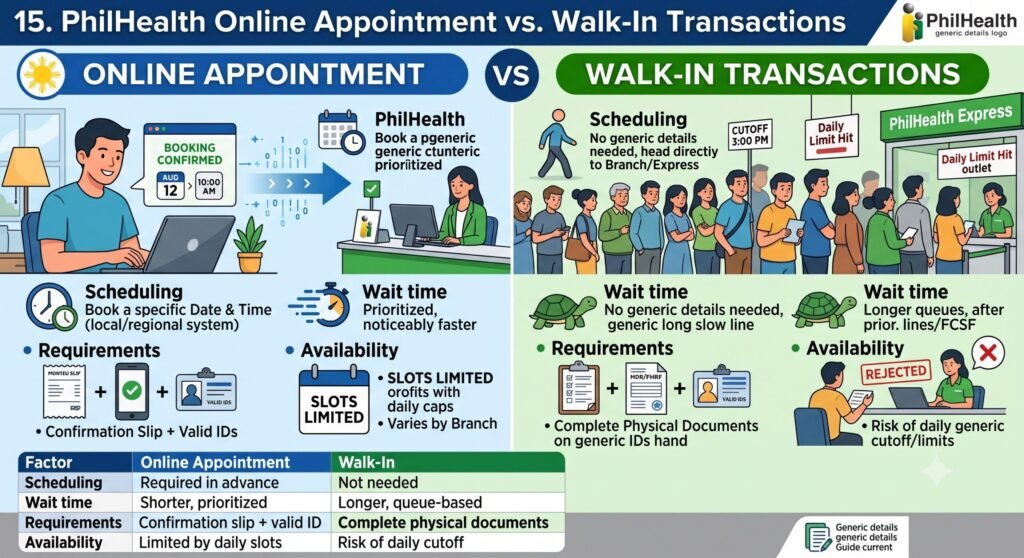
Deciding between booking ahead or just showing up really comes down to priority and what your specific branch allows. Online booking gets you dedicated scheduling and shorter waits, while walk-ins offer immediate access, but come with real queue risk.
Here’s how each approach actually breaks down.
Online appointments look like this:
- Scheduling — book a specific date and time through your local branch’s web link or regional system before heading out
- Wait time — noticeably faster, since offices prioritize scheduled ticket holders first
- Requirements — bring a printed or digital confirmation slip along with valid IDs
- Availability — limited by daily slot caps, which vary depending on the branch
Walk-in transactions look like this:
- Scheduling — none needed, just head directly to a PhilHealth branch or a mall-based PhilHealth Express outlet
- Wait time — longer queues, since walk-ins only get served after scheduled appointments, or strictly first-come, first-served
- Requirements — complete physical documents, like your MDR or PMRF form and valid IDs, need to be ready on hand
- Availability — real risk of rejection or cutoff if the branch hits its daily visitor limit early in the day
| Factor | Online Appointment | Walk-In |
|---|---|---|
| Scheduling | Required in advance | Not needed |
| Wait time | Shorter, prioritized | Longer, queue-based |
| Requirements | Confirmation slip + valid ID | Complete physical documents |
| Availability | Limited by daily slots | Risk of daily cutoff |
Bottom line: if your schedule allows a bit of planning, booking online almost always saves you time. Walk-ins work best only if you’re dealing with something urgent and can’t wait for an available slot.
16. PhilHealth Branches That Support Online Appointments
Not every branch offers identical booking capacity, so checking beforehand saves confusion.
PhilHealth doesn’t run one central website where everyone books appointments — each branch or regional office manages its own scheduling separately.
Certain offices — including Local Health Insurance Offices (LHIOs), Regional Offices, and mall-based service counters (like select SM or Robinsons PhilHealth desks) — set up their own booking links or QR-code queue systems independently.
Because the process differs from branch to branch, you’ll need to look into the specific office you intend to visit instead of expecting one standard method.
Steps to find and set an appointment:
- Look up the branch in PhilHealth’s Regional Offices Directory (found on their official site) to get that office’s contact info, along with any local booking link or hotline they use.
- Reach out to mall-based counters directly — ask whether they accept walk-ins or use a particular digital queuing system.
- Call through PhilHealth’s official “Click to Call” feature, available 24/7, to speak with an agent who can confirm what’s needed for the branch you’re targeting.
In short: decide which branch you’re heading to, then check or call that office directly — since scheduling isn’t standardized across locations.
17. PhilHealth Online Services You Can Access From Home
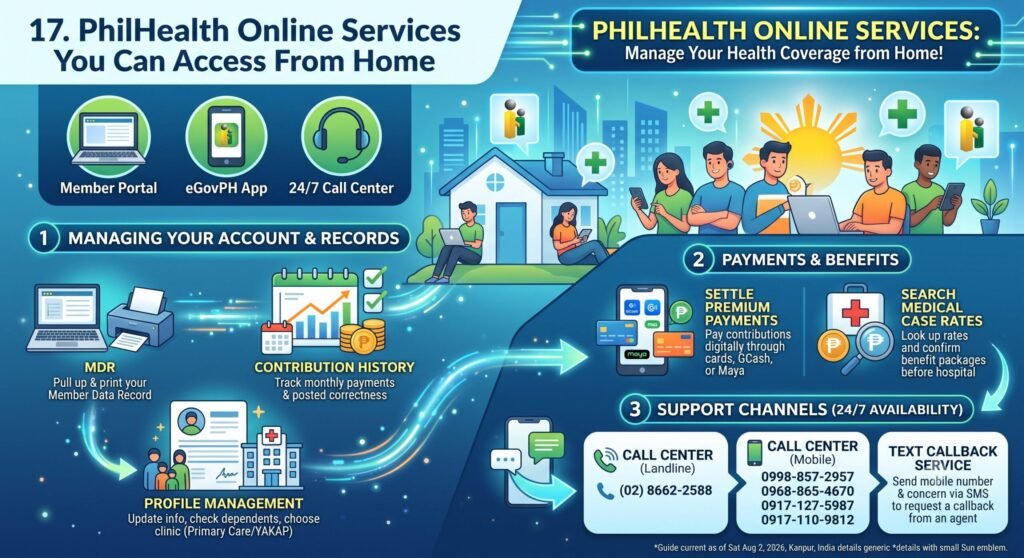
PhilHealth offers several ways to manage your membership without going to a branch in person — mainly through the Member Portal, the 24/7 Call Center, and the eGovPH App. These let you handle most account needs from home.
Managing your account and records
- Member Data Record (MDR): Pull up and print your official MDR straight from your online dashboard.
- Contribution History: Track your monthly premium payments and see whether they’ve posted correctly.
- Profile Management: Update or verify your personal info, check registered dependents, and choose your preferred primary care or YAKAP clinic.
Payments and benefits
- Online Premium Payments: Settle your contributions digitally through cards, GCash, or Maya.
- Case Rates Search: Look up medical case rates and confirm active benefit packages before checking into a hospital.
Support channels
| Channel | Details |
|---|---|
| Call Center (landline) | (02) 8662-2588 |
| Call Center (mobile) | 0998-857-2957, 0968-865-4670, 0917-127-5987, 0917-110-9812 |
| Text Callback Service | Send your mobile number and concern via SMS to request a callback from an agent |
In short: for day-to-day account tasks — checking records, paying contributions, or looking up benefits — the Member Portal and app cover most needs, while the call center and text callback service are there for direct assistance.
18. PhilHealth Contact Information and Support Channels
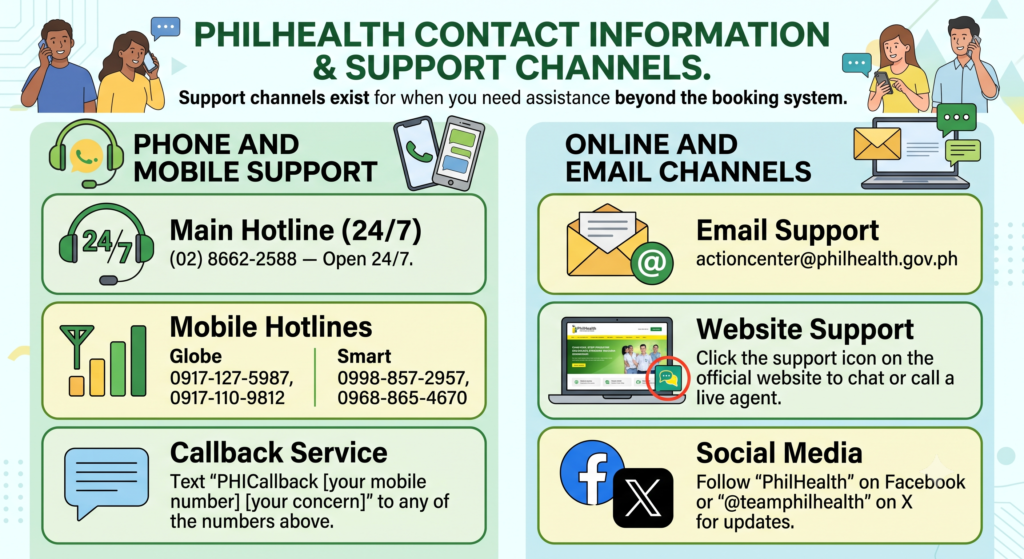
Sometimes the booking system itself can’t solve your problem, and that’s fine. Support channels exist for exactly this.
You can get in touch with PhilHealth through several channels — phone, mobile, email, or their online support widget.
Phone and mobile support
| Channel | Details |
|---|---|
| Main Hotline | (02) 8662-2588 — open 24/7 |
| Globe Numbers | 0917-127-5987, 0917-110-9812 |
| Smart Numbers | 0998-857-2957, 0968-865-4670 |
| Callback Service | Text “PHICallback [your mobile number] [your concern]” to any of the numbers above |
Online and email channels
| Channel | Details |
|---|---|
| actioncenter@philhealth.gov.ph | |
| Website Support | Go to the official PhilHealth website and click the support icon in the bottom-right corner to chat or call a live agent |
| Social Media | Follow their Facebook page or X account @teamphilhealth for updates |
In short: for urgent concerns, the hotline or callback text service works anytime; for non-urgent questions, email or the website chat widget are good alternatives, and social media is useful mainly for checking announcements.
19. Editor’s Analysis: The Appointment System Is a Band-Aid, Not a Cure
The PhilHealth online appointment system is best understood as a workaround, not an actual solution — it emerged mainly to control crowds during the pandemic, and while it helps organize branch visits, it doesn’t fix the deeper problems in how services are delivered.
Where the system falls short
- It’s a surface-level fix that hides the real issues — slow processing and overcrowded branches — rather than solving them.
- The booking platforms themselves are often glitchy or hard to navigate for routine transactions.
- It doesn’t touch the root causes: understaffed offices, outdated internal workflows, and rising demand from members.
What this means for people using it
At best, it just relocates the line — from the sidewalk into an app — without making the in-person process itself any faster.
Security staff strictly enforce the booking requirement — anyone without a printed or digital confirmation gets turned away at the gate.
Even with a confirmed slot, visitors often still face long waits once inside for their actual transaction.
Also Read:
- PhilHealth Portal Login & Registration 2026: Complete Guide to Membership, Benefits, Contributions & Online Services
- PhilHealth ID: Your Complete July 2026 Guide
- PhilHealth Login 2026: Ultimate Guide to Member Portal, Password Reset & MDR Download
- PhilHealth Online Registration: Why 90% of Filipinos Get This One Step Wrong
- PhilHealth Contribution 2026: Rates, Table, Calculator & Payment Guide
- PhilHealth Employer Guide 2026: Registration & Compliance
- PhilHealth Requirements 2026: The One Document Everyone Forgets
Frequently Asked Questions About PhilHealth Online Appointment
Does PhilHealth require an appointment?
No, PhilHealth doesn’t have one centralized appointment requirement — some branches use local online booking or QR-code systems, while others still accept walk-ins, so it depends on the specific branch you’re visiting.
How much will PhilHealth cover for hospitalization?
PhilHealth does not provide one fixed amount for all hospitalizations. The coverage depends on your illness, treatment, hospital type, and the applicable benefit package. It may help pay for room charges, medicines, laboratory tests, and professional fees. The remaining balance, if any, is paid by the patient unless fully covered by other programs.
How many times can we use PhilHealth in a month?
There is no fixed monthly limit on how many times you can use PhilHealth benefits. Eligibility depends on your membership status, contribution record, and the specific benefit package you are claiming. Coverage is provided based on PhilHealth’s benefit rules and medical necessity.
Can I access PhilHealth on my phone?
Yes. You can access many PhilHealth online services using your smartphone through the PhilHealth Member Portal or the official eGovPH mobile application. These platforms allow you to check contributions, view your Member Data Record (MDR), and manage your membership information.
How do I know if my PhilHealth is active online?
Log in to the PhilHealth Member Portal using your PhilHealth Identification Number (PIN) and password. Once inside your account, you can view your membership status, contribution history, and personal information. If you cannot access your account, you may contact PhilHealth for verification.
What is the app for PhilHealth?
PhilHealth services can be accessed through the official eGovPH mobile application, which integrates several government services. Members can also use the PhilHealth Member Portal through a mobile web browser to access online services and view their account information.
How to log in to PhilHealth online?
Visit the official PhilHealth Member Portal and enter your 12-digit PhilHealth Identification Number (PIN) and password. Complete any required security verification, then click Log In. If you do not yet have an online account, select Create Account and complete the registration process first.
How much is PhilHealth monthly?
For 2026, the PhilHealth contribution rate is 5% of the applicable monthly income, subject to an income floor of ₱10,000 and a ceiling of ₱100,000. Monthly contributions therefore range from ₱500 to ₱5,000. Employed members share the contribution equally with their employer, while voluntary members pay the full amount.
What is not covered by PhilHealth?
PhilHealth does not cover every medical expense. Costs beyond the approved benefit package, non-covered treatments, personal convenience items, and services from non-accredited providers may not be reimbursed. Members may still need to pay any remaining hospital charges after PhilHealth deductions.
Is surgery covered by PhilHealth?
Yes. PhilHealth covers many surgical procedures performed at accredited healthcare facilities. The amount covered depends on the type of surgery and the applicable benefit package or case rate. Coverage varies depending on the patient’s medical condition and eligibility.
What is Category 3 in PhilHealth?
“Category 3” is not a standard PhilHealth membership classification. PhilHealth generally groups members into categories such as formal economy, informal economy, sponsored members, senior citizens, lifetime members, and others under the National Health Insurance Program. If “Category 3” appears in a specific document, you should verify its meaning with PhilHealth.
Can PhilHealth cover all expenses?
No. PhilHealth is designed to reduce healthcare costs, not pay every hospital expense. The amount covered depends on the approved benefit package, medical treatment, and hospital charges. Patients may still have out-of-pocket expenses after PhilHealth benefits have been applied.
Booking a PhilHealth online appointment takes just minutes, yet it saves you hours of standing around. Prepare your documents, arrive on time, and treat that confirmation slip like gold. A little planning now means a far smoother visit when you actually need it.